Loading
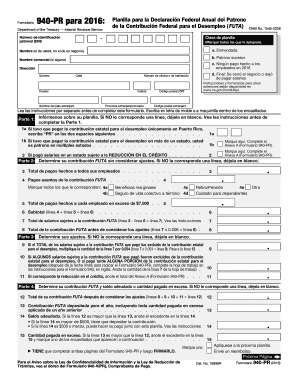
Get Irs 940-pr 2015
This website is not affiliated with IRS
How it works
-

Open form follow the instructions
-

Easily sign the form with your finger
-

Send filled & signed form or save
How to fill out the IRS 940-PR online
Filling out the IRS 940-PR form online can streamline your reporting of federal unemployment taxes. This guide will provide you with step-by-step instructions to ensure you complete the form accurately and efficiently.
Follow the steps to fill out the IRS 940-PR online.
- Press the ‘Get Form’ button to obtain the IRS 940-PR form and open it in the online editor.
- Begin by entering your Employer Identification Number (EIN) in the designated field. This number is crucial for identifying your business.
- Indicate the type of return you are filing by marking all applicable boxes. For example, you may select 'Amended' if you are making corrections.
- Provide your name, which should be your personal name and not your business name, along with any commercial name if applicable.
- Fill out your address in the specified format. Ensure all parts of the address are complete, including street number, city, state, and ZIP code.
- Move to Part 1 and provide your filing information. Leave any lines that do not apply to you blank.
- In Part 2, calculate your FUTA contribution without considering adjustments. This involves reporting total payments made to all employees and any exempt payments.
- Determine your contributions in Part 3. Follow the instructions to calculate any adjustments based on your prior contributions.
- Complete Part 4, which summarizes your final FUTA contribution after adjustments and indicates any balance due or overpayment.
- If applicable, report your FUTA liability for each quarter in Part 5. This is only necessary if your total liability exceeds $500.
- In Part 6, indicate whether you allow a third party to discuss your form with the IRS, providing their contact information as required.
- Sign and date the form in Part 7, confirming the accuracy of the information provided. Remember to complete both pages of the form.
- After reviewing the completed form for any errors, save your changes, download the form, or print it for your records or submission.
Ensure your compliance by completing your IRS 940-PR form online today!
Get form
Experience a faster way to fill out and sign forms on the web. Access the most extensive library of templates available.
Related links form
To file your Form 941 quarterly report, gather your payroll records for the quarter, and use IRS e-file software to submit the form online. Make sure to double-check your numbers for accuracy. Filing Form 941 on time is essential for maintaining compliance and ensuring your IRS 940-PR matters are addressed concurrently.
Get This Form Now!
Use professional pre-built templates to fill in and sign documents online faster. Get access to thousands of forms.