Loading
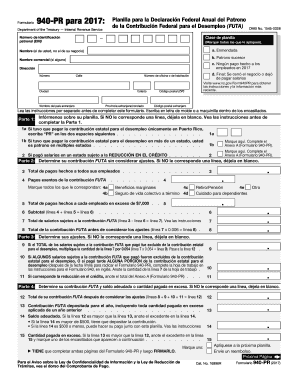
Get Irs 940-pr 2017
This website is not affiliated with IRS
How it works
-

Open form follow the instructions
-

Easily sign the form with your finger
-

Send filled & signed form or save
How to fill out the IRS 940-PR online
Filling out the IRS 940-PR form is an essential part of managing federal unemployment tax responsibilities for employers in Puerto Rico. This guide will offer comprehensive instructions to assist users in accurately completing the form online.
Follow the steps to fill out the IRS 940-PR accurately.
- Click ‘Get Form’ button to obtain the form and open it in the editor.
- Begin by entering your employer identification number (EIN) in the designated field. This number is crucial for identifying your business.
- In the sections labeled 'Class of form,' mark any applicable boxes, such as 'Amended' or 'Final' status. If you did not make any payments to employees in 2017, be sure to indicate this as well.
- Provide your name (the person filling out the form) and your business name, if applicable. Also include your complete address, including city, state, and ZIP code.
- In Part 1, indicate your employment tax situation by entering 'PR' for payments made only within Puerto Rico or marking 'Multiple States' if you paid taxes in more than one state.
- Move to Part 2 to determine your FUTA contribution without considering adjustments. Fill in the total payments made to all employees and identify any exempt payments accordingly.
- Calculate the total wages subject to FUTA by deducting any exempt payments from the total and enter this amount in the designated field.
- Proceed to Part 3 to assess your adjustments. If applicable, follow the instructions for line adjustments based on your payment situation.
- Complete Part 4 by calculating your total FUTA contribution after adjustments, indicating any balance owed or amount paid in excess.
- In Part 5, report your FUTA tax liability for each quarter only if your total liability exceeds $500. Fill out the details for each quarter as needed.
- Indicate if you allow a third party to discuss your form with the IRS by filling out the authorization section.
- It is mandatory to sign and date the form. Ensure that all information is accurate and complete before finalizing.
- After completing the form, save any changes made, and proceed to download or print the form for your records.
- Finally, share the completed form as necessary or send it to the IRS, following the submission guidelines provided in the form's instructions.
Complete your IRS forms online today for efficient filing and peace of mind.
Get form
Experience a faster way to fill out and sign forms on the web. Access the most extensive library of templates available.
Related links form
IRS Form 940-PR is used by employers to report federal unemployment tax (FUTA) liability. This form helps ensure businesses comply with the unemployment tax requirements at the federal level. If you want to simplify the filing process, consider using platforms like USLegalForms, which provide easy guidance and templates for completing your IRS 940-PR accurately.
Get This Form Now!
Use professional pre-built templates to fill in and sign documents online faster. Get access to thousands of forms.