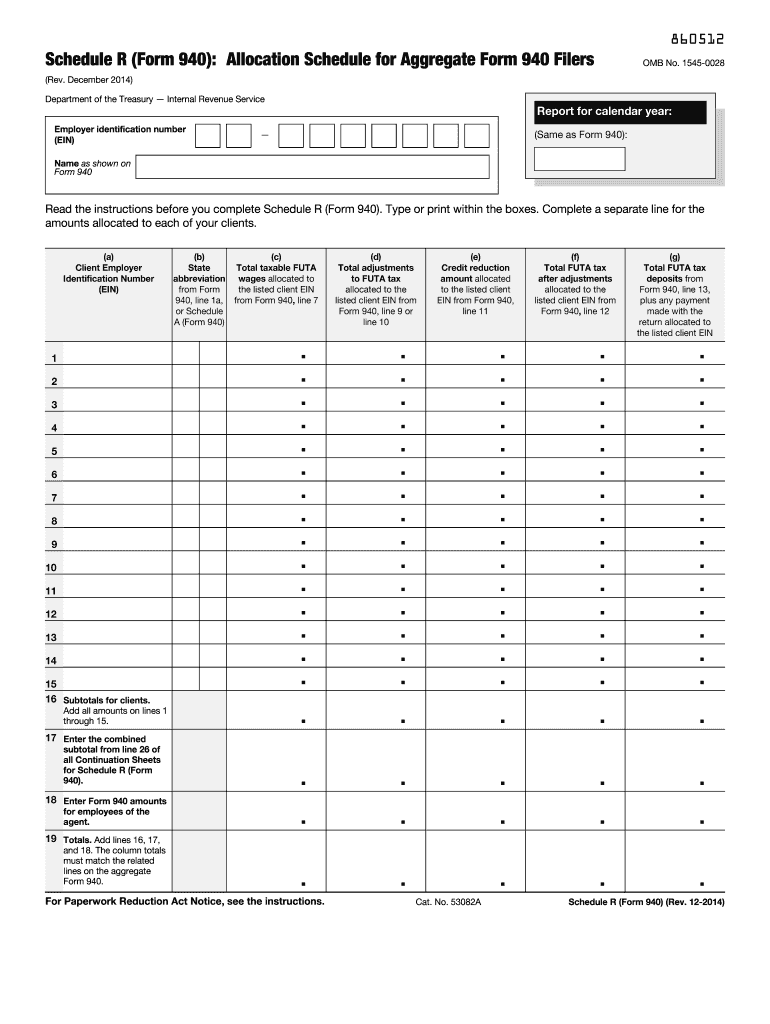
Lus any payment made with the return allocated to the listed client EIN . . . . . . . . . . . . . . . . . . . . . . . . . . Schedule R (Form 940) (Rev. 12-2014) 860712 Schedule R (Form 940) (Rev. 12-2014) Section references are to the Internal Revenue Code unless otherwise noted. General Instructions Purpose of Schedule R Use Schedule R to allocate the aggregate information reported on Form 940, Employer's Annual Federal Unemployment (FUTA) Tax Return, to each home care service recipient c.

Open form follow the instructions

Easily sign the form with your finger

Send filled & signed form or save
How to fill out the IRS 940 - Schedule R online
This guide provides a detailed explanation of how to complete IRS 940 - Schedule R online. By following these steps, users can ensure accurate reporting of unemployment tax allocations for their clients.
Follow the steps to fill out Schedule R correctly.
- Click ‘Get Form’ button to obtain the form and open it in the editor.
- Enter your business information. Carefully input your employer identification number (EIN) and your business name at the top of the Schedule. Ensure that this information exactly matches that on Form 940.
- Fill in the calendar year for which you are filing your Form 940. Confirm that the year entered matches the year on the attached Form 940.
- Report the necessary information for each client on Schedule R. This includes: the client’s EIN, the state abbreviation of the client's location, total taxable FUTA wages allocated, total adjustments to FUTA tax, credit reduction amounts, total FUTA tax after adjustments, and total FUTA tax deposits from Form 940.
- If applicable, for each employee, report the same information on Schedule R, line 18.
- Add the totals from lines 16, 17, and 18 to compute the overall totals on line 19. Ensure the totals match the related amounts reported on Form 940.
- Review all entries for accuracy. If the totals on Schedule R do not match those on Form 940, correct any inaccuracies before submission.
- Once completed, users can save changes, download, print, or share the completed form as needed.
Prepare and submit your Schedule R online to ensure accurate filing and compliance.
Experience a faster way to fill out and sign forms on the web. Access the most extensive library of templates available.
Related content
You must complete Schedule R if you file an aggregate Form. 940. Aggregate Forms 940 are...
Nov 22, 2011 — Use Form 940 to report your annual Federal Unemployment procedures...
Agents approved by the Internal Revenue Service to file Schedule R (Form 941 and 940)...
Get answers to your most pressing questions about US Legal Forms API.
What is the difference between a regular 1040 and a 1040SR?
The regular 1040 form is designed for all taxpayers, while the 1040SR is tailored for seniors aged 65 and older. The 1040SR features larger text and a clearer layout, enhancing usability for older individuals. Depending on your age and preferences, selecting the appropriate form can streamline your tax filing, including any necessary references to IRS 940 - Schedule R.
What does the IRS consider totally disabled?
The IRS considers you totally disabled if you cannot perform any substantial gainful activity due to a medical condition. This designation can influence your tax filings, including those related to IRS 940 - Schedule R. Understanding this definition ensures you make informed decisions when filing your taxes.
What does the IRS consider permanently disabled?
The IRS defines permanently disabled as the inability to engage in any substantial gainful activity due to a physical or mental condition. This classification impacts various tax treatments, including certain deductions and credits. Knowing how the IRS defines permanent disability is crucial when filing IRS 940 - Schedule R.
Can I paper file Form 940?
Yes, you can paper file Form 940. Filling it out by hand and mailing it to the IRS is an acceptable method of submission. Just be sure to double-check the mailing address and include all required schedules, including the IRS 940 - Schedule R, if applicable.
What is the Schedule R for 941?
Schedule R for Form 941 allows employers to claim the credit for qualified health plan expenses. This schedule links various tax credit calculations that small businesses may be eligible for, simplifying the filing process for quarterly payroll taxes. By using the Schedule R, you ensure that you properly report these credits on your Form 941.
Can I print Form 940?
Yes, you can print Form 940. After downloading it from the IRS website, you can easily print it from any device connected to a printer. Just make sure you are printing the official version for the correct tax year.
How to print Form 940?
To print Form 940, first visit the IRS website and navigate to the specified form section. Download the IRS 940 - Schedule R, review it for accuracy, and click the print option. Ensure your printer settings are configured correctly for optimal results.
Can I print out a non-filer form?
Non-filer forms can indeed be printed, just like other IRS forms. Visit the IRS website, find the appropriate non-filer form, and download it. You can then print it out at home or at your nearest printing service.
Can IRS forms be printed?
Yes, you can print IRS forms from the IRS website. Simply download the desired form, like the IRS 940 - Schedule R, and print it directly from your home or office printer. Make sure to use a good quality printer to ensure legibility, and confirm that you are printing the correct version for the tax year you need.
How do I get my 1099-R from the IRS?
To obtain your 1099-R, you should first contact the institution that issued the form. They are required to send you a copy if you received distributions from a retirement plan. Additionally, you can request a transcript from the IRS, which may include information from your 1099-R. However, keep in mind that the best way to ensure you have your documents on hand is to maintain accurate records throughout the year.
Use professional pre-built templates to fill in and sign documents online faster. Get access to thousands of forms.
If you believe that this page should be taken down, please follow our DMCA take down process here.
This form is available in several versions. Select the version you need from the drop-down list below.