This occurs. The Financial Management Service (FMS) offsets refunds through the Treasury Offset Program to cover past due child support, federal agency non-tax debts such as student loans and state income tax obligations. FMS sends you an offset notice if it applies your refund or part of your refund to non-tax debts. If you have questions about the offset, contact the agency identified in the notice. You may also call the Treasury Offset Program Call Center at 1-800-304-3107, if you have addit.
Loading

Open form follow the instructions

Easily sign the form with your finger

Send filled & signed form or save
How to fill out the IRS 9325 online
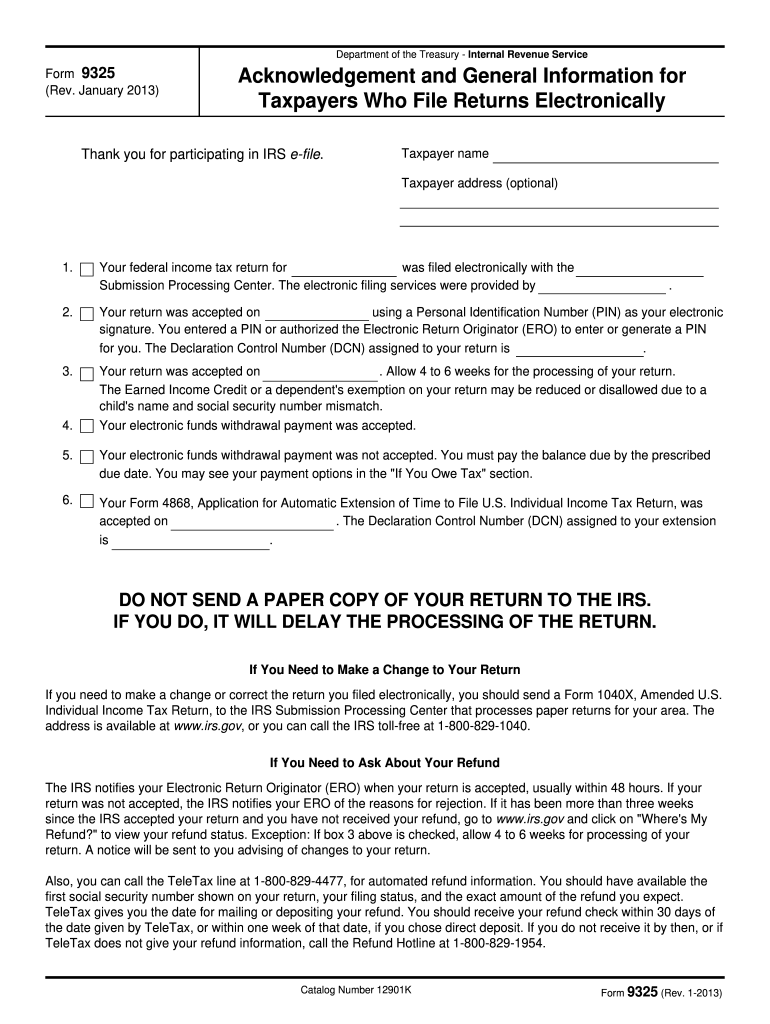
Filling out the IRS 9325 form online is an important step for taxpayers who file their returns electronically. This guide will help you understand each section of the form and provide clear instructions for a smooth completion process.
Follow the steps to accurately complete the IRS 9325 online.
- Click ‘Get Form’ button to access the form and open it in your preferred editing tool.
- In the form, begin by entering your taxpayer name in the appropriate field. This should be the name as it appears on your tax return.
- Next, if applicable, provide your taxpayer address. This field is optional, so you can choose to skip it if you prefer not to include your address.
- Indicate the tax year for which your federal income tax return was filed electronically. Make sure this corresponds with the filing date of your return.
- Fill in the submission processing center where your return was filed. This information is important for the IRS to track your submission.
- Record the date your return was accepted, along with your personal identification number (PIN) used as your electronic signature. If your Electronic Return Originator (ERO) entered or generated a PIN for you, ensure to reflect that accurately.
- If applicable, note the declaration control number (DCN) assigned to your return. This number is crucial for reference and tracking.
- Review all entered information for accuracy and completeness. Errors could delay processing, or you may find it necessary to amend your return later.
- Finally, save your completed form. You can download and print a copy for your records, or share it if needed. Ensure you do not send a paper copy of your return to the IRS, as this could hinder processing.
Complete your IRS forms online today to ensure efficient handling of your tax submissions.
Experience a faster way to fill out and sign forms on the web. Access the most extensive library of templates available.
Related content
If your return was not accepted, the IRS notifies your ERO of the reasons for rejection...
Jan 5, 2017 — If you are a resident alien, use the 2016 Instructions for Form. 1040...
Mar 1, 2017 — The federal income tax is a pay-as-you-go tax. You must pay the tax as you...
Get answers to your most pressing questions about US Legal Forms API.
How to get IRS form 9325?
You can get IRS form 9325 by visiting the official IRS website and downloading it directly from there. Look for specific sections on filing acknowledgments, or simply search for 'IRS 9325' to find the correct link. Once you download the form, it’s essential to keep it for your records as proof of your tax return submission.
What is the IRS form 9325 used for?
The IRS form 9325 is used as an acknowledgment of receipt for tax returns filed electronically. This form serves as evidence that the IRS has received your submission correctly. Having a copy of the 9325 is crucial for tracking your tax return status and serves as a reference in case of any inquiries.
Who prepares form 9325?
The IRS prepares form 9325 as a confirmation of receipt of your filed tax return. It automatically gets generated after the tax return is accepted and can be accessed by the taxpayer or their tax professional. As a result, there's no need for you to fill it out; simply keep it as proof of your submission.
How to print form 9325 from UltraTax?
To print IRS form 9325 from UltraTax, you will need to access the client files and locate the submission record in your account. Once you find the accepted tax return, look for the section that allows you to print forms. Follow the prompts, and you’ll easily generate a copy of the 9325 to have for your records.
Who completes form 9325?
Typically, the tax professional or taxpayer who submits a tax return will complete IRS form 9325. The form is generated after the IRS accepts the tax return as an acknowledgment. Therefore, it functions primarily as a record from the IRS, rather than as a document filled out by a taxpayer beforehand.
What is the 9325 form for TurboTax?
The IRS 9325 form is an acknowledgment of receipt issued by the IRS after your tax return is submitted. In TurboTax, this form provides proof that your return was filed successfully. This is particularly useful if you want to confirm the acceptance status of your return and have documentation for your records.
How do I get my IRS form 9325?
To obtain your IRS form 9325, you can visit the IRS website and download it directly. This form serves as your acknowledgment of acceptance from the IRS regarding your tax return. Simply search for 'IRS 9325' on their site, and you will find a link to access and print the form.
Why does TurboTax say my refund was accepted but IRS says processing?
When TurboTax indicates that your refund was accepted, it means that the IRS has received your return. However, the IRS shows it as processing because they need time to review the return for completeness and accuracy. Any discrepancies or issues may delay the processing further, so ensure your information is accurate to expedite this stage.
Why would I get a letter from the IRS submission processing center?
Receiving a letter from the IRS submission processing center can occur for several reasons, including verification of information or additional documentation requests. This communication serves to clarify any issues regarding your IRS 9325 or the submitted tax return. It's essential to respond promptly to ensure your tax return processes without delays.
What is form 9325 for?
The IRS 9325 is used to acknowledge that your tax return has been accepted for processing. This form provides confirmation that the IRS received your return, along with important details like the date of acceptance and the submission type. Utilizing this form helps you track the status of your submission, ensuring that your tax matters progress smoothly.
Use professional pre-built templates to fill in and sign documents online faster. Get access to thousands of forms.
If you believe that this page should be taken down, please follow our DMCA take down process here.
This form is available in several versions. Select the version you need from the drop-down list below.