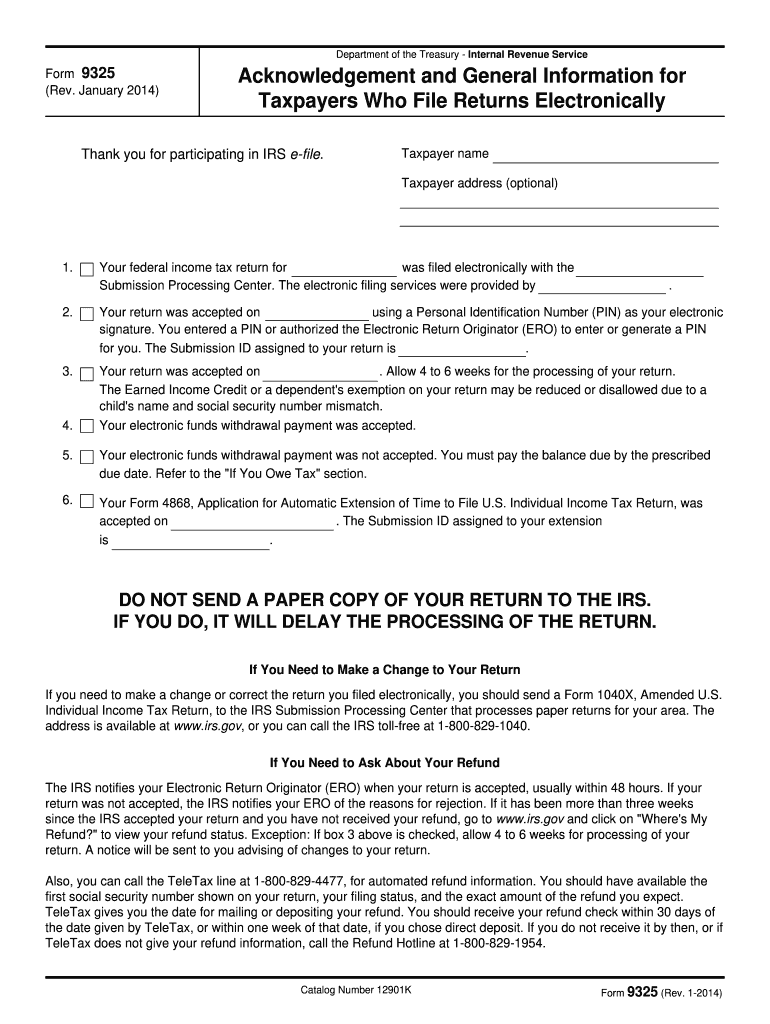
Past due child support, federal agency non-tax debts such as student loans and state income tax obligations. Fiscal Service sends you an offset notice if it applies your refund or part of your refund to non-tax debts. If you have questions about the offset, contact the agency identified in the notice. You may also call the Treasury Offset Program Call Center at 1-800-304-3107, if you have additional questions. If You Owe Tax If your return has a balance due, you must pay the amount you owe by th.
Loading

Open form follow the instructions

Easily sign the form with your finger

Send filled & signed form or save
How to fill out the IRS 9325 online
Filling out the IRS 9325 form is an essential step for taxpayers who file their returns electronically. This guide provides clear instructions to help users complete the form accurately and efficiently.
Follow the steps to effectively fill out the IRS 9325 online.
- Click the ‘Get Form’ button to access the form and open it in the online editor.
- Begin by entering the taxpayer’s name in the designated field. This is crucial for the identification of the tax return.
- Fill in the taxpayer's address. This field is optional, but it can help in processing your information more effectively.
- Next, indicate the year for which the federal income tax return is being filed. This information ensures clarity regarding the tax period.
- Specify the Submission Processing Center that handled your electronic filing. This helps track the processing of your return.
- Enter the Personal Identification Number (PIN) used as your electronic signature, or indicate if an authorized Electronic Return Originator (ERO) entered it for you.
- Provide the Submission ID assigned to your return, ensuring all records are correctly linked.
- Review all entered information for accuracy. Mistakes in this step can lead to delays or issues with your filing.
- Once complete, you can save your changes, download, print, or share the form as needed.
Complete your IRS 9325 form online today for an efficient filing experience.
Experience a faster way to fill out and sign forms on the web. Access the most extensive library of templates available.
Related content
If your return was not accepted, the IRS notifies your ERO of the reasons for rejection...
Jan 5, 2017 — If you are a resident alien, use the 2016 Instructions for Form. 1040...
Mar 1, 2017 — The federal income tax is a pay-as-you-go tax. You must pay the tax as you...
Get answers to your most pressing questions about US Legal Forms API.
What is the most common reason for an IRS letter?
The most common reason for receiving an IRS letter typically involves discrepancies in tax filings or missing information. The IRS often sends letters to clarify these issues before proceeding with collections or audits. Being well-prepared with documents like the IRS 9325 helps you address these concerns effectively. If you receive such a letter, don’t hesitate to seek assistance from tax professionals who can guide you on the necessary steps.
How to print form 9325 from UltraTax?
To print form 9325 from UltraTax, start by navigating to the specific section where forms are managed. Once you locate the IRS 9325 form, select it and choose the option to print. Ensure that your printer settings are correctly configured to avoid any issues. If you need additional assistance, professional platforms like US Legal Forms can provide helpful resources for tax-related documentation.
Who fills out form 9325?
Form 9325 is filled out by taxpayers who have filed a return electronically and need to confirm its acceptance. This document is crucial for ensuring that there are no issues with your filing status or tax return. If you’re working with an accountant or using tax software, they may handle the completion of the IRS 9325 form on your behalf. Ensure to verify that this form is properly completed to avoid any future complications with the IRS.
What is the 9325 form for TurboTax?
The IRS 9325 form for TurboTax serves as a confirmation document indicating the acceptance of your tax return by the IRS. It helps taxpayers keep records of their submitted returns and can be particularly useful if discrepancies arise in the future. If you are using TurboTax, it will simplify the process of locating the IRS 9325 form for you. Always ensure to save this document for your records after filing.
How do I write a disagreement letter to the IRS?
Writing a disagreement letter to the IRS involves stating your case clearly and presenting any evidence you have. Begin by referencing the IRS notice you disagree with, then outline your reasons for disputing their findings. It's advisable to mention the IRS 9325 form if you are providing evidence or a further explanation that supports your position. Ensure you send this letter promptly because there are specific time limits for responding to IRS correspondence.
How can I write a letter of explanation?
To write a letter of explanation, start with a clear and concise introduction that outlines the purpose of the letter. Use a friendly yet formal tone and provide detailed explanations of the situation, being careful to include only relevant information. Remember to refer to any applicable forms such as the IRS 9325, which may help frame your points more effectively. Close the letter by stating your willingness to discuss the matter further with the IRS.
How do I write a letter of explanation to the IRS?
When writing a letter of explanation to the IRS, begin by addressing the specific issue in question. Make sure to include your personal information, the tax year involved, and a concise statement about the reasons for your situation. This letter should be respectful and factual, and you may refer to IRS 9325 regulations if you have questions about what to include. Always keep a copy of your letter for your records.
How do I write a reasonable cause letter to the IRS?
To write a reasonable cause letter to the IRS, first clearly explain why you did not comply with IRS regulations. Include pertinent details, such as dates, amounts, and any other relevant documentation. It’s essential to gather any supporting evidence that strengthens your case, as this will help demonstrate your commitment to resolving the issue. The IRS 9325 can guide you in structuring your response if you need to provide additional explanations.
How do I print my return from UltraTax?
To print your return from UltraTax, first open the completed tax return in the software. Look for the print option in the toolbar or menu. Select the appropriate forms you wish to print, including any acknowledgment like the IRS 9325. This way, you can maintain a comprehensive file for your records.
Why would I get a letter from the IRS submission processing center?
Receiving a letter from the IRS submission processing center often means that they have acknowledged your IRS 9325 form or are confirming your tax submission. Sometimes, it can also indicate that there are questions or issues concerning your return. Always read the letter carefully, as it may contain essential instructions or requests for additional information. Staying informed is key to ensuring compliance with tax obligations.
Use professional pre-built templates to fill in and sign documents online faster. Get access to thousands of forms.
If you believe that this page should be taken down, please follow our DMCA take down process here.
This form is available in several versions. Select the version you need from the drop-down list below.