Loading
Form preview
  • US Legal Forms
  • Form Library
  • Tax Forms
  • Executive Department Treasury IRS Forms
  • Irs 911 2019

Get Irs 911 2019

Relief is not granted. (if any items 1-4 are checked, complete Question 9 below) (5) The taxpayer has experienced a delay of more than 30 days to resolve a tax account problem. (6) The taxpayer did not receive a response or resolution to their problem or inquiry by the date promised. (7) A system or procedure has either failed to operate as intended, or failed to resolve the taxpayer's problem or dispute within the IRS. (8) The manner in which the tax laws are being administered raise considera.

This website is not affiliated with IRS

How it works

  1. Open form

    Open form follow the instructions

  2. Easily sign form

    Easily sign the form with your finger

  3. Share form

    Send filled & signed form or save

How to fill out the IRS 911 online

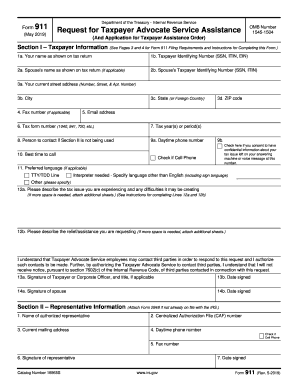
Filling out Form 911 can help you receive assistance from the Taxpayer Advocate Service when you face issues with the IRS. This guide provides step-by-step instructions to help you complete the form accurately and effectively.

Follow the steps to successfully complete your IRS 911 online request.

  1. Click ‘Get Form’ button to obtain the form and open it in the editor.
  2. Enter your name as shown on your tax return in section I, line 1a.
  3. Provide your Taxpayer Identifying Number (SSN, ITIN, or EIN) in section I, line 1b.
  4. If applicable, include your spouse's name and Taxpayer Identifying Number in sections I, lines 2a and 2b.
  5. Fill in your current street address, city, state, and ZIP code in section I, lines 3a-d.
  6. Enter your fax number in section I, line 4, and your email address in section I, line 5.
  7. Indicate the relevant tax form number in section I, line 6.
  8. Specify the tax year(s) or period(s) related to your request in section I, line 7.
  9. If you are not using section II, provide the name of the person to contact in section I, line 8.
  10. Complete your daytime phone number in section I, line 9a and indicate the best time to call in section I, line 10.
  11. Indicate your preferred language in section I, line 11, including any special communication needs.
  12. Describe the tax issue you are experiencing in section I, line 12a, detailing any IRS actions.
  13. In section I, line 12b, outline the relief or assistance you are requesting.
  14. Sign and date the request in sections I, lines 13a and 13b. If applicable, have your spouse sign in section I, lines 14a and 14b.
  15. If you wish to designate a representative, complete section II with the representative's information and include a power of attorney if necessary.
  16. Review all sections for completeness before finalizing your submission.
  17. Save your changes to the form, then download, print, or share as required.

Complete your documents online today for efficient processing.

Get form

Experience a faster way to fill out and sign forms on the web. Access the most extensive library of templates available.

Related content

Request for Taxpayer Advocate Service Assistance
If you don't receive a response within 30 days of submitting Form 911, call 877-777-4778...
Learn more
26 U.S. Code § 911 - Citizens or residents of the...
26 U.S. Code § 911 - Citizens or residents of the United States living abroad ; (1)...
Learn more
2011 - Instructions for Form 1120S
Jan 31, 2012 — Other Forms and Statements. Your Voice at the IRS. See the instructions...
Learn more

Related links form

IN Form 130 2008 IN SF 53228 2010 LA Students Year Guidelines MA Application for Permit to Perform Electrical Work 2007

Questions & Answers

Get answers to your most pressing questions about US Legal Forms API.

Contact support

To submit an IRS form 911, complete the form with your personal information and the details of your case. You can send it via mail to the IRS or deliver it in person at your local office. For support and ease of navigation through this process, visit the uslegalforms platform where you can find resources tailored to IRS 911 submissions. Keep a copy for your personal records until your situation resolves.

Applying for hardship with the IRS typically involves submitting form 911, which helps you communicate your financial difficulties. Include supporting documentation to substantiate your claims. The uslegalforms platform offers templates and guidance that can assist you in this process, making it easier to present your case. Remember, the IRS takes hardship applications seriously, so provide as much detail as possible.

To talk to a live person at the IRS, call 1-800-829-1040 and follow the prompts carefully. You might need to enter specific information, like your Social Security number, to ensure your call is routed properly. Once connected, request assistance related to IRS 911 if you are dealing with urgent matters. Patience is key, as wait times can vary.

Submitting an AW 9 form entails completing the form with accurate information and sending it to the IRS. You can find this form on the IRS website or through the uslegalforms platform for ease of use. After filling it out, mail it to the specified address indicated in the instructions. Make sure to keep a copy for your records, especially if it ties into IRS 911 claims.

The fastest way to connect with an IRS agent is by calling the IRS 911 phone number early in the morning or close to their closing time. Be strategic about your call; start by pressing the option for business or tax-related inquiries for more direct access. Prepare your personal information in advance for a smoother conversation. Quick actions like these can minimize your wait and address your urgent questions.

To reach the IRS taxpayer protection hotline, call the IRS 911 number. It is essential to have your information ready, including your Social Security number and any relevant tax documents. When you call, listen carefully to the prompts to navigate directly to the protection hotline. This will help you get the assistance you need without delays.

To speak with a live person at the IRS, call the IRS customer service line and follow the prompts carefully. It's helpful to have your tax information ready to provide the representative with necessary details quickly. Patience is key, as wait times can vary significantly. Connecting with a live person can help clarify your concerns and guide you in the right direction.

IRS form 911 is used to request immediate consideration for tax relief due to financial hardship. It allows taxpayers to explain their situations clearly to the IRS and seek possible assistance options. By submitting this form, you can initiate a dialogue with the IRS regarding your tax issues. Utilizing resources like USLegalForms can simplify this process and enhance your chances of successful relief.

The phone number 800-829-4933 is the IRS's dedicated line for taxpayer inquiries and concerns. When calling, you can get assistance regarding your tax accounts, forms, and various IRS services. It's crucial to have your tax information handy to expedite the conversation. This number is essential for anyone needing direct support from the IRS.

You should send your completed IRS form 911 to the appropriate IRS office based on your location and circumstances. This information is available directly on the form's instructions. Ensuring that you send it to the correct address is vital for timely processing and response from the IRS. If you’re unsure, the USLegalForms platform can help guide you through this process.

Get This Form Now!

Use professional pre-built templates to fill in and sign documents online faster. Get access to thousands of forms.
If you believe that this page should be taken down, please follow our DMCA take down processhere.
Get IRS 911
  • Adoption
  • Bankruptcy
  • Contractors
  • Divorce
  • Home Sales
  • Employment
  • Identity Theft
  • Incorporation
  • Landlord Tenant
  • Living Trust
  • Name Change
  • Personal Planning
  • Small Business
  • Wills & Estates
  • Packages A-Z
  • Affidavits
  • Bankruptcy
  • Bill of Sale
  • Corporate - LLC
  • Divorce
  • Employment
  • Identity Theft
  • Internet Technology
  • Landlord Tenant
  • Living Wills
  • Name Change
  • Power of Attorney
  • Real Estate
  • Small Estates
  • Wills
  • All Forms
  • Forms A-Z
  • Form Library
  • Legal Hub
  • About Us
  • Help Portal
  • Legal Resources
  • Blog
  • Affiliates
  • Contact Us
  • Delete My Account
  • Site Map
  • Industries
  • Forms in Spanish
  • Localized Forms
  • State-specific Forms
  • Forms Kit
  • Real Estate Handbook
  • All Guides
  • Notarize
  • Incorporation services
  • For Consumers
  • For Small Business
  • For Attorneys
  • USLegal
  • FormsPass
  • pdfFiller
  • signNow
  • altaFlow
  • DocHub
  • Instapage
Form Packages
  • Adoption
  • Bankruptcy
  • Contractors
  • Divorce
  • Home Sales
  • Employment
  • Identity Theft
  • Incorporation
  • Landlord Tenant
  • Living Trust
  • Name Change
  • Personal Planning
  • Small Business
  • Wills & Estates
  • Packages A-Z
Form Categories
  • Affidavits
  • Bankruptcy
  • Bill of Sale
  • Corporate - LLC
  • Divorce
  • Employment
  • Identity Theft
  • Internet Technology
  • Landlord Tenant
  • Living Wills
  • Name Change
  • Power of Attorney
  • Real Estate
  • Small Estates
  • Wills
  • All Forms
  • Forms A-Z
  • Form Library
Customer Service
  • Legal Hub
  • About Us
  • Help Portal
  • Legal Resources
  • Blog
  • Affiliates
  • Contact Us
  • Delete My Account
  • Site Map
  • Industries
  • Forms in Spanish
  • Localized Forms
  • State-specific Forms
  • Forms Kit
Legal Guides
  • Real Estate Handbook
  • All Guides
Prepared for you
  • Notarize
  • Incorporation services
Our Customers
  • For Consumers
  • For Small Business
  • For Attorneys
Our Sites
  • USLegal
  • FormsPass
  • pdfFiller
  • signNow
  • altaFlow
  • DocHub
  • Instapage
Social Media
Call us now toll free:
+1 833 426 79 33
As seen in:
© Copyright 1999-2026 airSlate Legal Forms, Inc. 17 Station Street, Suite 303, Brookline, MA 02445
  • Your Privacy Choices
  • Terms of Service
  • Privacy Notice
  • Content Takedown Policy
  • Bug Bounty Program
IRS 911
This form is available in several versions.
Select the version you need from the drop-down list below.
2024 IRS 911
Select form
  • 2024 IRS 911
  • 2019 IRS 911
  • 2015 IRS 911
  • 2011 IRS 911
  • 1997 IRS 911
Select form