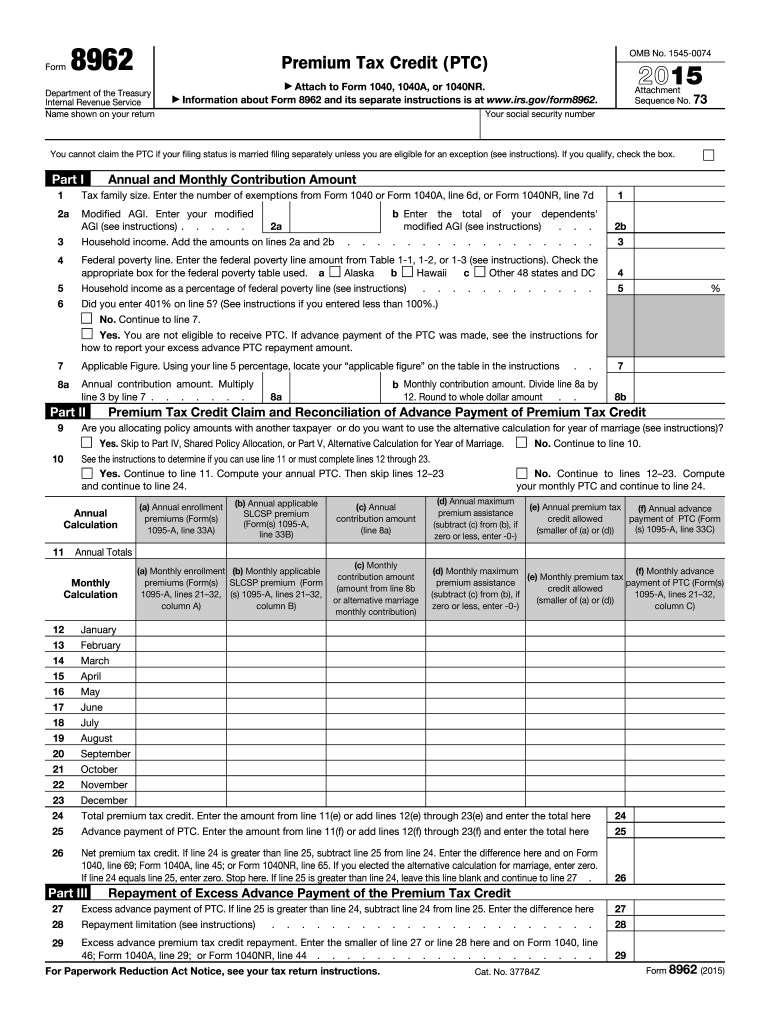
N amount (amount from line 8b or alternative marriage monthly contribution) (d) Monthly maximum (f) Monthly advance (e) Monthly premium tax premium assistance payment of PTC (Form(s) credit allowed (subtract (c) from (b), if 1095-A, lines 21 32, (smaller of (a) or (d)) zero or less, enter -0-) column C) 12 13 14 15 16 17 18 19 20 21 22 23 January February March April May June July August September October November December 24 25 Total premium tax credit. Enter the amount from line 11(e) o.
Loading

Open form follow the instructions

Easily sign the form with your finger

Send filled & signed form or save
How to fill out the IRS 8962 online
Filling out the IRS Form 8962 can appear daunting, but with a clear understanding of its sections and requirements, you can confidently complete it online. This guide will take you through each step of the process, ensuring that you accurately report your premium tax credit information.
Follow the steps to successfully complete your IRS 8962 form
- Click ‘Get Form’ button to access the IRS Form 8962 and open it for editing.
- In Part I, enter your tax family size in line 1, based on the number of exemptions you claimed on your Form 1040, 1040A, or 1040NR.
- For line 2a, input your modified adjusted gross income (AGI). Refer to the provided instructions if you need clarification on calculating this figure.
- Complete line 2b by entering your household income, which is the sum of the amounts from lines 2a and 2b.
- In line 4, enter the federal poverty line amount as indicated in the tables provided in the instructions, and check the applicable box for your state.
- On line 5, calculate your household income as a percentage of the federal poverty line based on the information from previous lines.
- If you reported 401% on line 5, select ‘Yes’ and note that you are not eligible for the premium tax credit (PTC). If not, proceed to line 7.
- Line 7 requires you to find your ‘applicable figure’ using the percentage calculated from line 5 and referring to the table in the instructions.
- Calculate your annual contribution amount on line 8a by multiplying the amount on line 3 by the applicable figure from line 7.
- In line 8b, determine your monthly contribution amount by dividing the annual amount from line 8a by 12 and rounding to the nearest whole dollar.
- Proceed to the next section based on whether you are allocating policy amounts with another taxpayer or using the alternative calculation for the year of marriage.
- If you are calculating your annual PTC, fill in lines 10 through 25 as instructed, detailing your premiums for each month and the corresponding PTC.
- Finally, review your completed form for accuracy before saving changes, downloading, or printing the document for your records.
Complete your IRS 8962 form online today to ensure you receive any applicable premium tax credits.
Experience a faster way to fill out and sign forms on the web. Access the most extensive library of templates available.
Related content
Sep 13, 2024 — Use Form 8962 to: Figure the amount of your Premium Tax Credit (PTC)...
Irs instructions form 8962. Clear Start Tax Relief Website Disclaimer Clear Start Tax does...
Apr 15, 2015 — If you enrolled someone who is not claimed as a dependent on your tax...
Get answers to your most pressing questions about US Legal Forms API.
Does TurboTax automatically fill out form 8962?
Yes, TurboTax can automatically fill out IRS 8962 for you if you provide the necessary information about your health coverage. The software guides you through answering relevant questions, ensuring your premium tax credits are calculated accurately. This feature simplifies the process, making it easier for you to file your tax return without stress. Plus, with platforms like US Legal Forms, you can easily access additional resources to support your filing needs.
How to fill out form 8962 step by step?
Filling out IRS 8962 requires you to start by gathering your Form 1095-A, which reports your health coverage details. Next, follow the instructions to complete each section, including entering your household size, calculating the premium tax credit, and reconciling that amount with any advance payments received. Finally, double-check your entries for accuracy before adding this form to your tax return to ensure compliance with IRS regulations.
Why is my tax return asking for form 8962?
Your tax return is asking for IRS 8962 because you or a household member received premium tax credits through the Health Insurance Marketplace. This form helps you reconcile the advance payments you received by comparing them with your actual income. If you do not include IRS 8962, your tax return may be delayed or rejected. Ensuring you provide this form accurately will help avoid issues with your tax filing.
Why is the IRS asking for form 8962?
The IRS requests form 8962 to verify your premium tax credits and ensure that you received the correct amount of assistance. This step is crucial for tax compliance, especially for taxpayers who utilized the Health Insurance Marketplace. By submitting the IRS 8962, you help maintain accuracy in your tax return and support the integrity of the tax system.
Is form 8962 the same as 1095-A?
No, form 8962 is not the same as 1095-A, although they work closely together. While 1095-A provides information about your health insurance coverage, form 8962 allows you to calculate and report your premium tax credits. Both forms are essential for those using the Health Insurance Marketplace to ensure accurate tax reporting.
What is form 8962 with IRS?
Form 8962, often used in conjunction with IRS 1095-A, is necessary for individuals who wish to claim the premium tax credit. This form calculates how much assistance you qualify for based on your income and household size. By filing the IRS 8962 correctly, you can ensure you receive the benefits you are entitled to.
What is an 8962 tax form used for?
The IRS 8962 form helps you reconcile your premium tax credits when filing your taxes. It ensures that the amount you receive aligns with your income and the coverage you had. Completing this form accurately is vital for your tax return, particularly if you received financial assistance through the Health Insurance Marketplace.
What happens if I don't fill out form 8962?
If you do not fill out form 8962, you may face consequences such as delaying your tax refund or being unable to claim your premium tax credits. The IRS may also flag your return for further review. It’s crucial to ensure that the IRS 8962 form is completed to avoid these potential issues.
Do I need 1095-A to file taxes?
Yes, you need the 1095-A form to file your taxes if you received health coverage through the Health Insurance Marketplace. This form provides essential information about your health insurance and premium tax credits. It's important to keep this document handy when preparing your tax return, especially if you need to complete the IRS 8962 form.
Why is the IRS asking me for form 8962?
The IRS may ask for form 8962 to determine if you are eligible for the premium tax credit based on your health insurance. This form helps show the amount you received in advance payments of the credit. If you failed to file this form, the IRS wants to ensure that your tax return correctly reflects your health coverage situation. Using USLegalForms can help you access and fill out form 8962 accurately.
Use professional pre-built templates to fill in and sign documents online faster. Get access to thousands of forms.
If you believe that this page should be taken down, please follow our DMCA take down process here.
This form is available in several versions. Select the version you need from the drop-down list below.