Loading
Form preview
  • US Legal Forms
  • Other Templates
  • Tax Forms
  • Executive Department Treasury IRS Forms
  • Irs 8962 2018

Get Irs 8962 2018

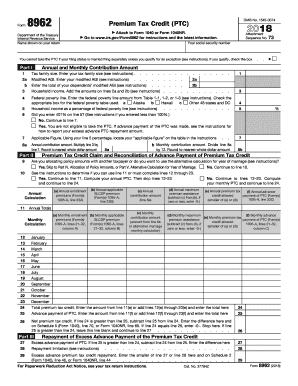
1095-A, lines column A) 21 32, column B) (c) Monthly contribution amount (amount from line 8b or alternative marriage monthly calculation) (d) Monthly maximum (f) Monthly advance (e) Monthly premium tax premium assistance payment of PTC (Form(s) credit allowed (subtract (c) from (b), if 1095-A, lines 21 32, (smaller of (a) or (d)) zero or less, enter -0-) column C) 12 13 14 15 16 17 18 19 20 21 22 23 January February March April May June July August September October November December.

This website is not affiliated with IRS

How it works

  1. Open form

    Open form follow the instructions

  2. Easily sign form

    Easily sign the form with your finger

  3. Share form

    Send filled & signed form or save

How to fill out the IRS 8962 online

Filling out the IRS Form 8962, which is used to claim the Premium Tax Credit, can seem daunting. This guide will provide you with clear, step-by-step instructions to help you complete the form accurately and efficiently online.

Follow the steps to successfully complete your IRS Form 8962 online.

  1. Press the ‘Get Form’ button to obtain the form and open it in your editor.
  2. Fill in your name as shown on your tax return in the designated field.
  3. Enter your Social Security number in the appropriate section.
  4. For Part I, input your tax family size in the given field. This number should reflect all individuals who are part of your household.
  5. Provide your modified adjusted gross income (AGI) in the next field, as well as the total modified AGI for your dependents.
  6. Calculate your household income by adding the amounts on lines 2a and 2b and input this number.
  7. Refer to the federal poverty line table to find the applicable federal poverty line amount for your household size and input this value.
  8. If your household income exceeds 400% of the federal poverty line, indicate this by checking the appropriate box.
  9. Using the percentage calculated in the previous steps, locate your applicable figure and input it accordingly.
  10. Multiply your household income by the applicable figure to determine your annual contribution amount and enter this in the designated field.
  11. Divide your annual contribution amount by 12 to determine the monthly contribution amount and input this value.
  12. Proceed to Part II and decide if you need to allocate policy amounts or complete additional calculations based on your situation.
  13. If applicable, fill in the details for up to four policy amounts in Part IV, following the specific instructions for allocation.
  14. Complete any necessary calculations outlined in Part V if you qualify for the alternative calculation for the year of marriage.
  15. Review your entries to ensure accuracy. Once confirmed, you may save your changes, download, print, or share the completed form.

Start filling out your IRS Form 8962 online today and ensure you maximize your Premium Tax Credit eligibility.

Get form

Experience a faster way to fill out and sign forms on the web. Access the most extensive library of templates available.

Related content

About Form 8962, Premium Tax Credit
Sep 13, 2024 — Use Form 8962 to: Figure the amount of your Premium Tax Credit (PTC)...
Learn more
Irs instructions form 8962
Irs instructions form 8962. Clear Start Tax Relief Website Disclaimer Clear Start Tax does...
Learn more
2014 Instructions for Form 1040NR
Apr 15, 2015 — If you enrolled someone who is not claimed as a dependent on your tax...
Learn more

Related links form

CA DHCS 9098 2010 CA DHCS MC 371 2009 CA dpa-E UCA 2010 CA LIC 9163 2015

Questions & Answers

Get answers to your most pressing questions about US Legal Forms API.

Contact support

TurboTax does have the functionality to help users fill out form 8962 automatically, provided that your information is entered correctly. As you enter your premium tax credit details, TurboTax will generate the form based on your data. To ensure accuracy, review the information carefully and make any necessary adjustments.

The refundable credit form 8962 allows taxpayers to claim premium tax credits for health insurance purchased through the Marketplace. This form helps determine your eligibility based on your household income and family size. Utilizing the IRS 8962 can help reduce your tax liability and may result in a refund.

Filling out form 8962 involves several steps, starting with gathering information about your health insurance coverage and premium tax credits. You'll need to calculate your annual income and gather data from your Form 1095-A. Follow the guidelines provided in the form instructions carefully to complete it correctly. Consider using platforms like US Legal Forms for additional support.

If your tax return is asking for form 8962, it's likely because you received a premium tax credit for health insurance. This form helps the IRS verify the accuracy of your credit based on your income and coverage. To avoid delays in processing your return, ensure this form is accurately filled out and submitted.

Whether you receive a refund for your premium tax credit depends on several factors, including your income and the amount of credit you qualify for. If the IRS 8962 indicates you overpaid in premiums or other eligible expenses, you may indeed receive a refund. Always consult with a tax professional for personalized advice.

Yes, the IRS 8962 tax credit can significantly affect your taxes. This form allows you to claim the premium tax credit, which may lower your overall tax bill. By completing the IRS 8962 correctly, you can ensure you maximize your credits while complying with tax regulations.

Premium refunds are generally not taxable. However, if you received a premium tax credit through the IRS 8962 and later received a refund, it's important to understand how it affects your overall tax situation. You should report any changes in your coverage or credits when filing your taxes to ensure accuracy.

Form 1095-A is a statement you receive from the Health Insurance Marketplace, detailing your coverage and any premium tax credits you received. In contrast, form 8962 is the IRS form you use to reconcile these credits on your tax return. Understanding both forms is crucial, as they work together to ensure that your premium tax credits are reported correctly to the IRS.

The IRS may request form 8962 to verify your claim for the premium tax credit. This request often occurs if there are discrepancies in your reported income or health coverage details. Completing IRS 8962 accurately helps resolve any issues and confirms your eligibility for the credits.

If you don’t fill out form 8962, you might face complications with your tax return. The IRS will likely deny your premium tax credit, leading to a higher tax bill. Additionally, you may be subject to potential penalties, which is why filling out IRS 8962 is essential for maintaining compliance.

Get This Form Now!

Use professional pre-built templates to fill in and sign documents online faster. Get access to thousands of forms.
If you believe that this page should be taken down, please follow our DMCA take down processhere.
Get IRS 8962
  • Adoption
  • Bankruptcy
  • Contractors
  • Divorce
  • Home Sales
  • Employment
  • Identity Theft
  • Incorporation
  • Landlord Tenant
  • Living Trust
  • Name Change
  • Personal Planning
  • Small Business
  • Wills & Estates
  • Packages A-Z
  • Affidavits
  • Bankruptcy
  • Bill of Sale
  • Corporate - LLC
  • Divorce
  • Employment
  • Identity Theft
  • Internet Technology
  • Landlord Tenant
  • Living Wills
  • Name Change
  • Power of Attorney
  • Real Estate
  • Small Estates
  • Wills
  • All Forms
  • Forms A-Z
  • Other Templates
  • Legal Hub
  • About Us
  • Help Portal
  • Legal Resources
  • Blog
  • Affiliates
  • Contact Us
  • Delete My Account
  • Site Map
  • Industries
  • Forms in Spanish
  • Localized Forms
  • State-specific Forms
  • Forms Kit
  • Real Estate Handbook
  • All Guides
  • Notarize
  • Incorporation services
  • For Consumers
  • For Small Business
  • For Attorneys
  • USLegal
  • FormsPass
  • pdfFiller
  • signNow
  • altaFlow
  • DocHub
  • Instapage
Form Packages
  • Adoption
  • Bankruptcy
  • Contractors
  • Divorce
  • Home Sales
  • Employment
  • Identity Theft
  • Incorporation
  • Landlord Tenant
  • Living Trust
  • Name Change
  • Personal Planning
  • Small Business
  • Wills & Estates
  • Packages A-Z
Form Categories
  • Affidavits
  • Bankruptcy
  • Bill of Sale
  • Corporate - LLC
  • Divorce
  • Employment
  • Identity Theft
  • Internet Technology
  • Landlord Tenant
  • Living Wills
  • Name Change
  • Power of Attorney
  • Real Estate
  • Small Estates
  • Wills
  • All Forms
  • Forms A-Z
  • Other Templates
Customer Service
  • Legal Hub
  • About Us
  • Help Portal
  • Legal Resources
  • Blog
  • Affiliates
  • Contact Us
  • Delete My Account
  • Site Map
  • Industries
  • Forms in Spanish
  • Localized Forms
  • State-specific Forms
  • Forms Kit
Legal Guides
  • Real Estate Handbook
  • All Guides
Prepared for you
  • Notarize
  • Incorporation services
Our Customers
  • For Consumers
  • For Small Business
  • For Attorneys
Our Sites
  • USLegal
  • FormsPass
  • pdfFiller
  • signNow
  • altaFlow
  • DocHub
  • Instapage
Social Media
Call us now toll free:
+1 833 426 79 33
As seen in:
© Copyright 1999-2026 airSlate Legal Forms, Inc. 17 Station Street, Suite 303, Brookline, MA 02445
  • Your Privacy Choices
  • Terms of Service
  • Privacy Notice
  • Content Takedown Policy
  • Bug Bounty Program
IRS 8962
This form is available in several versions.
Select the version you need from the drop-down list below.
2021 IRS 8962
Select form
  • 2021 IRS 8962
  • 2020 IRS 8962
  • 2019 IRS 8962
  • 2018 IRS 8962
  • 2017 IRS 8962
  • 2016 IRS 8962
  • 2015 IRS 8962
  • 2014 IRS 8962
Select form