. . Part II 8 2016 Attachment Sequence No. 71 Your social security number . 19 20 . 21 Subtract line 21 from line 19. If zero or less, enter -0-. This is your Additional Medicare Tax withholding on Medicare wages . . . . . . . . . . . . . . . . . . . . Additional Medicare Tax withholding on railroad retirement (RRTA) compensation from Form W-2, box 14 (see instructions) . . . . . . . . . . . . . . . . . . . . . Total Additional Medicare Tax withholding. Add lines 22 and 23. Also includ.

Open form follow the instructions

Easily sign the form with your finger

Send filled & signed form or save
How to fill out the IRS 8959 online
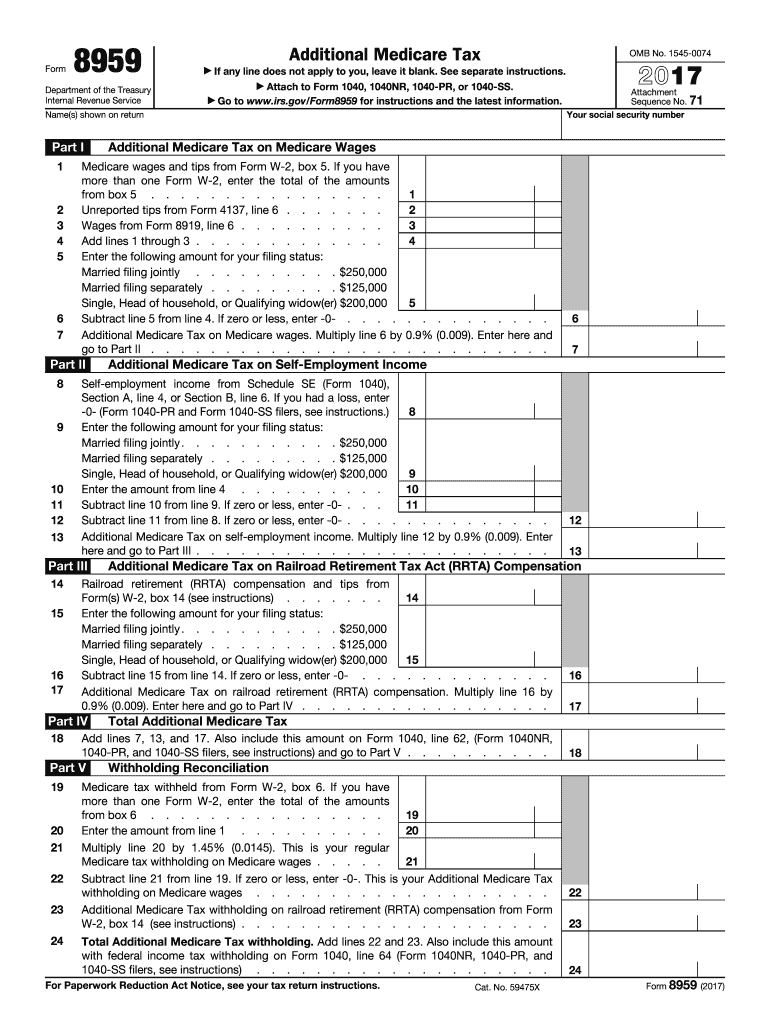
The IRS Form 8959 is used to calculate the Additional Medicare Tax, applicable to high-income earners. This guide will provide you with a step-by-step approach to completing the form online, ensuring a smooth filing process.
Follow the steps to complete the IRS Form 8959 online:
- Press the ‘Get Form’ button to access the form and open it in your editor.
- Enter your name as it appears on your tax return in the designated field.
- In Part I, provide any unreported tips from Form 4137 in line 1, followed by wages from Form 8919 in line 2.
- Add the amounts from lines 1 through 3 and enter the total in line 3.
- For line 4, select the appropriate threshold amount based on your filing status: $250,000 for married filing jointly, $125,000 for married filing separately, or $200,000 for single, head of household, or qualifying widow(er).
- Subtract line 5 from line 4. If the result is zero or less, enter -0-.
- Multiply the amount from line 6 by 0.9% (0.009) and enter the result on line 7.
- Continue to complete Part II, by providing the total Medicare tax withheld from any Form W-2 in line 20.
- In Part IV, enter your self-employment income in line 6 as needed, and continue as instructed.
- Once all sections are completed, review your entries for accuracy.
- Save your changes, and then download, print, or share the completed form as required.
Complete your IRS documents online for a streamlined tax filing experience.
Experience a faster way to fill out and sign forms on the web. Access the most extensive library of templates available.
Related content
Apr 29, 2025 — Use this form to figure: the amount of additional Medicare tax you owe...
For information about the. Additional Medicare Tax, see the Instructions for Form. 8959...
Jan 19, 2017 — See Form 8959 and the Instructions for Form 8959 for more informa tion on...
Get answers to your most pressing questions about US Legal Forms API.
How to fill out W9 as an individual?
Filling out a W9 form as an individual requires you to maintain clarity and accuracy. Start by providing your name and address as it appears on your tax return, then include your Social Security number. Ensure you sign and date the form, indicating that the information is correct. For assistance, you can refer to reliable resources such as US Legal Forms to complete this process with confidence.
Why is TurboTax asking for a 1095 form?
TurboTax requests a 1095 form to verify your health insurance coverage during the tax year. This form provides essential information to determine whether you complied with the Affordable Care Act’s health insurance mandate. By including this form, you ensure that your tax return is complete and accurate, avoiding penalties associated with health coverage gaps. Knowing this helps streamline your filing process.
What triggers form 8959?
Form IRS 8959 is triggered primarily when your income exceeds the set thresholds for additional Medicare tax. This usually happens for high earners, such as those making over $200,000 individually or $250,000 for joint filers. To ensure you meet your tax obligations, it is essential to keep thorough records of your income throughout the year. Accurate reporting can help avoid future complications.
Why is TurboTax saying I need 8995?
If TurboTax indicates you need IRS form 8995, it’s likely because it detected eligible income for the Qualified Business Income Deduction. This deduction is for self-employed individuals and small business owners, allowing a deduction of up to 20% of qualified business income. It’s essential to understand this requirement to maximize your tax benefits. Consider consulting resources like US Legal Forms for clarification and support.
How to calculate the additional Medicare tax?
To calculate the additional Medicare tax, first compute your total income and subtract the threshold amounts of $200,000 or $250,000 depending on your filing status. Then, apply the 0.9% tax rate to any income exceeding these thresholds. Understanding this process is crucial for accurately reporting your taxes on IRS 8959. Using tax software can streamline the calculations and ensure accuracy.
Why is TurboTax making me fill out form 8919?
TurboTax prompts for IRS form 8919 when it detects a discrepancy in your income reporting, particularly involving unreported self-employment income. This form is essential to claim your share of Social Security and Medicare taxes if your employer hasn’t reported income correctly. Filling this out ensures compliance with health care tax obligations. Using resources like US Legal Forms can provide clear guidance for filling these forms.
How is form 8959 calculated?
The IRS 8959 is calculated based on your wages, self-employment income, and other compensation. First, identify the amount of income that exceeds the threshold for Medicare tax, which is $200,000 for individuals and $250,000 for married couples filing jointly. Next, you will calculate the additional Medicare tax by applying the 0.9% rate to the excess income. This form helps determine the total amount you owe to the IRS.
Why do I have to file Form 8959?
You must file Form 8959 to report any additional Medicare taxes owed on your income. This filing ensures compliance with IRS regulations and reflects accurately the amounts withheld from your wages. If you have income that exceeds the set limits, filing this form protects you from potential issues with the IRS.
At what income do you stop paying Medicare tax?
You do not stop paying Medicare tax based on income limits as you do with Social Security tax. Medicare tax applies to all earned income without a cap. However, additional Medicare tax applies only to income exceeding $200,000 for individuals or $250,000 for married couples, which is where Form 8959 comes into play.
What triggers IRS Form 8960?
IRS Form 8960 is triggered by having net investment income above specific thresholds. These thresholds are $200,000 for single filers and $250,000 for married couples filing jointly. The form helps calculate your net investment income tax, and understanding this can streamline your tax preparation process.
Use professional pre-built templates to fill in and sign documents online faster. Get access to thousands of forms.
If you believe that this page should be taken down, please follow our DMCA take down process here.
This form is available in several versions. Select the version you need from the drop-down list below.