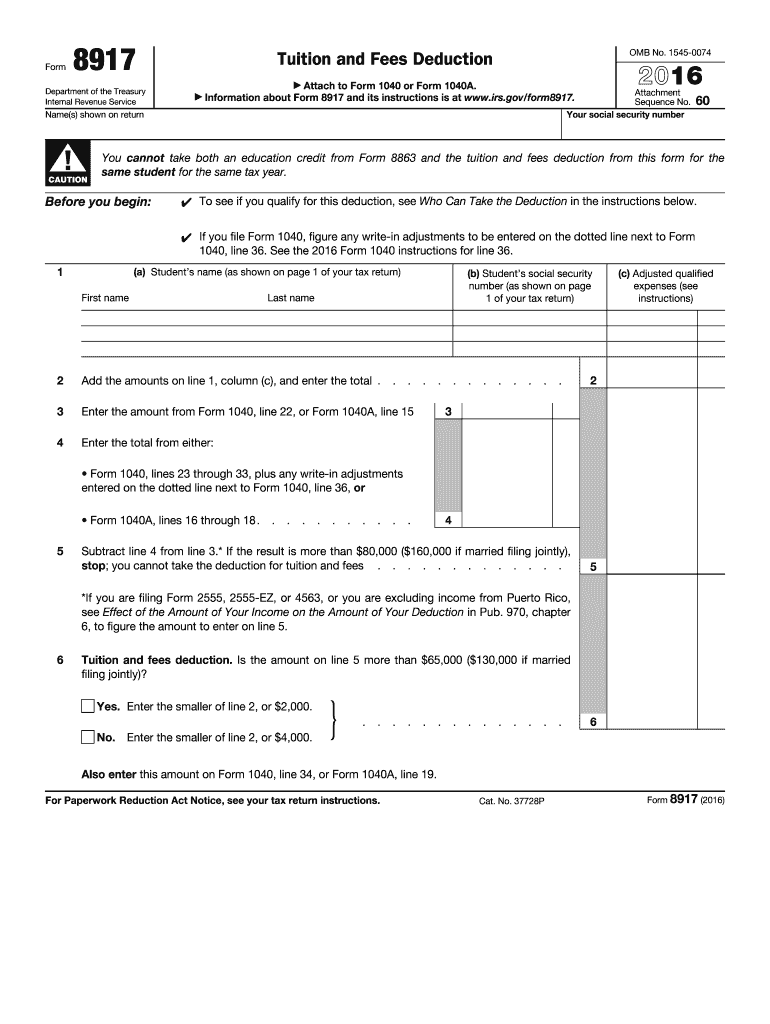
CAUTION 2016 Attach to Form 1040 or Form 1040A. Information about Form 8917 and its instructions is at www.irs.gov/form8917. 60 You cannot take both an education credit from Form 8863 and the tuition and fees deduction from this form for the same student for the same tax year. Before you begin: To see if you qualify for this deduction, see Who Can Take the Deduction in the instructions below. If you file Form 1040, figure any write-in adjustments to be entered on the dotted.

Open form follow the instructions

Easily sign the form with your finger

Send filled & signed form or save
How to fill out the IRS 8917 online
Filling out the IRS Form 8917 can seem daunting, but with this guide, you will have a comprehensive, step-by-step approach to complete the form online efficiently. This form is essential for the tuition and fees deduction, allowing eligible taxpayers to reduce their taxable income.
Follow the steps to fill out the IRS 8917 form online.
- Click ‘Get Form’ button to obtain the form and open it in the editor.
- Begin by entering your social security number in the designated field. Ensure accuracy, as this number is essential for processing your tax return.
- Proceed to line 1, where you will list the student’s name and social security number for whom you are claiming the deduction.
- On line 2, sum the amounts from column (c) of line 1 for each qualified student, entering that total in the specified field.
- In line 3, enter the amount from Form 1040, line 22, or Form 1040A, line 15.
- For line 4, identify and enter the adjusted qualified expenses. This includes reviewing other related lines on your Form 1040 or 1040A.
- Subtract the amount on line 4 from line 3. If this result exceeds $80,000 for single filers ($160,000 if married filing jointly), you cannot claim the deduction.
- On line 6, assess your situation: if the amount from line 5 is greater than $65,000 (or $130,000 for joint filers), enter the smaller of line 2 or $2,000. Otherwise, enter the smaller of line 2 or $4,000.
- Finally, be sure to enter this deduction amount onto either Form 1040, line 34, or Form 1040A, line 19.
- Review your entries for accuracy. Save your changes, and when finalized, download, print, or share the form as needed.
Take action now by filling out your IRS 8917 form online to maximize your potential tuition and fees deduction.
Experience a faster way to fill out and sign forms on the web. Access the most extensive library of templates available.
Related content
Feb 19, 2025 — Use Form 8917 to figure and take the deduction for tuition and fees...
The Student Loan Deduction is available for taxpayers who have taken loans to pay...
Jan 26, 2017 — Attach Form 8917 . . . . . . . 34. 35. Domestic production activities...
Get answers to your most pressing questions about US Legal Forms API.
How do I report tuition payments?
To report tuition payments, you should start by gathering all relevant receipts and records of tuition expenses. These expenses can be claimed using Form 8917 during tax filing. Accurate reporting of these payments ensures you can take full advantage of any credits or deductions available to you, maximizing your potential tax savings.
What is form 8917 used for?
Form 8917 is used to claim the tuition and fees deduction on your tax return. This form allows you to deduct up to $4,000 in qualified education expenses from your taxable income, thus potentially lowering your tax bill. It is a valuable tool for students and parents managing educational costs.
What is the income limit for the American Opportunity Tax Credit?
As of the latest guidelines, the income limit for the American Opportunity Tax Credit begins to phase out for single filers with a modified adjusted gross income (MAGI) above $80,000 and for joint filers above $160,000. If your income exceeds these limits, you may not qualify for the full credit. Always refer to the IRS guidelines to confirm eligibility.
What is the difference between form 8917 and 8863?
Form 8917 is used to claim a tuition and fees deduction, while Form 8863 is used for claiming the American Opportunity Credit and the Lifetime Learning Credit. The key difference lies in the benefits each provides. Understanding when to use each form can enhance your tax returns and maximize your savings.
How to file tuition reimbursement on taxes?
To file tuition reimbursement on your taxes, you will need to report any reimbursement amounts on your tax return. These amounts are typically reported as taxable income on your Form 1040. Be sure to keep thorough documentation, including Form 8917, which can help you identify qualified expenses related to your education.
Am I eligible to claim an education credit IRS?
Eligibility to claim an education credit from the IRS typically requires you to meet specific income thresholds and have incurred qualified education expenses. You may also need to be enrolled in an eligible educational institution. Exploring IRS 8917 and other relevant forms can provide clarity regarding your eligibility status and help you take advantage of available credits.
How to get the full $2500 American Opportunity credit?
To receive the full $2500 American Opportunity Credit, you should ensure you meet all the eligibility criteria, which includes incurring qualified tuition expenses and adhering to income guidelines. When filing your tax returns, complete IRS Form 8863 correctly, and if applicable, use IRS 8917 to further decrease your taxable income. Detailed record-keeping of your expenses is essential for claiming the maximum credit.
What is the IRS form for college tuition?
The IRS form for college tuition is primarily Form 8917, which allows you to claim the Tuition and Fees Deduction. If you aim for credits, you would typically use Form 8863 for the education tax credits. Knowing which form to file can help you accurately report tuition expenses and potentially lower your taxable income.
How do I get the full $2500 American Opportunity Credit?
To claim the full $2500 American Opportunity Credit, ensure that you meet the eligibility requirements, including qualifying education expenses and income limits. You need to file IRS Form 8863 while also utilizing IRS 8917 for any additional tuition deductions that may apply. By keeping accurate records of your expenses and completing the required forms diligently, you can maximize your credit.
Who qualifies for tuition tax credit?
To qualify for a tuition tax credit, you typically need to have incurred qualified education expenses for an eligible student. This generally includes yourself, your spouse, or a dependent claimed on your tax return. Additionally, you must meet income requirements and attend a qualified educational institution, making IRS 8917 an essential form for determining your eligibility.
Use professional pre-built templates to fill in and sign documents online faster. Get access to thousands of forms.
If you believe that this page should be taken down, please follow our DMCA take down process here.
This form is available in several versions. Select the version you need from the drop-down list below.