Ecking, savings, or other account such as: An individual retirement arrangement (IRA), including a myRA , A health savings account (HSA), An Archer MSA, A Coverdell education savings account (ESA), or A TreasuryDirect online account. You can't have your refund deposited into more than one account or buy paper series I savings bonds if you file Form 8379, Injured Spouse Allocation. Deposit of refund to only one account. If you want your refund deposited to only one account,.
Loading

Open form follow the instructions

Easily sign the form with your finger

Send filled & signed form or save
How to fill out the IRS 8888 online
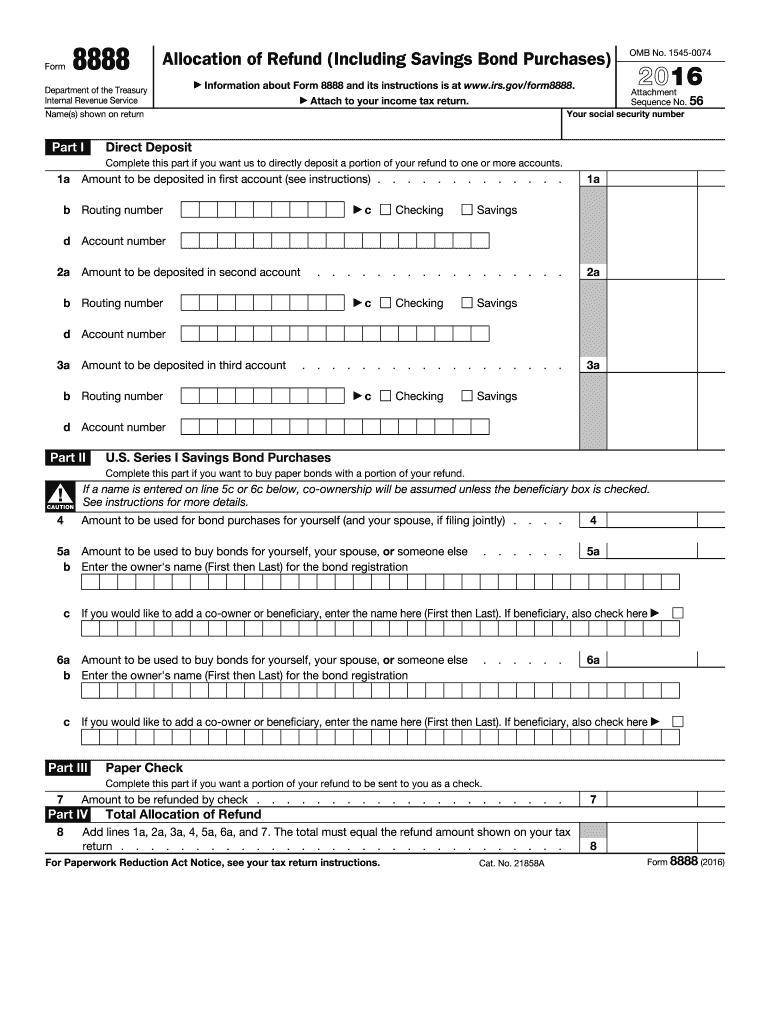
The IRS 8888 form, also known as the allocation of refund (including savings bond purchases), allows users to specify how to distribute their tax refund across multiple accounts or to purchase savings bonds. This guide provides step-by-step instructions to assist users in effectively filling out this form online.
Follow the steps to complete the IRS 8888 form online.
- Click ‘Get Form’ button to obtain the IRS 8888 form and open it in your chosen online editor.
- In Part I, enter the amounts of your refund you wish to directly deposit into up to three different accounts. Ensure each amount is at least $1.
- Repeat the process for the second account in lines 2a to 2d, and for the third account in lines 3a to 3d, if applicable.
- Move to Part II if you wish to purchase U.S. Series I savings bonds. Specify the amount you want to use in line 4 for personal bonds, and lines 5a and 6a for bonds for others.
- If you have remaining funds after specifying deposits and bond purchases, proceed to Part III. In line 7, enter any amount you wish to receive as a paper check.
- Review all entries for accuracy. Finalize the document by saving your changes, and you may choose to download, print, or share your completed form.
Take the next step towards managing your tax refund by filling out the IRS 8888 form online today.
Experience a faster way to fill out and sign forms on the web. Access the most extensive library of templates available.
Related content
Apr 23, 2025 — Use Form 8888 to directly deposit your refund (or part of it) to one or...
Jul 11, 2017 — Use IRS Form 8888 to automatically save all or part of your tax refund...
The Cisco 880 Series Integrated Services Routers (ISRs) combine Internet access, security...
Get answers to your most pressing questions about US Legal Forms API.
What is the purpose of form 888?
The purpose of IRS Form 888 is to allow taxpayers to designate how their federal tax refund will be distributed. This form facilitates the direct deposit of refunds into multiple accounts, making it easier to manage funds. Using Form 8888 can help you save or invest portions of your refund more effectively. By directing your refund wisely, you can take advantage of opportunities that align with your financial goals.
How do I fill out an IRS withholding form?
To fill out an IRS withholding form, begin by obtaining either Form W-4 or another appropriate withholding document. Clearly state your filing status, number of dependents, and any additional amounts you wish to withhold. Utilizing the IRS 8888 may assist you in ensuring the correct amount is designated for your upcoming tax refund, helping you manage your financial planning better. Double-check all information to avoid errors that could delay your refund.
What number should I put for withholding allowances?
The number of withholding allowances you claim affects how much tax is withheld from your paycheck. To determine the appropriate number, consider your filing status, dependents, and expected deductions. Many individuals find accurate guidance through the IRS 8888, as it helps calculate the necessary withholding. Aim for a number that aligns with your overall tax liability to avoid a large balance due or unexpected refunds.
What is the IRS form to cancel all debt?
Currently, there is no specific IRS form designed explicitly for canceling all debt. However, if you're dealing with forgiven debt from a lender, the IRS requires the reporting of that amount on your tax return. Form 1099-C is commonly used in these cases. Meanwhile, you can explore the IRS 8888 for handling your tax refund effectively, particularly if you're expecting a refund.
How should I fill out my tax withholding form?
Filling out your tax withholding form requires clarity about your financial situation and tax obligations. Begin by gathering essential documents like your previous year's tax return and current income details. The IRS 8888 provides a reliable method for directing your anticipated tax refund, which can streamline your finances. Ensure all entries are accurate to maximize your refund potential and avoid complications.
What banking information must be submitted on form 8888?
When filling out IRS 8888, you need to provide your bank account number, routing number, and account type, either checking or savings. This information is essential as it directs your tax refund to the correct account. Ensuring accuracy here helps avoid potential delays with your funds. For added support in completing this form, uslegalforms can be a valuable resource.
What is form 8888 amended return?
The IRS 8888 amended return is a way to correct errors on a previously filed tax return. It allows taxpayers to request a refund or adjust any discrepancies discovered after the original filing. Utilizing this form ensures that your tax data is accurate and up to date. For assistance with this form, consider using platforms like uslegalforms.
How do I get through to the IRS taxpayer Protection Hotline?
To contact the IRS Taxpayer Protection Hotline, call 1-800-908-4490. It's essential to have your personal information and documentation on hand when you call. This hotline helps you address various issues regarding tax fraud and identity theft. Keep in mind that wait times may vary, so be patient while seeking assistance.
How long does it take for the IRS to investigate a whistleblower complaint?
The IRS typically takes several months to investigate a whistleblower complaint, depending on the complexity of the case. You may not receive updates immediately, as thorough investigations require time. However, using resources like IRS 8888 can help you stay informed about the process and any tax benefits.
How do I dispute an IRS debt?
If you want to dispute an IRS debt, you can start by contacting the IRS directly to discuss your case. Filing IRS form 843 can help you formally request relief from that debt. Additionally, understanding the purpose and use of IRS 8888 can assist you in your overall tax journey.
Use professional pre-built templates to fill in and sign documents online faster. Get access to thousands of forms.
If you believe that this page should be taken down, please follow our DMCA take down process here.
This form is available in several versions. Select the version you need from the drop-down list below.