Loading
Form preview
  • US Legal Forms
  • Form Library
  • Tax Forms
  • Executive Department Treasury IRS Forms
  • Irs 8880 2003

Get Irs 8880 2003

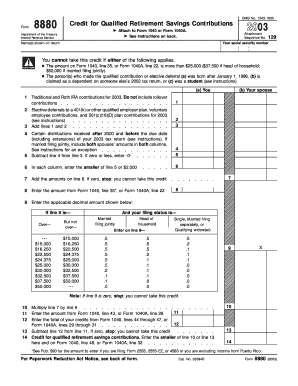
K. 2003 Attachment Sequence No. Name(s) shown on return 129 Your social security number You cannot take this credit if either of the following applies. The amount on Form 1040, line 35, or Form 1040A, line 22, is more than $25,000 ($37,500 if head of household; $50,000 if married filing jointly). The person(s) who made the qualified contribution or elective deferral (a) was born after January 1, 1986, (b) is claimed as a dependent on someone else s 2003 tax return, or (c) was a s.

How it works

  1. Open form

    Open form follow the instructions

  2. Easily sign form

    Easily sign the form with your finger

  3. Share form

    Send filled & signed form or save

How to fill out the IRS 8880 online

Filling out the IRS Form 8880, which is used to calculate the credit for qualified retirement savings contributions, can be straightforward with the right guidance. This guide will provide step-by-step instructions to help you complete the form accurately and efficiently.

Follow the steps to fill out the IRS 8880 online.

  1. Click 'Get Form' button to obtain the form and open it in the editor.
  2. Enter the name(s) shown on your tax return in the designated field at the top of the form.
  3. Input your social security number in the field provided. This is crucial for identification.
  4. Review the eligibility criteria, ensuring that neither you nor your spouse (if filing jointly) meets any of the exclusion clauses listed on the form.
  5. In Part I, line 1, record your contributions to traditional and Roth IRAs for the current tax year, excluding rollover contributions.
  6. On line 2, add any elective deferrals to a 401(k) or other qualified employer plans, including voluntary employee contributions and contributions to a 501(c)(18)(D) plan.
  7. Calculate the total of lines 1 and 2 and enter the sum on line 3.
  8. Report any distributions received after 2000 and before the due date of your tax return in line 4. Ensure to include only qualifying amounts.
  9. Subtract the amount on line 4 from line 3 and enter the result on line 5. If this amount is zero or lower, enter -0-.
  10. For line 6, enter the smaller value of line 5 or $2,000 in each column.
  11. Sum the total amounts from line 6 in line 7. If the total is zero, you are not eligible for the credit.
  12. On line 8, input the income amount from either Form 1040, line 35 or Form 1040A, line 22.
  13. Follow the instructions to enter the appropriate decimal multiplier on line 9 based on your income and filing status.
  14. Multiply the result from line 7 by the decimal from line 9 and write it on line 10.
  15. Report the total amount from Form 1040, line 43, or Form 1040A, line 28 in line 11.
  16. Enter your total credits from Form 1040 in line 12. Subtract line 12 from line 11.
  17. Finally, enter the smaller amount from line 10 or line 13 on line 14. This is your credit for qualified retirement savings contributions.
  18. Review all entries for accuracy, then save changes, download, print, or share the form as needed.

Start filing your IRS 8880 online today!

Get form

Experience a faster way to fill out and sign forms on the web. Access the most extensive library of templates available.

Related content

Credit for Qualified Retirement Savings...
Use Form 8880 to figure the amount, if any, of your retirement savings ... Also enter this...
Learn more
Form 8880, credit for qualified retirement savings...
Form 8880, credit for qualified retirement savings contributions. Online. Available...
Learn more
2016 Publication 560
Jan 26, 2017 — To take the credit, use Form 8880, Credit for Qualified Re tirement...
Learn more

Related links form

Unicef Personal History P11 1974 Ardmore Enterprises Bowel Movement Chart ASHA Clinical Swallowing Exam Besnard & Associates Insurance Sample Delivery Driver Agreement

Questions & Answers

Get answers to your most pressing questions about US Legal Forms API.

Contact support

TurboTax typically inquires about IRS Form 8889 T to assess your health savings account contributions, distinct from Form 8880, which focuses on retirement contributions. Clarifying your contributions across different accounts helps ensure you receive all eligible tax benefits. If you encounter confusion about these forms, reaching out to a tax professional or exploring resources like US Legal Forms can provide clarity and direction tailored to your specific situation.

TurboTax calculates the retirement savings contribution credit based on your contributions to eligible retirement accounts as reported on the IRS 8880. If you qualify, this credit can significantly reduce your tax liability, making retirement savings more affordable. Ensure that you enter your income and contribution details accurately, as TurboTax assesses eligibility for this credit based on these factors. Utilizing US Legal Forms can help you navigate both TurboTax and Form 8880 effectively, maximizing your benefits.

You can obtain Form 8880 directly from the IRS website or through various tax preparation software programs, including popular options like TurboTax. Simply search for IRS Form 8880 on the IRS site to download it, or visit your tax software’s resources to access it. Additionally, US Legal Forms offers easy access to various tax forms and useful tips on filling them out accurately. This makes obtaining and completing Form 8880 more straightforward for you.

Form 8880, known as the IRS 8880, applies to taxpayers who wish to claim the Saver's Credit. This form allows eligible individuals to report their contributions to qualified retirement accounts, thereby qualifying for a tax credit. To successfully complete the form, you must include information about your income, filing status, and the contributions made to your retirement accounts. Using US Legal Forms can simplify this process by providing guidance on necessary information and requirements.

To qualify for the Saver’s Credit on Form 8880, you must meet specific income requirements and have made contributions to a qualified retirement account. Typically, individuals and couples with adjusted gross income under certain thresholds are eligible. It’s advisable to review IRS guidelines or consult with a tax professional to ensure you meet the criteria.

To remove Form 8880 from your tax return, access your tax preparation software or physical paperwork. Most tax programs allow you to easily delete or hide the form if needed. If you are unsure whether to keep it or not, consult guidance from tax professionals or resources available through services like US Legal Forms.

If you see the retirement savings contribution credit in TurboTax, it likely means you've opted to contribute to an eligible retirement savings account. TurboTax helps identify this credit by analyzing your financial data, including contributions reported on the IRS 8880. If you're unsure why it's appearing, review your contributions to retirement funds over the tax year.

Form 8880 is used to claim the Retirement Savings Contribution Credit, also known as the Saver’s Credit. This credit is designed to encourage low- to moderate-income individuals to save for retirement. By correctly filling out the IRS 8880, eligible taxpayers can receive a credit that directly reduces their tax bill.

You can typically find Form 8880, the Saver’s Credit, on the IRS website or through various tax preparation platforms. Additionally, many tax services, including US Legal Forms, provide easy access to the form along with instructions for completion. This form is essential if you qualify for a credit for retirement contributions.

In H&R Block, deleting a form requires you to access your current return and find the specific form you wish to remove. Look for an option or button that allows you to delete. Clearing any unnecessary forms can simplify your tax process, especially when dealing with forms like the IRS 8880.

Get This Form Now!

Use professional pre-built templates to fill in and sign documents online faster. Get access to thousands of forms.
If you believe that this page should be taken down, please follow our DMCA take down processhere.

Industry-leading security and compliance

US Legal Forms protects your data by complying with industry-specific security standards.
  • In businnes since 1997
    25+ years providing professional legal documents.
  • Accredited business
    Guarantees that a business meets BBB accreditation standards in the US and Canada.
  • Secured by Braintree
    Validated Level 1 PCI DSS compliant payment gateway that accepts most major credit and debit card brands from across the globe.
Get IRS 8880
  • Adoption
  • Bankruptcy
  • Contractors
  • Divorce
  • Home Sales
  • Employment
  • Identity Theft
  • Incorporation
  • Landlord Tenant
  • Living Trust
  • Name Change
  • Personal Planning
  • Small Business
  • Wills & Estates
  • Packages A-Z
  • Affidavits
  • Bankruptcy
  • Bill of Sale
  • Corporate - LLC
  • Divorce
  • Employment
  • Identity Theft
  • Internet Technology
  • Landlord Tenant
  • Living Wills
  • Name Change
  • Power of Attorney
  • Real Estate
  • Small Estates
  • Wills
  • All Forms
  • Forms A-Z
  • Form Library
  • Legal Hub
  • About Us
  • Help Portal
  • Legal Resources
  • Blog
  • Affiliates
  • Contact Us
  • Delete My Account
  • Site Map
  • Industries
  • Forms in Spanish
  • Localized Forms
  • State-specific Forms
  • Forms Kit
  • Real Estate Handbook
  • All Guides
  • Notarize
  • Incorporation services
  • For Consumers
  • For Small Business
  • For Attorneys
  • USLegal
  • FormsPass
  • pdfFiller
  • signNow
  • altaFlow
  • DocHub
  • Instapage
Form Packages
  • Adoption
  • Bankruptcy
  • Contractors
  • Divorce
  • Home Sales
  • Employment
  • Identity Theft
  • Incorporation
  • Landlord Tenant
  • Living Trust
  • Name Change
  • Personal Planning
  • Small Business
  • Wills & Estates
  • Packages A-Z
Form Categories
  • Affidavits
  • Bankruptcy
  • Bill of Sale
  • Corporate - LLC
  • Divorce
  • Employment
  • Identity Theft
  • Internet Technology
  • Landlord Tenant
  • Living Wills
  • Name Change
  • Power of Attorney
  • Real Estate
  • Small Estates
  • Wills
  • All Forms
  • Forms A-Z
  • Form Library
Customer Service
  • Legal Hub
  • About Us
  • Help Portal
  • Legal Resources
  • Blog
  • Affiliates
  • Contact Us
  • Delete My Account
  • Site Map
  • Industries
  • Forms in Spanish
  • Localized Forms
  • State-specific Forms
  • Forms Kit
Legal Guides
  • Real Estate Handbook
  • All Guides
Prepared for you
  • Notarize
  • Incorporation services
Our Customers
  • For Consumers
  • For Small Business
  • For Attorneys
Our Sites
  • USLegal
  • FormsPass
  • pdfFiller
  • signNow
  • altaFlow
  • DocHub
  • Instapage
Social Media
Call us now toll free:
+1 833 426 79 33
As seen in:
© Copyright 1999-2026 airSlate Legal Forms, Inc. 3720 Flowood Dr, Flowood, Mississippi 39232
  • Your Privacy Choices
  • Terms of Service
  • Privacy Notice
  • Content Takedown Policy
  • Bug Bounty Program
IRS 8880
This form is available in several versions.
Select the version you need from the drop-down list below.
2024 IRS 8880
Select form
  • 2024 IRS 8880
  • 2022 IRS 8880
  • 2021 IRS 8880
  • 2020 IRS 8880
  • 2019 IRS 8880
  • 2018 IRS 8880
  • 2017 IRS 8880
  • 2016 IRS 8880
  • 2015 IRS 8880
  • 2003 IRS 8880
  • Form 880
Select form