Loading
Form preview
  • US Legal Forms
  • Other Templates
  • Industry Forms
  • Industry Employment Forms
  • Unicef Personal History P11 1974

Get Unicef Personal History P11 1974-2026

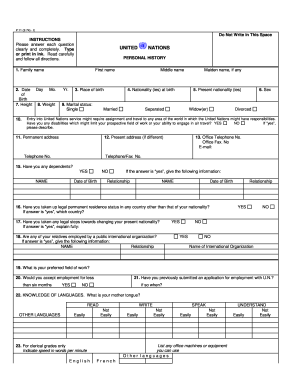
ORY First name 1. Family name 2. Date Day Mo. of Birth 7. Height 8. Weight 10. NATIONS Yr. 3. Place of birth 9. Marital status: Single Middle name Maiden name, if any 4. Nationality (ies) at birth Married 5. Present nationality (ies) Separated Widow(er) 6. Sex Divorced Entry into United Nations service might require assignment and travel to any area of the world in which the United Nations might have responsibilities. Have you any disabilities which might limit your prospective .

How it works

  1. Open form

    Open form follow the instructions

  2. Easily sign form

    Easily sign the form with your finger

  3. Share form

    Send filled & signed form or save

How to fill out the Unicef Personal History P11 online

The Unicef Personal History P11 is a crucial document that collects essential information about candidates applying for positions within the organization. Completing this document accurately ensures that your application is considered for relevant opportunities.

Follow the steps to successfully complete the form online.

  1. Click ‘Get Form’ button to obtain the form and open it in the editor.
  2. Start by filling in your personal information, including your first name, family name, and any middle or maiden names. Make sure to provide a complete response for full identification.
  3. Indicate your date of birth by providing the day, month, and year. Checking the accuracy of this information is essential as it may affect future employment considerations.
  4. Provide your place of birth and your nationality at birth, as well as your present nationality. Ensure you check for any discrepancies in your documentation.
  5. Select your marital status from the options provided, which include single, married, separated, divorced, and widow(er). This information is often needed for organizational records.
  6. Indicate your sex and note if you have any disabilities that may affect your work or travel. If yes, briefly describe these disabilities.
  7. Fill in your permanent and present addresses, including telephone and email contacts. This information is needed for any correspondence related to your application.
  8. Declare if you have any dependents and provide their names and dates of birth, if applicable. This is relevant for positions that might involve international travel or relocation.
  9. Answer questions regarding your legal residency status and your opportunity for employment with the U.N., ensuring all responses are complete and true.
  10. List your proficiency in languages, indicating your mother tongue and any additional languages, along with reading, writing, and speaking abilities.
  11. Detail your educational background, specifying each institution attended from university level to any formal training since age 14. Include titles of degrees and any distinctions obtained.
  12. Enumerate your professional societies and civic activities, as well as any significant publications you have written that are relevant to your application.
  13. Provide a comprehensive employment record, starting with your current or most recent position and working backward. Include details such as titles, employers, and responsibilities.
  14. Complete the references section with three individuals who can speak on your character and qualifications. Ensure they are not supervisors mentioned in your employment record.
  15. Finally, review your responses for accuracy and completeness. Once satisfied, you can save changes, download, print, or share the form as indicated.

Take the next step in your career by completing the Unicef Personal History P11 online today.

Get form

Experience a faster way to fill out and sign forms on the web. Access the most extensive library of templates available.
Get form

Related content

Junior Professional Officer (JPO) Emergency ......
If you wish to apply for multiple positions, please complete a Personal History Statement...
Learn more
p11new.doc
Please complete the form carefully, answering all mandatory sections fully and as...
Learn more
Casio Computer Co., Ltd.
Casio offers a wide array of products to make everyday life more convenient and enjoyable...
Learn more

Related links form

Enander Family Foundation Grant Application Energy Audit Data Collection Form Energy Express Activity Plan eNetLearning Mutations Worksheet

Questions & Answers

Get answers to your most pressing questions about US Legal Forms API.

Contact support

PHP in Inspira stands for Personal History Profile, which is vital for job applications within the UN system. This profile is essentially comparable to the Unicef Personal History P11, requiring candidates to provide detailed information about their backgrounds. It acts as your digital resume, ensuring that your skills and experiences are recorded accurately for recruitment processes.

The historical background of the United Nations dates back to its founding in 1945, in the aftermath of World War II, aimed at fostering international cooperation. Since then, it has played a pivotal role in peacekeeping, promoting human rights, and pursuing social progress globally. Understanding this history is vital for anyone completing a Unicef Personal History P11, as it contextualizes the work of the organization.

UNU P11 refers to a similar personal history form used by the United Nations University, also aimed at assessing candidates for various roles. Like the Unicef Personal History P11, it collects essential data on an applicant's qualifications and experiences. This ensures that the selection process remains transparent and competitive.

The profile of the United Nations encompasses its mission, goals, and the roles of its various agencies, including Unicef. Each profile highlights the organization's commitment to international development, peacekeeping, and humanitarian efforts. Understanding this framework helps candidates align their personal history with the UN's overarching goals, particularly when completing the Unicef Personal History P11.

The United Nations personal history profile is a structured document that outlines an individual's qualifications, work experience, and skills. It serves as a formal representation during the application process for UN positions. Understanding the significance of the Unicef Personal History P11 helps candidates create profiles that effectively showcase their capabilities to potential employers.

Filling out a personal history form requires attention to detail and organization. Start by gathering all necessary documents, including resumes and transcripts. Ensure that you accurately input all relevant information, such as jobs held, educational background, and personal achievements, emphasizing your experience in areas related to Unicef Personal History P11.

P11 in UNDP refers to a personal history form that candidates complete when applying for positions within the United Nations Development Programme. This form collects comprehensive information about the applicant's education, employment history, and relevant experience. It's crucial for the UN to assess how well candidates fit specific roles, including those related to Unicef Personal History P11.

PHP in a job application typically refers to a personal history profile, similar to the P11 in UNDP. This document encompasses an applicant's employment history, educational qualifications, and skills, serving as a key element of the application process. A well-structured PHP can significantly enhance your chances of making a good impression.

To fill out the P11 form effectively, start with your personal data, then include educational background, employment history, and relevant skills. Ensure that your entries are clear and concise, as this form is a vital aspect of your job application. Utilizing resources like the uslegalforms platform can simplify this process, guiding you through the specifics.

UNDP class 10 refers to a classification level within the United Nations Development Programme that establishes salary and benefits for specific positions. Being aware of this classification helps candidates understand their potential compensation and career trajectory within the organization. It plays a role in setting expectations during the hiring process.

Get This Form Now!

Use professional pre-built templates to fill in and sign documents online faster. Get access to thousands of forms.
Get form
If you believe that this page should be taken down, please follow our DMCA take down processhere.
Get Unicef Personal History P11
Get form
  • Adoption
  • Bankruptcy
  • Contractors
  • Divorce
  • Home Sales
  • Employment
  • Identity Theft
  • Incorporation
  • Landlord Tenant
  • Living Trust
  • Name Change
  • Personal Planning
  • Small Business
  • Wills & Estates
  • Packages A-Z
  • Affidavits
  • Bankruptcy
  • Bill of Sale
  • Corporate - LLC
  • Divorce
  • Employment
  • Identity Theft
  • Internet Technology
  • Landlord Tenant
  • Living Wills
  • Name Change
  • Power of Attorney
  • Real Estate
  • Small Estates
  • Wills
  • All Forms
  • Forms A-Z
  • Other Templates
  • Legal Hub
  • About Us
  • Help Portal
  • Legal Resources
  • Blog
  • Affiliates
  • Contact Us
  • Delete My Account
  • Site Map
  • Industries
  • Forms in Spanish
  • Localized Forms
  • State-specific Forms
  • Forms Kit
  • Real Estate Handbook
  • All Guides
  • Notarize
  • Incorporation services
  • For Consumers
  • For Small Business
  • For Attorneys
  • USLegal
  • FormsPass
  • pdfFiller
  • signNow
  • altaFlow
  • DocHub
  • Instapage
Form Packages
  • Adoption
  • Bankruptcy
  • Contractors
  • Divorce
  • Home Sales
  • Employment
  • Identity Theft
  • Incorporation
  • Landlord Tenant
  • Living Trust
  • Name Change
  • Personal Planning
  • Small Business
  • Wills & Estates
  • Packages A-Z
Form Categories
  • Affidavits
  • Bankruptcy
  • Bill of Sale
  • Corporate - LLC
  • Divorce
  • Employment
  • Identity Theft
  • Internet Technology
  • Landlord Tenant
  • Living Wills
  • Name Change
  • Power of Attorney
  • Real Estate
  • Small Estates
  • Wills
  • All Forms
  • Forms A-Z
  • Other Templates
Customer Service
  • Legal Hub
  • About Us
  • Help Portal
  • Legal Resources
  • Blog
  • Affiliates
  • Contact Us
  • Delete My Account
  • Site Map
  • Industries
  • Forms in Spanish
  • Localized Forms
  • State-specific Forms
  • Forms Kit
Legal Guides
  • Real Estate Handbook
  • All Guides
Prepared for you
  • Notarize
  • Incorporation services
Our Customers
  • For Consumers
  • For Small Business
  • For Attorneys
Our Sites
  • USLegal
  • FormsPass
  • pdfFiller
  • signNow
  • altaFlow
  • DocHub
  • Instapage
Social Media
Call us now toll free:
+1 833 426 79 33
As seen in:
© Copyright 1999-2026 airSlate Legal Forms, Inc. 17 Station Street, Ste. 203, Brookline, MA 02445
  • Your Privacy Choices
  • Terms of Service
  • Privacy Notice
  • Content Takedown Policy
  • Bug Bounty Program