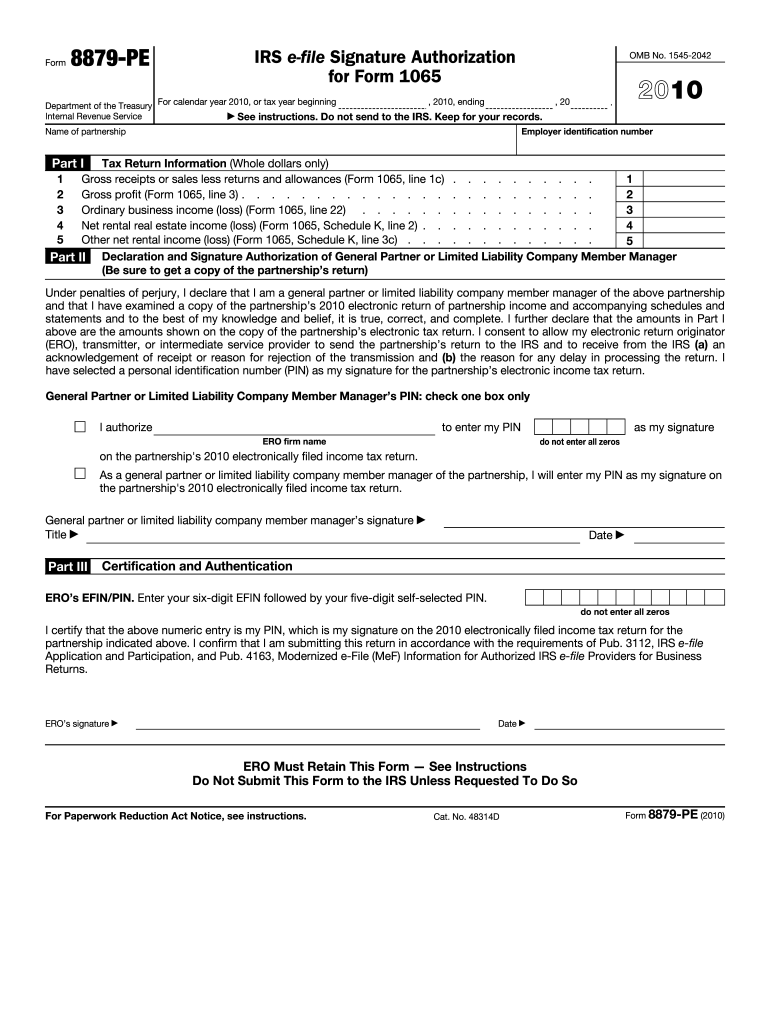
Line 1c) . . . . . . . . . . Gross profit (Form 1065, line 3) . . . . . . . . . . . . . . . . . . . . . . . . 2 Ordinary business income (loss) (Form 1065, line 22) . . . . . . . . . . . . . . . . 3 Net rental real estate income (loss) (Form 1065, Schedule K, line 2) . . . . . . . . . . . . 4 Other net rental income (loss) (Form 1065, Schedule K, line 3c) . . . . . . . . . . . . . 5 Part II Declaration and Signature Authorization of General Partner or Limited Liability Company Member Manager (Be.

Open form follow the instructions

Easily sign the form with your finger

Send filled & signed form or save
How to fill out the IRS 8879-PE online
Filling out the IRS 8879-PE form is an essential step for general partners or limited liability company member managers who intend to electronically sign their partnership's income tax return. This guide provides clear and concise instructions to help you complete the form accurately and efficiently.
Follow the steps to complete the form correctly.
- Click the ‘Get Form’ button to obtain the IRS 8879-PE form and open it in your editing interface.
- Enter the employer identification number and the name of the partnership at the top of the form.
- In Part I, input the tax return information using whole dollars only. Fill in the fields with the following details as applicable: gross receipts or sales, gross profit, ordinary business income or loss, net rental real estate income or loss, and other net rental income or loss, all obtained from the partnership's Form 1065.
- Proceed to Part II, where the general partner or limited liability company member manager must declare their authorization. They must confirm their title and sign in the designated area.
- Select one of the options regarding PIN submission: either authorize the electronic return originator (ERO) to enter the PIN on your behalf or enter it yourself.
- In Part III, enter the ERO’s EFIN followed by your self-selected PIN. Make sure the PIN does not consist of all zeros.
- Ensure that both the ERO and the general partner or limited liability company member manager sign and date the form where indicated.
- After completing the form, save your changes. You may then choose to download, print, or share the form as needed.
Complete your IRS 8879-PE form online to ensure timely processing of your partnership's tax return.
Experience a faster way to fill out and sign forms on the web. Access the most extensive library of templates available.
Related content
Jun 21, 2025 — Use this form when the general partner or limited liability company...
"IRS 8879 - PE Form 1-19-12" (2023). Transactional Matter Files. 65...
Feb 23, 2021 — The company is structured as a real estate investment trust, or REIT...
Get answers to your most pressing questions about US Legal Forms API.
What is a PE declaration?
A PE declaration is a statement used by partnerships to authenticate their electronic filing with the IRS. The IRS form 8879-PE serves as this declaration, allowing authorized individuals to confirm that submitted tax information is accurate. This step is vital for ensuring that your partnership meets IRS regulations while benefiting from electronic filing. By using the correct forms and declarations, you can streamline your tax-filing experience.
Do I really need to mail form 8453?
Yes, mailing form 8453 is often required as part of the e-filing process for partnerships. Though you can electronically submit your tax return, this form needs to be mailed to the IRS to authenticate the filing. It’s a crucial component in verifying that your tax return is legitimate. To streamline your process, consider using resources like USLegalForms to guide you through the necessary steps.
What is form 8453 PE used for?
Form 8453 PE is used by partnerships to provide a paper acknowledgment for electronically filed tax returns. This form contains necessary signatures that validate the submission of the partnership's tax information. While e-filing offers convenience, having form 8453 PE assists in maintaining compliance with IRS requirements. It's important to understand its purpose alongside the IRS 8879-PE to file correctly.
What is IRS form 8879 PE?
The IRS form 8879 PE is a specific version of the 8879 form tailored for partnerships. It enables them to electronically file their tax returns by authorizing their tax preparers. With IRS 8879-PE, partnerships can ensure their returns are submitted with proper authorization, streamlining their filing process. This form is essential for any partnership seeking a secure and efficient way to file their taxes.
What is form 8453 PE for?
Form 8453 PE serves as a declaration for partnership returns filed electronically. It verifies the accuracy and authenticity of the submitted return by providing essential signatures. This form helps confirm that the tax data filed by the partnership is legitimate. Utilizing the proper forms like 8453 PE, alongside the IRS 8879-PE, ensures your partnership's filing process is seamless and efficient.
What is the purpose of the 8453 form?
The purpose of the 8453 form is to provide a paper declaration for taxpayers filing electronically. It is used to authenticate the filing of a federal return and provides the IRS with necessary signatures when e-filing is not fully supported. Businesses must consider the proper form to ensure their tax returns are valid and meet IRS requirements. Thus, knowing when to use the 8453 form versus the IRS 8879-PE is crucial for compliance.
What is the difference between 8879 PE and 8453 PE?
The IRS 8879-PE is specifically designed for partnerships, allowing them to e-file their returns with authorization. In contrast, form 8453 PE is used for electronic submission of partnership returns and serves a different function. While both forms deal with electronic filing, the main difference lies in who can use them and their submission purposes. Understanding these differences helps ensure compliance in your filing.
What is the IRS form 8879 used for?
The IRS form 8879 is used for electronic filing of income tax returns. Specifically, it allows taxpayers to authorize their electronic return originators to submit their returns on their behalf. With the IRS 8879-PE, businesses can ensure their forms are filed accurately and timely. This form simplifies the filing process and enhances security.
What is form 8879 for IRS e-file?
Form 8879-PE for IRS e-file is the electronic signature authorization form specifically for partnerships. This form allows partners to approve the electronic submission of their tax returns, ensuring compliance with IRS regulations. Using IRS 8879-PE makes the filing process efficient and secure, benefiting both the partnership and its partners.
What is the IRS code 8453?
The IRS code 8453 refers to the declaration form used for e-filed returns that require additional documentation. While the 8879-PE authorizes e-filing specifically for partnerships, the code 8453 acts as a declaration for various types of e-filed returns. Understanding both forms can enhance your e-filing experience and ensure all necessary steps are taken.
Use professional pre-built templates to fill in and sign documents online faster. Get access to thousands of forms.
If you believe that this page should be taken down, please follow our DMCA take down process here.
This form is available in several versions. Select the version you need from the drop-down list below.