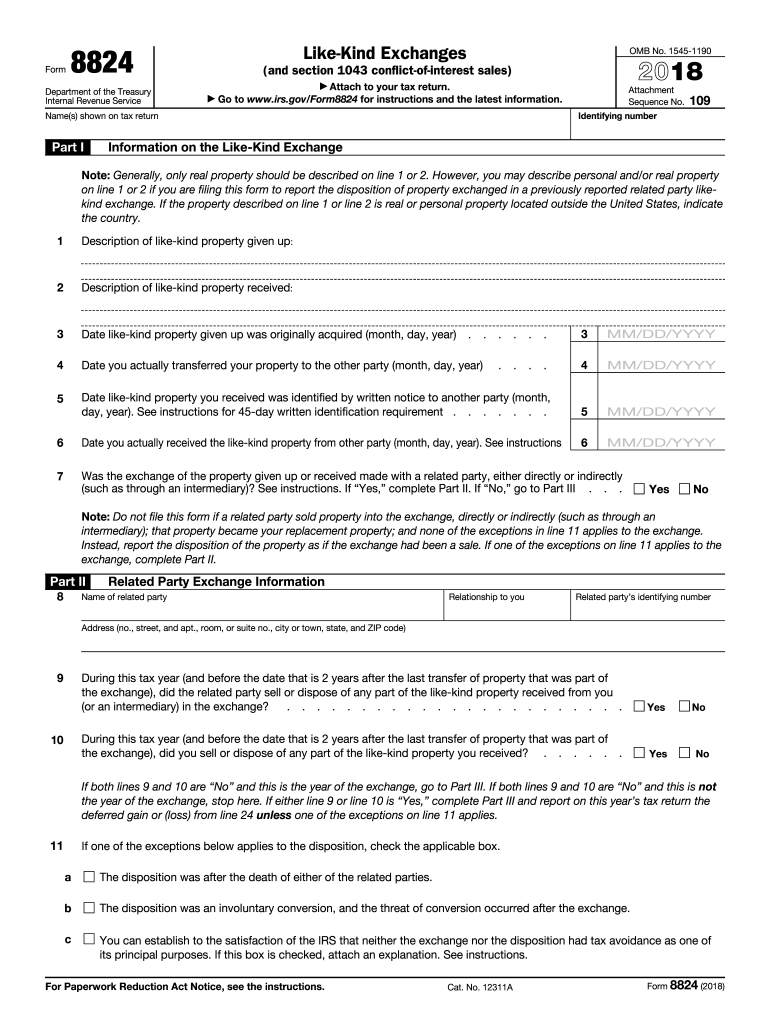
Ferred gain or (loss) from line 24 unless one of the exceptions on line 11 applies. 11 If one of the exceptions below applies to the disposition, check the applicable box. a The disposition was after the death of either of the related parties. b The disposition was an involuntary conversion, and the threat of conversion occurred after the exchange. c You can establish to the satisfaction of the IRS that neither the exchange nor the disposition had tax avoidance as one of its principal pur.
Loading

Open form follow the instructions

Easily sign the form with your finger

Send filled & signed form or save
How to fill out the IRS 8824 online
Filling out the IRS 8824 form can be a straightforward process when you have clear guidance. This guide will provide step-by-step instructions to help you complete the Like-Kind Exchange form accurately online.
Follow the steps to effectively complete the IRS 8824 form.
- Click ‘Get Form’ button to access the form and open it in the designated editor.
- Enter your identifying number and the names shown on your tax return at the top of the form.
- In Part I, provide detailed descriptions of the like-kind property given up and received in lines 1 and 2. If applicable, indicate the country where the property is located for properties outside the United States.
- Fill in the dates for when the like-kind property was originally acquired (line 3), the date it was actually transferred to the other party (line 4), and the date you received the property (line 6). Ensure all dates are formatted as month/day/year.
- Answer the question about whether the exchange involved a related party (line 7). Depending on your answer, you may need to complete Part II.
- If applicable, in Part II, provide the name, relationship, identifying number, and address of the related party. Complete the subsequent questions regarding the sale or disposal of the like-kind property as needed.
- Proceed to Part III to report the realized gain or loss and any recognized gain. Fill in lines 12 through 25 as they apply to your exchange, ensuring you calculate all values accurately according to the instructions.
- If you are reporting deferrals related to conflict-of-interest sales, complete Part IV with the required information regarding your divested and replacement property.
- Once all sections of the form are completed, save your changes, and prepare to download, print, or share the form as necessary for your tax filing.
Start filling out your IRS 8824 form online today!
Experience a faster way to fill out and sign forms on the web. Access the most extensive library of templates available.
Related content
Jan 21, 2025 — Use Parts I, II, and III of Form 8824 to report each exchange of business...
... IRS.gov/Form8824. Use Parts I, II, and III of Form 8824 to report each exchange of...
Dec 21, 2011 — For more information, see Form 8824. poses. Leasehold improvements. If a...
Get answers to your most pressing questions about US Legal Forms API.
Where do I enter my 1031 exchange in TurboTax?
In TurboTax, you will find prompts to enter your 1031 exchange information, specifically asking about the like-kind exchange on the tax return. You will need to follow their guided process for entering details from Form 8824. TurboTax simplifies this by providing specific fields to report your exchanged properties and gain. If you encounter any difficulties, US Legal Forms offers additional resources to assist you.
Do you have to disclose a 1031 exchange?
Yes, you must disclose a 1031 exchange to the IRS by filing Form 8824. This disclosure is essential for maintaining your tax-deferral status on the exchange. Not reporting the exchange could lead to penalties and the possibility of immediate taxation on gains. Ensure that you understand the disclosure requirements to stay compliant.
How do I show a 1031 exchange on my tax return?
To show a 1031 exchange on your tax return, you must complete Form 8824 and attach it to your tax return. This form outlines the details of the exchange, including the properties involved and the gain realized. Filing correctly ensures the IRS recognizes your exchange and grants you tax deferral. If you need assistance with this process, consider the comprehensive tools available on the US Legal Forms platform.
What happens if you don't file Form 8824?
Failing to file Form 8824 can lead to IRS penalties and you may lose tax benefits associated with your 1031 exchange. The IRS uses this form to track like-kind exchanges and ensure compliance. Without it, you risk paying taxes on gains that should be tax-deferred. Therefore, filing the form is essential for maintaining your tax breaks.
Do I need to file form 4797 for 1031 exchange?
You typically need to file Form 4797 when reporting a 1031 exchange, especially if you're selling property used in a trade or business. This form helps you report gains from the exchange. It’s crucial to complete it accurately to avoid issues with the IRS. You should consult with a tax professional for specific guidance tailored to your situation.
Do like-kind exchanges get reported on 4797?
Yes, like-kind exchanges are reported on IRS Form 4797, particularly if there is a gain involved in the exchange. You would typically report the results of Form 8824 on this form to capture the details related to the sale of business property. It's important to keep your records organized to simplify this process.
What are the IRS rules for a 1031 exchange?
IRS rules for a 1031 exchange stipulate that properties involved must be of like-kind and held for investment or business purposes. There are specific time frames to follow; you must identify a replacement property within 45 days and complete the exchange within 180 days. Following these rules is essential to take advantage of the tax deferment benefits.
Who files form 8824?
Form 8824 is filed by individuals or entities that have completed a like-kind exchange under the IRS rules. If you have exchanged real estate properties to defer capital gains taxes, you must submit this form alongside your tax return. Ensuring that this form is filed correctly helps maintain compliance with IRS regulations.
How do I report a like-kind exchange?
You can report a like-kind exchange by filling out IRS Form 8824. This form requires you to provide specific information about both the relinquished and acquired properties, including dates and values associated with the transactions. Completing this form correctly is crucial for qualifying the exchange and deferring taxes.
Where do you report a 1031 exchange?
You report a 1031 exchange on IRS Form 8824, which outlines the details of the exchange and ensures that you can defer taxes on any capital gains. It helps document the transaction properly to confirm that it meets IRS criteria. It's important to provide complete and accurate information to avoid penalties or audits.
Use professional pre-built templates to fill in and sign documents online faster. Get access to thousands of forms.
If you believe that this page should be taken down, please follow our DMCA take down process here.
This form is available in several versions. Select the version you need from the drop-down list below.