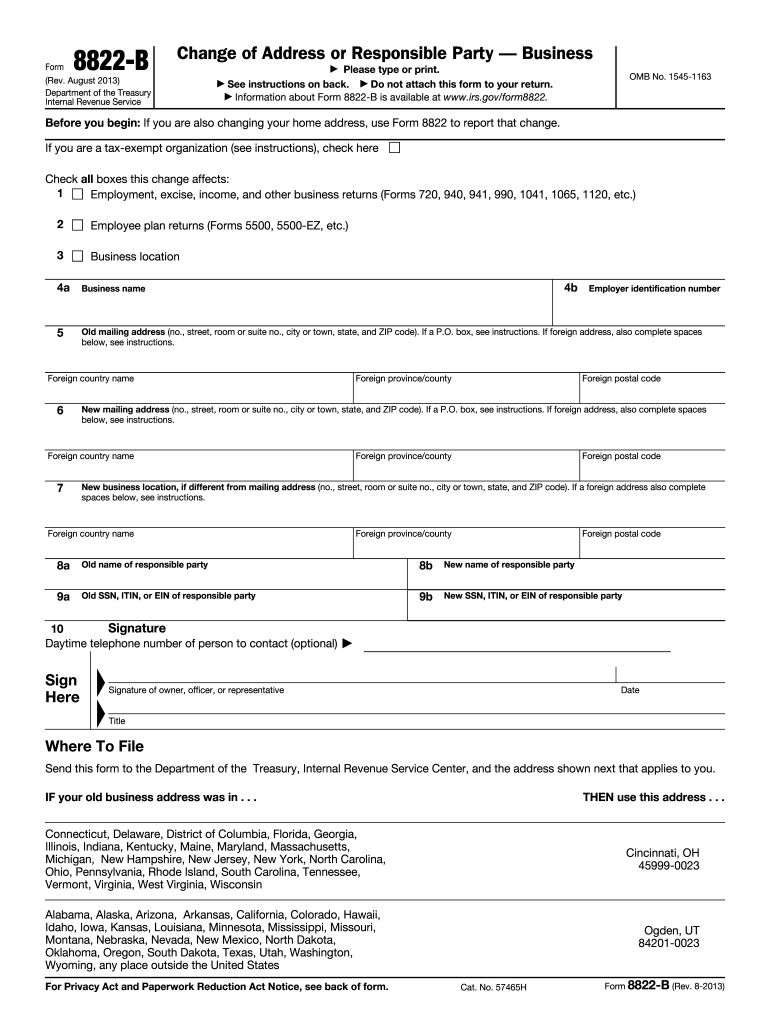
Ge to its responsible party. Form 8822-B must be filed within 60 days of the change. If the change in the identity of your responsible party occurred before 2014, and you have not previously notified the IRS of the change, file Form 8822-B before March 1, 2014, reporting only the most recent change. Complete Form 8822-B as appropriate; use applicable boxes 8a through 9b to report any changes to the identity of your responsible party. See Responsible Party, later, for more information. Enter the.

Open form follow the instructions

Easily sign the form with your finger

Send filled & signed form or save
How to fill out the IRS 8822-B online
Filling out the IRS 8822-B form online is a vital step in updating your business's address or responsible party information. This guide provides clear and comprehensive instructions tailored for users at all experience levels.
Follow the steps to fill out the IRS 8822-B online effectively.
- Press the ‘Get Form’ button to obtain the IRS 8822-B form and open it for editing.
- Indicate if you are changing your business mailing address, business location, or responsible party by checking the appropriate boxes provided.
- Fill in the old mailing address, ensuring to include the complete street address, city, state, and ZIP code. If applicable, follow the instructions for a P.O. box or foreign address.
- Enter your new mailing address in the specified fields, again ensuring that all required information is accurately provided.
- If using a foreign address, complete all relevant sections, including foreign country name and postal code.
- If your business location differs from the mailing address, provide the new business location information, adhering to the same format as the mailing addresses.
- Complete the section regarding the responsible party by entering both the old and new names and Social Security Number (SSN), Individual Taxpayer Identification Number (ITIN), or Employer Identification Number (EIN) as required.
- Sign the form, indicating the signer's title, and include a daytime telephone number for the contact person if desired.
- Review the form for accuracy and completeness before saving changes.
- Once all information is verified, download, print, or share the completed form as needed.
Complete your IRS 8822-B form online today to ensure your information is current.
Experience a faster way to fill out and sign forms on the web. Access the most extensive library of templates available.
Related content
Use Form 8822-B to notify the Internal. Revenue Service if you changed your business...
Form 8822 is used to notify the IRS of a change in your home mailing address, which can...
Jan 31, 2012 — 8822-B, Change of take into account any tax law changes...
Get answers to your most pressing questions about US Legal Forms API.
Can you file form 8822-B electronically?
As of now, IRS form 8822-B cannot be filed electronically; it must be submitted by mail. However, using services like US Legal Forms can simplify the process for you. They provide guidance and resources to help you complete and send your form correctly.
Is IRS form 8822 necessary?
While it may seem like just a form, filing IRS form 8822-B is necessary for maintaining accurate records with the IRS. It prevents confusion regarding your business information and ensures you receive important tax notices. Skipping this step can lead to complications in your tax filings.
Who must file form 8822-B?
Any business that changes its address or ownership must file form 8822-B. This includes sole proprietors, partnerships, and corporations. Filing this form ensures the IRS has the correct information for tax reporting and communications.
How do I notify the IRS of an address change?
To notify the IRS of an address change, simply complete and submit form 8822-B. This form allows you to officially inform the IRS about your new address. Make sure to fill it out accurately to prevent any delays in updating your records.
How will the IRS know I changed my address?
The IRS will know you changed your address when you submit form 8822-B. This form serves as your official notification to update their records. Keeping your address current is important to receive necessary correspondence and tax notices.
What is form 8822-B used for?
Form 8822-B is primarily used for informing the IRS about a change in business address or ownership. This form ensures that your business information stays current, which is crucial for tax purposes. By filing it, you maintain the integrity of your business records.
How do I notify the IRS of a business change of ownership?
To notify the IRS of a business change of ownership, you should file form 8822-B. This form helps the IRS update its records to reflect the new ownership status. It is essential to provide accurate details to avoid any complications.
How long does it take the IRS to process form 8822-B?
Typically, the IRS takes about four to six weeks to process form 8822-B. However, processing times can vary depending on their workload and the time of year. To ensure everything goes smoothly, make sure you fill out the form correctly and submit it on time.
What is the easiest way to change your address with the IRS?
The simplest way to change your address with the IRS is by submitting form 8822-B. Ensure you complete the form accurately and submit it to the IRS via mail. For added convenience and to avoid errors, consider using uslegalforms for guidance on filling out and submitting the form efficiently.
Can you file form 8822 b electronically?
Unfortunately, you cannot file form 8822-B electronically at this time. This form requires the traditional method of printing and mailing. It is beneficial to stay updated on any changes to IRS protocols, as electronic filing of this form could be introduced in the future.
Use professional pre-built templates to fill in and sign documents online faster. Get access to thousands of forms.
If you believe that this page should be taken down, please follow our DMCA take down process here.
This form is available in several versions. Select the version you need from the drop-down list below.