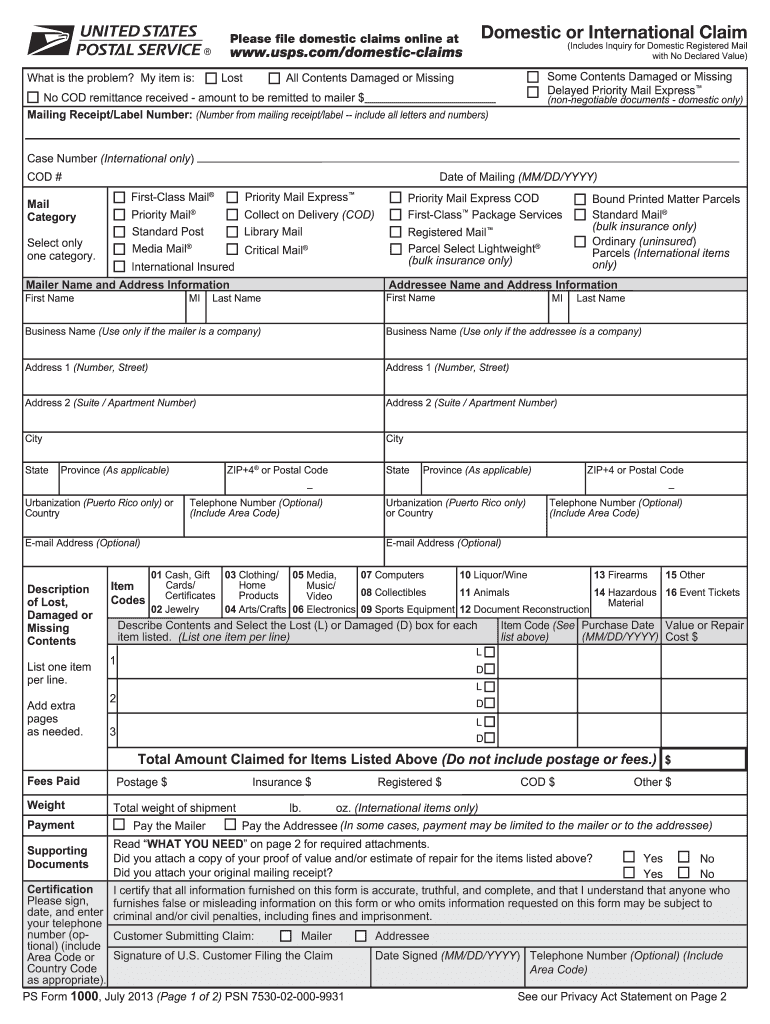
M? My item is: Some Contents Damaged or Missing Delayed Priority Mail Express™ All Contents Damaged or Missing No COD remittance received - amount to be remitted to mailer $ Mailing Receipt/Label Number: (Number from mailing receipt/label -- include all letters and numbers) (non-negotiable documents - domestic only) Case Number (International only) COD # Date of Mailing (MM/DD/YYYY) First-Class Mail® Priority Mail Express™ Priority Mail Standard Post Media Mail® Mail Category Col.

Open form follow the instructions

Easily sign the form with your finger

Send filled & signed form or save
How to fill out the USPS PS 1000 online
Filing a claim with the USPS using the PS 1000 form is an important step in addressing issues related to lost, damaged, or missing mail. This guide provides clear and supportive instructions to help you complete the form accurately and efficiently online.
Follow the steps to fill out the USPS PS 1000 online.
- Press the ‘Get Form’ button to access the USPS PS 1000 form and open it in your preferred editing platform.
- Begin by choosing the appropriate option for your claim type: Domestic Claims or International Claims. This can include details like damaged contents or missing items.
- Fill out the mailing receipt/label number, ensuring all letters and numbers are included for accurate identification.
- Select the category that applies to your item, such as Priority Mail Express or First-Class Mail, and indicate if it is for domestic or international use.
- Enter your name and address information in the designated fields, making sure to include correct spelling and contact details.
- Provide the addressee's information as well, making sure each field is filled out accurately, including their address and any optional contact details.
- Describe the lost, damaged, or missing contents by listing one item per line. Use item codes from the provided list to easily categorize your items.
- Specify the details of each item, indicating if it is lost or damaged, and include the purchase date and value of each.
- Complete the total amount claimed for the items listed and include any fees paid related to the claim.
- Review the certification section and sign to affirm that all information provided is accurate, then enter the date signed and include any optional contact details.
- Finally, save your changes, download the filled form for your records, and proceed to submit it through the appropriate channels as outlined.
Complete your USPS PS 1000 claim online today for a streamlined process.
Experience a faster way to fill out and sign forms on the web. Access the most extensive library of templates available.
Related content
2 Claims Filed by Mail. Customers may file a claim by completing a Form 1000 and mailing...
Jul 13, 2025 — 500.01 to 1,000 (max. amount $1,000). 3.60. Postal military money...
Aug 26, 2011 — Maximum Order Quantity: 1000. Bulk Pack Quantity: 1000. Quick Pick...
Get answers to your most pressing questions about US Legal Forms API.
How to file a claim for USPS ground advantage?
Filing a claim for USPS Ground Advantage requires you to gather necessary documentation such as receipts and tracking information. You can initiate the claim process through the USPS website, where the USPS PS 1000 guidelines offer detailed instructions. If you need assistance with the claim process, services like US Legal Forms can help provide clarity and guide you through the steps.
How do I get a truck contract with the USPS?
To obtain a truck contract with the USPS, you need to meet their contractor qualifications and complete the bidding process. Research the USPS PS 1000 guidelines, which explain the contract specifications clearly. Working with a platform like US Legal Forms can provide you with the necessary forms and legal advice to increase your chances of success.
How to become a USPS authorized shipping center?
Becoming a USPS authorized shipping center involves meeting specific criteria set by USPS, including having appropriate facilities and resources. Start by reviewing the USPS PS 1000 requirements, which detail the application process and necessary documentation. Engaging with teams that can guide you through compliance and regulations can streamline your journey.
How do I get USPS government contracts?
To secure USPS government contracts, you should start by visiting the USPS website where they list current opportunities. You need to register as a vendor at the System for Award Management (SAM) and ensure your business qualifies under the USPS PS 1000 guidelines. Additionally, you may consider utilizing platforms like US Legal Forms to help navigate the paperwork and requirements involved in the application process.
What happens when you make a claim with USPS?
When you make a claim with USPS, you initiate a process that begins with your submission through their claims portal. Your claim will then undergo review based on the USPS PS 1000 criteria to assess its validity. You will receive updates as USPS processes the claim, typically within a few days. Understanding this process can help you manage expectations and prepare any additional information if requested.
Where does USPS refund go?
When you receive a USPS refund, it typically returns to the original payment method you used for the transaction. If you purchased your postage through a third-party provider or via an online tool, refunds might process differently. Always check your email for confirmation about the status of your refund in accordance with the USPS PS 1000 guidelines. It's essential to keep track of your claims for timely follow-up.
How to win a USPS insurance claim?
To win a USPS insurance claim, gather all relevant documentation, such as receipts and tracking information. Submit your claim through the USPS claims portal, including details about the item and its value. Ensure you follow the guidelines outlined in the USPS PS 1000, as this can expedite the review process. By staying organized and providing clear evidence, you enhance your chances of a favorable outcome.
How do I fill out a USPS return receipt?
Filling out a USPS return receipt is straightforward. Begin by obtaining the USPS PS 1000 return receipt form at your local post office or online. Complete the form with the recipient's name and address, and attach it to your mail. After delivery, the receipt will be returned to you as proof of delivery, making it an essential component of your mailing process.
How do I fill out a USPS certified mail form?
When you need to fill out a USPS certified mail form, first acquire the USPS PS 1000 form from the USPS website or your local post office. Clearly write the recipient's name and address, and don’t forget to include your return address. Affix the certified mail sticker to your envelope, ensuring it is clearly visible. Finally, retain the receipt for tracking purposes.
How do I fill out a USPS claim form?
To complete a USPS claim form, you will need to access the USPS PS 1000 form online. Fill in sections that ask for the tracking number, your details, and a description of the issue. Make sure to provide any necessary proof, such as receipts or photos, to support your claim. Finally, submit your claim online or print it out and mail it to USPS.
Use professional pre-built templates to fill in and sign documents online faster. Get access to thousands of forms.
If you believe that this page should be taken down, please follow our DMCA take down process here.
This form is available in several versions. Select the version you need from the drop-down list below.