N a file formatted according to the specifications in Pub. 1220. ! For Privacy Act and Paperwork Reduction Act Notice, see page 2. On paper Form 8809. Mail the form to the address shown in Where to file, later, or fax it to 1-877-477-0572 (toll free). You are encouraged to submit your request via the online fill-in form. Where to file. Send Form 8809 to: Internal Revenue Service Attn: Extension of Time Coordinator 240 Murall Drive, Mail Stop 4360 Kearneysville, WV 25430 Need help? If.
Loading

Open form follow the instructions

Easily sign the form with your finger

Send filled & signed form or save
How to fill out the IRS 8809 online
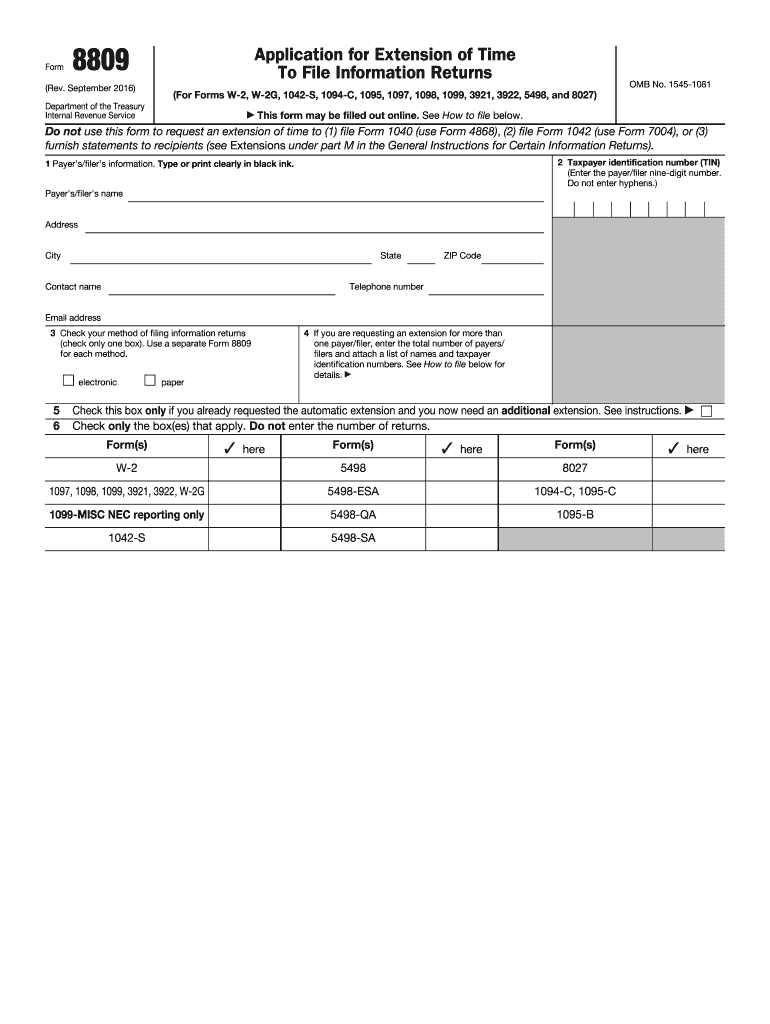
Filing an extension for information returns can be essential for accurate reporting. This guide will assist you in filling out the IRS 8809 form online, ensuring you understand each component and step required for smooth processing.
Follow the steps to successfully complete the IRS 8809 online form.
- Click ‘Get Form’ button to obtain the form and open it in the editor.
- Begin by entering the payer's/filer's information in the designated fields. This includes providing the name, address, city, state, ZIP Code, contact name, telephone number, and email address clearly.
- Enter the taxpayer identification number, which is the nine-digit number without hyphens.
- Check the appropriate method of filing for the information returns by selecting either 'electronic' or 'paper'. Remember to use a separate Form 8809 for each method if applicable.
- If requesting an extension for multiple payers/filers, enter the total number and attach a list with the names and taxpayer identification numbers.
- If you have previously requested an automatic extension, check the corresponding box only if you need an additional extension.
- For certain forms, provide a detailed explanation for your extension request, ensuring to attach any additional sheets if necessary.
- Affix your signature, if required, and indicate the date and title. Remember that no signature is needed for the automatic 30-day extension.
- Review all information for accuracy, then save changes, download, or print the completed form as needed.
Start completing your IRS 8809 form online today to ensure timely filing.
Experience a faster way to fill out and sign forms on the web. Access the most extensive library of templates available.
Related content
Jun 21, 2025 — You can file Form 8809 online by completing a fill-in Form 8809 through...
Jul 27, 2023 — IRS Form 720, Quarterly Federal Excise Tax Return. Primary. IRS Form...
May 2, 2017 — You may request one 30-day extension to file Form W-2 by submitting a...
Get answers to your most pressing questions about US Legal Forms API.
Does form 8809 need to be signed?
Form 8809 does not require a signature when submitted electronically. However, if you choose to file a paper version, ensure you sign the form before submitting it to the IRS. Keep in mind that the form is used to request an extension for filing information returns. For more clarity on the submission process, consider using US Legal Forms to access detailed instructions and resources.
How to properly fill out a W9 form?
To properly fill out a W9 form, ensure you write your name and business name accurately in the designated fields. Enter your correct address and your taxpayer identification number, whether it's your Social Security number or your EIN. It's also essential to sign and date the form, affirming the accuracy of the information. Platforms like US Legal Forms provide useful tips to ensure you get it right.
How do you fill out a W9 step by step?
To fill out a W9 form, start by entering your name and business name, if applicable, in the first two lines. Next, complete the address section, followed by your taxpayer identification number, which can be your Social Security number or Employer Identification Number. Finally, sign and date the form, confirming the information provided is accurate. For extra support, US Legal Forms offers detailed instructions that can guide you through each step.
Is a W9 hard to fill out?
Filling out a W9 form is generally straightforward, but it requires attention to detail. You need to provide accurate information such as your name, business name, address, and tax identification number. While some may find IRS forms complex, platforms like US Legal Forms simplify the process with guidance and templates that ensure you fill it out correctly.
How do I file form 8809?
To file Form 8809, you must submit the form electronically through the IRS e-file system or send a paper form to the address specified in the instructions. It is vital to file this form to request an extension of time to file information returns, including Forms 1099 and W2. By using trusted platforms like US Legal Forms, you can easily access the necessary forms and guidelines for your filing needs.
Should I put 0 or 1 on W9?
When filling out a W9 form, the number you put in box 3 depends on your tax classification. If you are an individual or a sole proprietor, you typically enter a '1' for an individual. However, if you are a corporation, partnership, or another type of entity, it may be more suitable to place a '0'. Understanding these nuances helps ensure accurate tax reporting.
Does the IRS usually accept an Offer in Compromise?
The IRS does accept Offers in Compromise, but only under specific conditions. The agency evaluates offers based on your financial situation to ensure they are reasonable and achievable. Being thorough and accurate in submitting your Offer in Compromise may improve your chances of acceptance.
How to stop IRS from taking tax returns for child support?
To prevent the IRS from taking your tax return for child support, you need to address the underlying child support obligation. Communicating with the child support agency can often lead to a resolution, such as placing a hold on your tax refund to cover support payments. It’s advisable to consult a legal professional or a tax advisor who can guide you on this issue.
What is the minimum payment the IRS will accept?
The IRS generally requires that any accepted Offer in Compromise include a minimum payment that reflects your disposable income. This minimum amount is calculated based on your monthly income minus necessary living expenses. Providing accurate financial documentation is essential to ensure that your proposed payment aligns with IRS requirements.
Does the IRS forgive debt after 10 years?
Yes, the IRS can forgive tax debt after a period of ten years, known as the Collection Statute Expiration Date. This timeframe usually starts from the date the IRS assessed your tax liability. However, some factors can affect this timeline, so consider consulting a tax professional to understand your specific situation concerning the IRS 8809.
Use professional pre-built templates to fill in and sign documents online faster. Get access to thousands of forms.
If you believe that this page should be taken down, please follow our DMCA take down process here.
This form is available in several versions. Select the version you need from the drop-down list below.