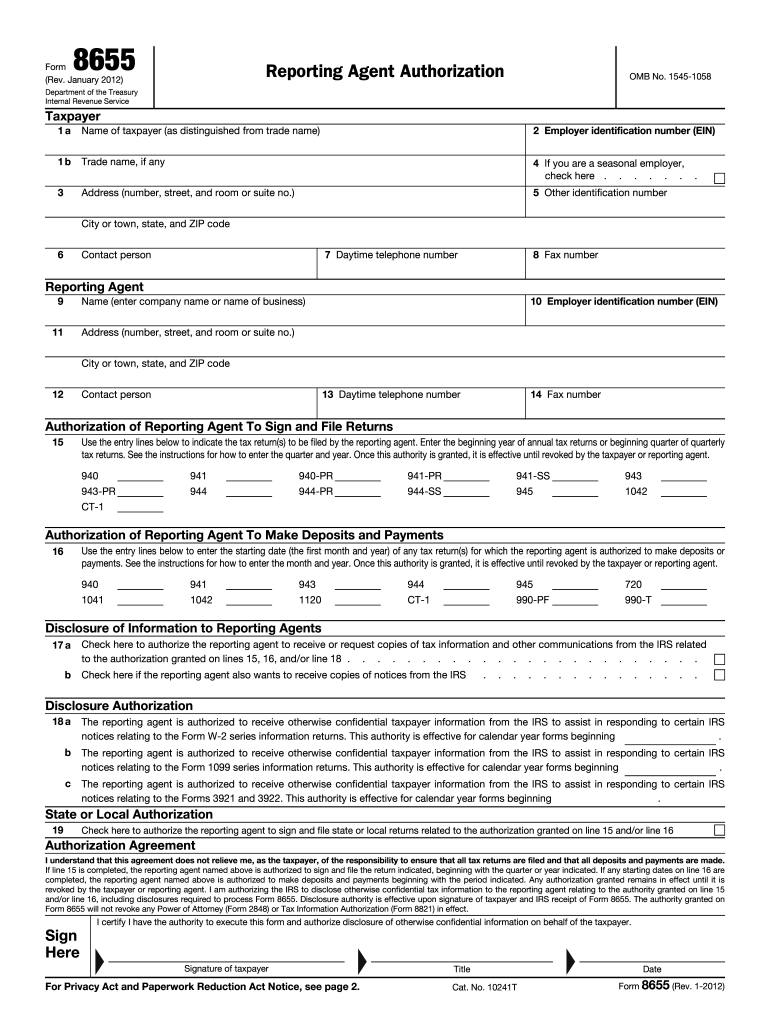
Led and that all deposits and payments are made. If line 15 is completed, the reporting agent named above is authorized to sign and file the return indicated, beginning with the quarter or year indicated. If any starting dates on line 16 are completed, the reporting agent named above is authorized to make deposits and payments beginning with the period indicated. Any authorization granted remains in effect until it is revoked by the taxpayer or reporting agent. I am authorizing the IRS to disclo.

Open form follow the instructions

Easily sign the form with your finger

Send filled & signed form or save
How to fill out the IRS 8655 online
This guide provides clear and detailed instructions on how to complete the IRS Form 8655, which is used to authorize a reporting agent for certain tax-related tasks. Follow these steps to ensure accurate and efficient online submission.
Follow the steps to successfully complete the IRS 8655 form online.
- Click ‘Get Form’ button to obtain the form and open it in the editor.
- In the taxpayer section, input the name of the taxpayer in line 1a, ensuring it is distinct from any trade name. Enter the Employer Identification Number (EIN) in line 2 and any trade name in line 1b if applicable.
- Provide the full address, including the number, street, and room or suite number on line 3, followed by the city or town, state, and ZIP code.
- Input the contact information, including the daytime telephone number in line 7 and fax number in line 8. Designate a contact person if necessary.
- Next, in the reporting agent section, fill in the reporting agent's name and EIN in lines 10 and 11 respectively. Provide the address details in line 11, including city or town, state, and ZIP code.
- Continue to enter the reporting agent’s contact information in lines 13 and 14, including the daytime telephone number and fax number.
- In section 15, specify the tax return(s) the reporting agent is authorized to file. Follow the format guidelines provided: enter the year in 'YYYY' format for annual returns, and 'MM/YYYY' for quarterly returns.
- For section 16, enter the first month and year of tax returns for which the reporting agent is authorized to make deposits and payments.
- In section 17, check the appropriate boxes to authorize the reporting agent to receive or request copies of tax information or notices from the IRS.
- Complete the disclosure authorization sections (lines 18a, 18b, and 18c) as applicable, indicating the periods for which the reporting agent can access confidential taxpayer information.
- In section 19, check the box if the reporting agent is authorized to sign and file state or local returns.
- Finally, sign and date the form where indicated, certifying your authority to execute this form. Ensure all required information is completed before submission.
- Once completed, you can save the changes, download the form, and print or share it as required.
Complete your IRS 8655 form online with confidence and efficiency today.
Experience a faster way to fill out and sign forms on the web. Access the most extensive library of templates available.
Related content
Form 8655 is used to authorize a reporting agent to sign and file tax returns, make...
... 8655] Removal of Final and Temporary Regulations AGENCY: Internal Revenue Service...
8655 submitted to IRS for processing. 2.4.5 94x OnLine Filing Provider. A 94x OnLine...
Get answers to your most pressing questions about US Legal Forms API.
How do I file an IRS whistleblower complaint?
To file an IRS whistleblower complaint, you need to submit Form 211, which is different from IRS 8655. This form allows individuals to report information regarding tax violations anonymously. Be sure to provide comprehensive details to support your claim. If you need assistance in understanding the requirements, platforms like uslegalforms can guide you through the filing process effectively.
Can form 8655 be signed electronically?
Indeed, IRS form 8655 can be signed electronically when you submit it through an authorized e-filing platform. This offers a convenient way to finalize your submission without the need for physical paperwork. Just ensure you adhere to the guidelines provided by the e-filing service. If you have any questions about the process, uslegalforms can provide additional support to clarify your doubts.
How do I check the status of my form 8655?
To check the status of your IRS 8655, you can visit the IRS website and utilize their online tools. You may need to enter specific identification details to access your status. Alternatively, consider calling the IRS directly for updates. Platforms like uslegalforms offer insights and tips on how to monitor the status of your form effectively.
Can IRS form 8655 be signed electronically?
Yes, IRS form 8655 can be signed electronically if you are filing it through an authorized e-filing service. Electronic signatures are valid and recognized by the IRS when properly processed. Ensure that you follow the e-filing service's instructions for signing IRS 8655 electronically. Utilizing a service like uslegalforms can assist you in this process, making it simpler to comply with IRS requirements.
What is the IRS form 8655 used for?
IRS form 8655, also known as the Reporting Agent Authorization, allows a business to authorize a third-party agent to handle tax-related matters on its behalf. This can simplify tax administration by directing the agent to file returns and make payments. Organizations that frequently engage in complex tax situations benefit greatly from using IRS 8655. Understanding its importance can save you time and ensure compliance.
How long does it take IRS to process 8655?
IRS processing of form 8655 usually takes around four to six weeks. This timeline can be affected by the volume of submissions the IRS is handling. Therefore, it’s wise to submit IRS 8655 as early as possible, especially during peak times. If you need assistance, platforms like uslegalforms can help you navigate the filing process efficiently.
How long does it take the IRS to go from processing to approved?
The time from processing to approval of IRS 8655 can vary, but generally, it takes about six to eight weeks. However, delays can occur during peak filing seasons or if there are issues with your submission. To ensure a smoother process, make sure all information on IRS 8655 is complete and accurate. Keeping track of your submission through the IRS portal can give you updates on your status.
How to submit 8655 to IRS?
To submit IRS 8655, you need to complete the form accurately and ensure you have all necessary information. You can file it electronically through the IRS e-file system or send it by mail to the appropriate IRS address. If you choose to mail it, consider using a trackable service for peace of mind. Using a platform like uslegalforms can simplify this process by providing guidance and templates.
What evidence does the IRS use for whistleblowers?
The IRS relies on a variety of evidence provided by whistleblowers, such as documentation, records, and other information relevant to tax fraud. Your submission should ideally include as much detail as possible to support your claim. This robust evidence helps the IRS take necessary actions and ensures that your tip is taken seriously. Consider utilizing tools from US Legal Forms to strengthen your submissions with well-organized documentation.
Who is eligible for a whistleblower?
Eligibility for the IRS whistleblower program typically includes anyone with credible information about tax fraud or misconduct. The IRS encourages individuals from various backgrounds to come forward, as every tip can help improve compliance. If you believe you have valuable information, you should not hesitate to reach out. It's crucial to follow the proper procedures to ensure your eligibility and safeguard your identity.
Use professional pre-built templates to fill in and sign documents online faster. Get access to thousands of forms.
If you believe that this page should be taken down, please follow our DMCA take down process here.
This form is available in several versions. Select the version you need from the drop-down list below.