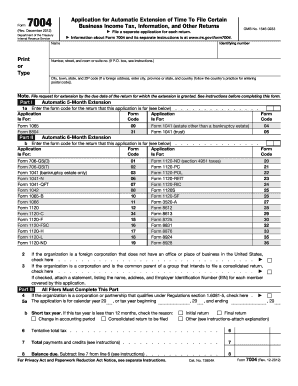
Ce Identifying number Name Print or Type OMB No. 1545-0233 File a separate application for each return. Information about Form 7004 and its separate instructions is at www.irs.gov/form7004. Number, street, and room or suite no. (If P.O. box, see instructions.) City, town, state, and ZIP code (If a foreign address, enter city, province or state, and country (follow the country s practice for entering postal code)). Note. File request for extension by the due date of the return.

How it works
  • Open form

    Open form follow the instructions

  • Easily sign form

    Easily sign the form with your finger

  • Share form

    Send filled & signed form or save

How to fill out the IRS 7004 online

The IRS 7004 form is essential for users seeking an automatic extension of time to file certain business income tax, information, and other returns. This guide provides clear and supportive instructions on how to complete this form online.

Follow the steps to fill out your IRS 7004 online.

  1. Click the ‘Get Form’ button to retrieve the IRS 7004 form and access it in the editing interface.
  2. Begin by entering your identifying number in the appropriate field. This is typically your Employer Identification Number (EIN) or Social Security Number (SSN) if you are an individual filer.
  3. Next, provide the name of your business or your own name if applicable. Ensure that this is printed or typed clearly.
  4. Fill in your address including the number, street, room or suite number. If you are using a P.O. Box, make sure to follow the instructions provided.
  5. Complete the city, town, state, and ZIP code fields. For foreign addresses, enter the city, province/state, and country, ensuring to follow the specific postal code conventions of that country.
  6. In Part I, indicate the form code for the return that you are applying for an extension. Refer to the provided list to select the correct code.
  7. If you are applying for an automatic 6-month extension, fill in the corresponding form code in Part II as applicable.
  8. In Part III, confirm whether your organization is a corporation or partnership that qualifies under specific regulations by checking the box.
  9. Enter the tax year for which you are requesting the extension. This includes filling in the starting and ending dates accurately.
  10. Provide details for any short tax year if applicable, and check the appropriate reason for the shortened year.
  11. Calculate and enter the tentative total tax, total payments, and the balance due in lines 6, 7, and 8 respectively.
  12. Once all information is completed, save the form. You can also download or print it for your records, or share it if necessary.

Take the next step in managing your business's taxes by completing and submitting your IRS 7004 form online.

Get form

Experience a faster way to fill out and sign forms on the web. Access the most extensive library of templates available.

Related content

About Form 7004, Application for Automatic...

Jan 23, 2025 — Use Form 7004 to request an automatic 6-month extension of time to file...

Learn more
26 CFR § 1.6081-3 - Automatic extension of time...

(1) An application must be submitted on Form 7004, “Application for Automatic Extension...

Learn more
Instructions for Form 7004 (Rev. December 2017)

Feb 1, 2018 — Use Form 7004 to request an automatic extension of time to file certain...

Learn more
Questions & Answers

Get answers to your most pressing questions about US Legal Forms API.

Contact support

Can IRS extensions be filed electronically?

Indeed, you can file IRS extensions electronically using Form 7004. This option allows you to request more time to file your business tax returns seamlessly and efficiently. Using electronic filing generally results in quicker processing times and prompt confirmations. Choosing a service like US Legal Forms can help you navigate this process effortlessly.

IRS Form 7004 does not require a signature when filed electronically. When you e-file, the software often provides electronic confirmation that serves as your signature. However, if you choose to mail in your Form 7004, you must sign it before submission. Understanding these requirements helps guarantee the accuracy of your tax filings.

Yes, filing for an IRS extension online is a legitimate process recognized by the IRS. When you submit IRS Form 7004 electronically, you use a secure method that ensures your information is protected. Filing online is efficient and allows you to receive rapid confirmation, giving you peace of mind. Always utilize official IRS channels or trusted platforms like US Legal Forms for your submission.

To file an extension for your LLC taxes, you should use IRS Form 7004. This form is specifically designed for businesses, allowing you to request more time to file your tax returns. It is crucial to file it before the original due date of your return to avoid late fees. You can simplify this process with online services like US Legal Forms.

Most states allow you to file a state tax extension online, but the process can vary. You typically need to check your specific state's tax authority website for details on how to obtain your extension. Many states will accept IRS Form 7004 to extend the filing of your state income taxes as well. Always ensure you meet your state's deadlines to avoid penalties.

Yes, you can file an IRS extension online using IRS Form 7004. This form allows you to request an extension for various business tax returns easily. By filing Form 7004 electronically, you streamline the process and receive immediate confirmation that your request has been submitted. This option enhances convenience for busy taxpayers.

Certain IRS forms cannot be submitted electronically. For instance, paper forms like Form 8879, which is an e-file signature authorization, must be filed by mail. Additionally, some older forms or those requiring specific attachments may also need to be submitted on paper. It's important to check the IRS guidelines to ensure compliance with submission requirements.

Filing late without an extension can lead to significant penalties from the IRS. Typically, the penalty is a percentage of the unpaid taxes, accruing daily until you file your return. Moreover, interest may also accumulate on the amount owed. To avoid such pitfalls, consider using IRS 7004 for timely extensions and educate yourself on your tax filing responsibilities.

Filing IRS 7004 after the deadline is generally not allowed. If you submit the form late, the IRS will likely deny your extension request. However, you should still file your tax return as soon as possible to avoid additional penalties. Using services like US Legal Forms can assist you in understanding your options and the best steps to take.

If you forgot to file IRS 7004, you may miss out on your tax extension, which leads to potential penalties. Filing without an extension can trigger late fees and interest on owed taxes. It's best to rectify the situation quickly by filing your return as soon as you remember or obtaining professional advice. US Legal Forms can help simplify the filing process.

Get This Form Now!

Use professional pre-built templates to fill in and sign documents online faster. Get access to thousands of forms.

If you believe that this page should be taken down, please follow our DMCA take down process here.

IRS 7004 Form

This form is available in several versions. Select the version you need from the drop-down list below.

Get IRS 7004