Loading
Get Irs 5500-ez 2001
This website is not affiliated with IRS
How it works
-

Open form follow the instructions
-

Easily sign the form with your finger
-

Send filled & signed form or save
How to fill out the IRS 5500-EZ online
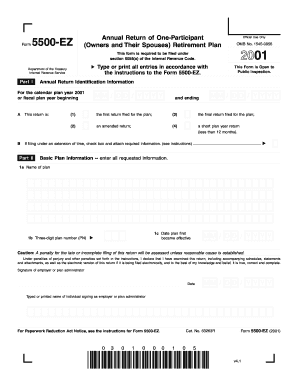
The IRS 5500-EZ is an annual return designed for one-participant retirement plans, providing essential information to the Internal Revenue Service. This guide will help you navigate the steps to successfully fill out the form online, ensuring a complete and accurate submission.
Follow the steps to effectively complete the IRS 5500-EZ online.
- Click the ‘Get Form’ button to obtain the IRS 5500-EZ form and open it in the appropriate online editor.
- In Part I, provide the annual return identification information, including the plan year beginning and ending dates, and check the appropriate box to indicate the type of return being filed (first, amended, final, or short plan year). If applicable, indicate if filing under an extension.
- In Part II, enter the basic plan information. Complete the required fields such as the name of the plan, the three-digit plan number, and the date the plan first became effective.
- Provide the employer's name, address, and Employer Identification Number (EIN) in the designated sections of the form. Ensure accuracy to avoid penalties for late or incomplete filing.
- Fill in the plan administrator's information if it differs from the employer. If the same, you can simply note 'Same.'
- Indicate the type of plan by marking the appropriate box (defined benefit pension plan, profit-sharing plan, etc.).
- Complete the questions regarding plan assets, liabilities, contributions, and distributions as prompted in the form. Be diligent in providing the necessary numeric values.
- Affix the signatures of the employer or plan administrator, along with the date of signing. Ensure that the electronic version of the return, if applicable, is also accurate and complete.
- Review all entries for accuracy. Once all sections are completed and verified, save changes in the online editor. After saving, you can download, print, or share the completed form as needed.
Complete your IRS 5500-EZ form online today to ensure compliance with IRS regulations.
Get form
Experience a faster way to fill out and sign forms on the web. Access the most extensive library of templates available.
Related links form
The primary difference between IRS 5500 and 5500-EZ lies in the type of plans they cover. Form 5500 is for larger plans with 100 or more participants, while 5500-EZ is designed for smaller plans with fewer than 100 participants. Understanding which form applies to your situation is crucial for compliance.
Get This Form Now!
Use professional pre-built templates to fill in and sign documents online faster. Get access to thousands of forms.