Ibutions that the Social Security Administration makes to your MA MSA aren't includible in your gross income nor are they deductible. Neither you nor your employer can make contributions to your MA MSA. Generally, contributions you or someone other than your employer make to your HSA are deductible on your tax return. Employer contributions to your HSA may be excluded from your income and aren't deductible by you. You and your employer can make contributions to your HSA in the same year. See For.

How it works
  • Open form

    Open form follow the instructions

  • Easily sign form

    Easily sign the form with your finger

  • Share form

    Send filled & signed form or save

How to fill out the IRS 5498-SA online

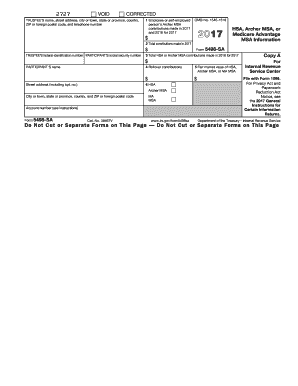
Filling out the IRS 5498-SA form is essential for reporting contributions to health savings accounts and Archer medical savings accounts. This guide provides a step-by-step approach to ensure accurate and effective completion of the form online.

Follow the steps to complete the IRS 5498-SA online

  1. Click ‘Get Form’ button to obtain the form and open it in the editor.
  2. Enter the trustee's name, street address, city, state, country, ZIP code, and telephone number in the designated fields.
  3. In box 1, input the contributions made by the employee or self-employed person to the Archer MSA for the year 2017 and up to April 17, 2018.
  4. In box 2, provide the total contributions made in 2017 to the HSA or Archer MSA.
  5. Fill in box 3 with the total HSA or Archer MSA contributions made in 2018 for the tax year 2017.
  6. In box 4, record any rollover contributions from an Archer MSA or HSA.
  7. Complete box 5 with the fair market value of the HSA, Archer MSA, or MA MSA at the end of 2017.
  8. In box 6, indicate whether it is an HSA or Archer MSA.
  9. Ensure that you have the correct participant's name and social security number entered in the appropriate fields.
  10. Once all necessary fields are filled, review the information for accuracy before saving changes, downloading, printing, or sharing the form.

Take the next step and complete your IRS 5498-SA form online today.

Get form

Experience a faster way to fill out and sign forms on the web. Access the most extensive library of templates available.

Related content

About Form 5498-SA, HSA, Archer MSA, or Medicare...

Jan 28, 2025 — File Form 5498-SA for each person for whom you maintained an HSA, Archer...

Learn more
Form 5498-SA now available online - News

Apr 30, 2024 — The 5498-SA is the IRS form that reports all contributions to your HSA...

Learn more
2016 Publication 560

Jan 26, 2017 — For specific information about reporting corrective distributions, see...

Learn more
Questions & Answers

Get answers to your most pressing questions about US Legal Forms API.

Contact support

Why does my HSA 5498 and W-2 not match?

It's possible for your IRS 5498-SA and W-2 to show different amounts due to several factors, such as timing of contributions or payroll deductions. Your W-2 reflects your income, while the 5498-SA shows HSA contributions made throughout the year. Reviewing both documents can clarify discrepancies, helping you ensure accurate tax reporting. If you need assistance, US Legal Forms offers tools for managing your finances effectively.

You do not directly report the IRS 5498 on your tax return. It serves as a valuable record of your HSA contributions. However, ensure that you report any distributions or related deductions accurately in your return. If you need help navigating the process, consider utilizing US Legal Forms for straightforward guidance.

You do not report the IRS 5498 directly on your tax return; rather, use it as a reference for tracking contributions to your HSA. Make sure to include any HSA distributions or medical deductions where applicable. Accurate recordkeeping is crucial, as it supports your reported medical expenses. Platforms like US Legal Forms can assist you in preparing for your tax reporting.

In TurboTax, you generally do not enter the IRS 5498-SA directly. Instead, use it to guide your entries regarding contributions and distributions from your HSA. Ensure that your medical expenses align with your HSA records, which TurboTax helps you verify. If you encounter complexities, consider using US Legal Forms for added clarity on your tax filing.

You do not need to report the IRS 5498-SA itself on your tax form. Instead, it's a record for your contributions, aiding in verifying your HSA contributions and distributions. It's essential, however, to ensure your reported medical expenses match the information on the 5498-SA. Using resources like US Legal Forms can simplify managing your HSA documentation.

The IRS 5498 is a general tax form used for various retirement accounts, while the IRS 5498-SA specifically pertains to Health Savings Accounts (HSAs). The main distinction lies in the type of account each form reports. The 5498-SA reflects contributions made to your HSA, ensuring you have all necessary details for your tax planning. Understanding these differences helps you manage your accounts effectively.

You typically do not need to include the IRS 5498-SA directly on your tax return. However, keep it for your records, as it provides crucial information about your HSA contributions. Use it to ensure you report your medical expenses and deductions accurately. For filing convenience, consider platforms like US Legal Forms that guide you through proper tax reporting.

Receiving a 1099-SA but not an IRS 5498-SA may occur when you withdrew funds from your Health Savings Account (HSA) during the tax year. The 1099-SA reports distributions you took, while the IRS 5498-SA reports contributions made to the HSA. If you made no contributions during the year, the IRS 5498-SA may not be issued. It's essential to track both forms for accurate tax reporting.

No, the IRS 5498-SA does not need to be filed. It serves as a record for your HSA contributions and is intended for your reference during tax preparation. Always keep it on hand to ensure that you report your contributions correctly on your tax forms.

You do not need to report Form 5498 on your tax return, as it is not submitted to the IRS. However, it is essential to use the information from the IRS 5498-SA when filing. This form provides you with necessary insights into your HSA contributions and balances.

Get This Form Now!

Use professional pre-built templates to fill in and sign documents online faster. Get access to thousands of forms.

If you believe that this page should be taken down, please follow our DMCA take down process here.

IRS 5498-SA Form

This form is available in several versions. Select the version you need from the drop-down list below.

Get IRS 5498-SA