Is under age 30 (except for a beneficiary with special needs) is not taxable. Future developments. For the latest information about developments related to Form 5498-ESA and its instructions, such as legislation enacted after they were published, go to www.irs.gov/form5498esa. VOID CORRECTED TRUSTEE S or ISSUER'S name, street address, city or town, state or province, country, and ZIP or foreign postal code 1 Coverdell ESA contributions OMB No. 1545-1815 $ 2 Rollover contributions $ For.

Open form follow the instructions

Easily sign the form with your finger

Send filled & signed form or save
How to fill out the IRS 5498-ESA online
Filling out the IRS 5498-ESA form is essential for reporting contributions made to a Coverdell education savings account, including rollover contributions. This guide will walk you through the process of completing the form online with clear, step-by-step instructions to ensure accuracy and compliance.
Follow the steps to complete the IRS 5498-ESA online.
- Click 'Get Form' button to retrieve the IRS 5498-ESA and open it in your preferred PDF editor.
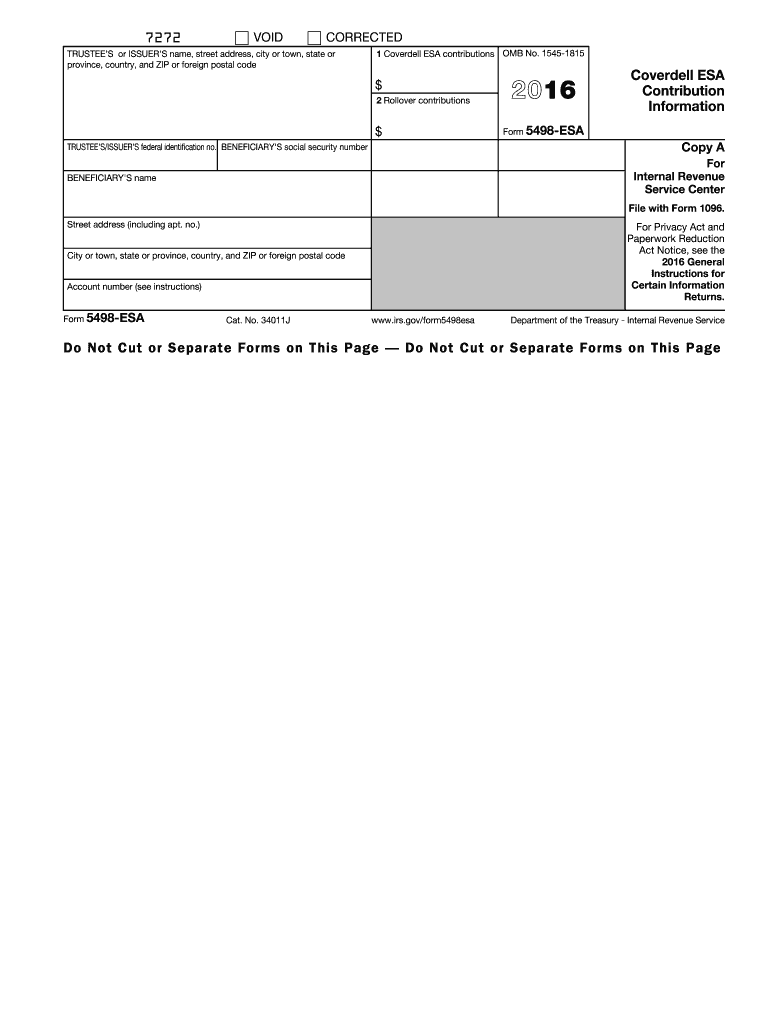
- Enter the trustee’s or issuer's name, street address, city or town, state or province, country, and ZIP or foreign postal code in the designated fields.
- Provide the trustee’s or issuer’s federal identification number, which is necessary for tax reporting.
- Fill in the beneficiary's name and the beneficiary's social security number in the appropriate sections.
- Complete the coverdell ESA contributions in Box 1, indicating total contributions made for the 2016 tax year.
- In Box 2, record any rollover contributions made during the tax year. This includes contributions from one Coverdell ESA to another.
- If required, include the account number assigned by the trustee or issuer to further identify the account.
- Review all entered information for accuracy to avoid any future complications.
- Once all fields are filled out, you can save changes, download, print, or share the completed form.
Start filling out your IRS 5498-ESA online today to ensure proper reporting of your education savings contributions.
Experience a faster way to fill out and sign forms on the web. Access the most extensive library of templates available.
Related content
Jan 23, 2025 — File this form for each person for whom you maintained any Coverdell...
Form. 5498-ESA reports contributions and rollover contributions made for you for 2003. For...
Get answers to your most pressing questions about US Legal Forms API.
What is the difference between 5498 and 5498 ESA?
Form 5498 and Form 5498-ESA serve different purposes. Form 5498 is used for reporting contributions to traditional IRAs, while Form 5498-ESA specifically focuses on educational savings accounts. Knowing these differences can help you navigate your financial responsibilities more effectively, so exploring information through US Legal Forms can be beneficial.
How do I report form 5498 to the IRS?
To report form 5498 to the IRS, you typically do not need to submit it with your tax return, as this form is filed by the account trustee or issuer. However, you should keep it for your records since it details contributions to your education savings account, which can impact your tax responsibilities. Understanding the intricacies of this form is crucial, and you may find US Legal Forms helpful for precise guidelines.
Can you write off pets on your taxes?
In general, writing off pets on your taxes is not allowed, as they are considered personal property. Exceptions exist for working animals like service animals, which may qualify for deductions tied to their care and training. Always consult tax resources or platforms like US Legal Forms to explore your unique circumstances regarding the IRS 5498-ESA.
Can I change my beneficiary on ESA?
You can change the beneficiary on your Educational Savings Account (ESA) by following the rules set by the account’s administrator. This flexibility allows you to adapt the account to suit your current financial goals. Always ensure you document any changes appropriately and consider using US Legal Forms for easy access to necessary forms and guidance.
Do you report ESA on taxes?
You typically do not report an emotional support animal (ESA) on your taxes unless you are claiming associated medical expenses. If those expenses exceed a certain threshold, they may become relevant for your tax filing. The IRS 5498-ESA can play a key role in tracking education contributions that influence your overall tax situation.
Does ESA affect taxes?
The presence of an emotional support animal (ESA) generally does not directly affect your taxes. However, if your ESA incurs expenses tied to a qualified medical situation, you may be able to claim those costs. When in doubt, consult platforms like US Legal Forms for personalized advice on how to report your particular situation.
Can I claim my ESA dog on my taxes?
You cannot directly claim an emotional support animal (ESA) on your taxes as a pet deduction. However, if your ESA is recognized as a necessary part of your treatment for a mental health condition, some related expenses may qualify as tax-deductible medical expenses. For comprehensive guidance, consider utilizing resources like US Legal Forms to understand your filing options.
What is IRS form 5498 ESA?
IRS Form 5498-ESA is used to report contributions to an Education Savings Account (ESA). This form is important for tracking your contributions and ensuring compliance with IRS regulations. It provides you with the necessary details to manage your education savings effectively. Utilizing resources like US Legal Forms can help you understand how to navigate these forms and reports.
Do I report ESA on taxes?
You generally do not report the contributions to an Education Savings Account (ESA) on your tax return, as they are not tax-deductible. However, if you withdraw funds from the ESA, you must report any non-qualified expenses. Use IRS 5498-ESA to keep track of your contributions and ensure you stay compliant with tax regulations. Consulting a tax professional can be beneficial to clarify your specific situation.
How do you write off your pet on taxes?
Writing off pet expenses on taxes is generally limited to specific circumstances, such as service animals or pets used for business purposes. However, typical pet expenses do not qualify for tax deductions. If you have a service dog, document your expenses thoroughly for tax purposes. Consulting a tax advisor can guide you on relevant deductions related to IRS 5498-ESA.
Use professional pre-built templates to fill in and sign documents online faster. Get access to thousands of forms.
If you believe that this page should be taken down, please follow our DMCA take down process here.
This form is available in several versions. Select the version you need from the drop-down list below.