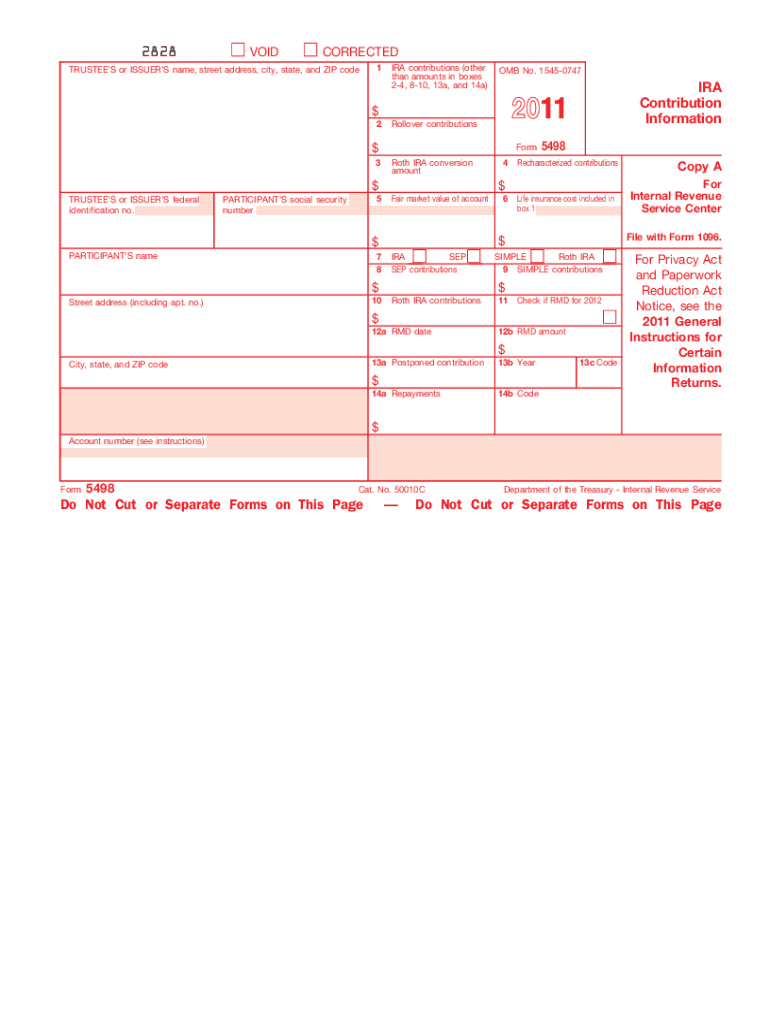
Ant The information on Form 5498 is submitted to the Internal Revenue Service by the trustee or issuer of your individual retirement arrangement (IRA) to report contributions, including any catch-up contributions, required minimum distributions (RMDs), and the fair market value (FMV) of the account. For information about IRAs, see Pubs. 590 and 560. Account number. May show an account or other unique number the trustee assigned to distinguish your account. Box 1. Shows traditional IRA contributi.
Loading

Open form follow the instructions

Easily sign the form with your finger

Send filled & signed form or save
How to fill out the IRS 5498 online
The IRS 5498 form is essential for reporting contributions to individual retirement arrangements (IRAs) and other related accounts. This guide provides a step-by-step approach for users to accurately complete this form online, ensuring compliance with IRS requirements.
Follow the steps to fill out the IRS 5498 form correctly.
- Click the ‘Get Form’ button to obtain the form and open it for editing.
- Enter the trustee's or issuer's name, street address, city, state, and ZIP code in the designated fields.
- Fill out box 1 with the total traditional IRA contributions for the year, made in the tax year indicated through the specified date.
- In box 2, report any rollover contributions made during the tax year, including direct rollovers to traditional or Roth IRAs.
- If applicable, enter the amount converted to a Roth IRA from a traditional, SEP, or SIMPLE IRA in box 3.
- Complete box 4 if you executed any recharacterizations, transferring funds between different types of IRAs.
- Record the fair market value of the account at the year-end in box 5.
- Indicate the type of IRA reported in box 7.
- Detail any SEP contributions made during the year in box 8.
- Document any SIMPLE contributions you made in box 9.
- Report any Roth IRA contributions in box 10.
- If a required minimum distribution (RMD) is necessary, check the corresponding box in box 11 and fill in the RMD date and amount in boxes 12a and 12b respectively.
- Enter any postponed contributions made for a previous year in box 13, along with the corresponding year in box 13b.
- Complete box 14 if there are any repayments from qualified distributions.
- Review all entries for accuracy before saving or downloading the completed form.
Complete your documents online to ensure compliance with IRS guidelines.
Experience a faster way to fill out and sign forms on the web. Access the most extensive library of templates available.
Related content
May 13, 2025 — File this form for each person for whom you maintained any individual...
Apr 30, 2024 — The 5498-SA is the IRS form that reports all contributions to your HSA...
Caution: Because paper forms are scanned during processing, you cannot file Forms 1096...
Get answers to your most pressing questions about US Legal Forms API.
Do I need form 5498-SA to file my taxes?
While not required to file your taxes, Form 5498-SA is beneficial for understanding your Health Savings Account contributions. Having this form helps you confirm that all your contributions align with the amounts you have documented. If you make contributions to your HSA, it's wise to keep it for reference, but it does not need to be submitted with your tax return.
Do I have to report 5498-SA on my tax return?
You do not directly report 5498-SA on your tax return. This form is used to document contributions to a Health Savings Account. It is mainly for your records, helping you keep track of your contributions for potential tax deductions. If you withdraw funds from your HSA, the 1099-SA will be more relevant when filing.
How do I enter form 5498 on my tax return TurboTax?
There is no need to enter Form 5498 directly into your TurboTax return. However, refer to its details to ensure your contributions are accurate and align with what you plan to report. If you have any questions, TurboTax guides can help clarify how this form affects your overall tax picture. Make sure you have all the associated figures ready when using the software.
How do I report form 5498 to the IRS?
You do not report Form 5498 to the IRS yourself; the custodian of your retirement account submits it on your behalf. This form is for your records and helps you to track your contributions and account balances. Be sure to keep it with your tax documents for reference. If discrepancies arise, you may need to contact the custodian.
What's the difference between a 1099-SA and 5498-SA?
SA and Form 5498SA serve different purposes. The 1099SA reports distributions from your Health Savings Account, while the 5498SA details the contributions you made. Understanding this distinction is crucial for accurate tax preparation, as one shows what you took out, and the other shows what you put in. Always verify that the information matches your records when filing taxes.
Do I have to wait for 5498 to file taxes?
You do not have to wait for your IRS 5498 to file your taxes, as this form is typically sent out after the tax-filing deadline. Since the IRS 5498 provides information on contributions made to your retirement accounts, you can still file with the information you have collected. However, ensure that you review your account statements for accuracy. If necessary, you can amend your return later when you receive the 5498.
Do I need to enter 5498-SA in TurboTax?
You typically do not need to enter 5498-SA directly into TurboTax. This form is used to report contributions to a Health Savings Account. Nevertheless, reviewing your 5498-SA is essential for understanding your contributions, which may impact your overall tax situation. If you have questions about how it affects your return, consider reaching out for professional advice.
Does form 5498 need to be reported on taxes?
Form 5498 does not need to be reported on your tax return. Instead, this form is intended for your records, as it provides information about contributions and account balances. However, it is important to review it for accuracy since it contains critical data about your retirement accounts. Ensure that all contributions are correctly reflected when preparing your taxes.
Is form 5498 needed for tax filing?
The IRS 5498 is not required for tax filing, but it is essential for keeping accurate records of your retirement account contributions. It helps you understand your contributions and ensure you're not overlooking potential tax deductions. While it's a valuable form, you can still file your tax return without it. UsLegalForms can support you in managing your tax forms effectively throughout the year.
Why is form 5498 so late?
Form IRS 5498 is issued later in the tax season because it needs to include contributions made by the tax filing deadline. This allows account holders to make last-minute contributions to their retirement plans. Although it can be frustrating to wait, the timing ensures accurate reporting of your contributions. Platforms like UsLegalForms can help you prepare and keep track of important dates for tax documentation.
Use professional pre-built templates to fill in and sign documents online faster. Get access to thousands of forms.
If you believe that this page should be taken down, please follow our DMCA take down process here.
This form is available in several versions. Select the version you need from the drop-down list below.