Loading
Form preview
  • US Legal Forms
  • Form Library
  • Tax Forms
  • Executive Department Treasury IRS Forms
  • Irs 5498 2018

Get Irs 5498 2018

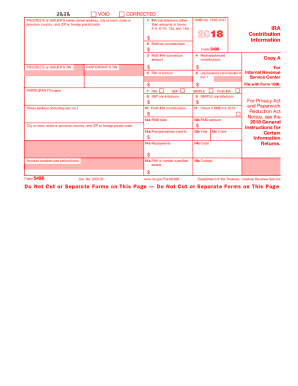
Rance cost included in box 1 $ $ Street address (including apt. no.) 4 Recharacterized contributions 5 FMV of account 7 IRA SEP 8 SEP contributions PARTICIPANT S name 10 Roth IRA contributions $ IRA Contribution Information Copy B For Participant $ SIMPLE Roth IRA 9 SIMPLE contributions $ 11 If checked, required minimum distribution for 2019 12a RMD date 12b RMD amount 13a Postponed/late contrib. 13b Year This information is being furnished to the IRS. $ City or town, state or.

This website is not affiliated with IRS

How it works

  1. Open form

    Open form follow the instructions

  2. Easily sign form

    Easily sign the form with your finger

  3. Share form

    Send filled & signed form or save

How to fill out the IRS 5498 online

Filling out the IRS Form 5498 is essential for individuals managing their individual retirement accounts (IRAs). This form provides the IRS with necessary information regarding contributions, rollovers, and account valuations. In this guide, we will help you navigate the process of completing this form online.

Follow the steps to complete the IRS 5498 form online.

  1. Click ‘Get Form’ button to obtain the form and open it in the editor.
  2. Fill in the Trustee’s or Issuer’s name and address in the respective fields at the top of the form.
  3. Enter the participant’s taxpayer identification number (TIN) and name, ensuring accuracy.
  4. Complete Box 1 with the total IRA contributions made during the reporting year.
  5. Fill in Box 2 with any rollover contributions, including direct rollovers to a traditional IRA or Roth IRA.
  6. Input the amount for Box 3 if there were any Roth IRA conversion amounts for the year.
  7. Complete Box 4 if any contributions were recharacterized from one IRA type to another.
  8. Box 5 should reflect the fair market value (FMV) of your account at year-end.
  9. Boxes 6 through 10 should be filled out as necessary, detailing specifics like life insurance costs and any SEP or SIMPLE contributions.
  10. Check Box 11 if there is a required minimum distribution (RMD) due for the reporting year.
  11. Indicate any postponed or late contributions in Box 13, including the respective year.
  12. Complete any repayment amounts in Boxes 14a and 14b if applicable.
  13. Finalize the form by reviewing all entries for accuracy. Users can then save changes, download, print, or share the form as needed.

Get started with filing your IRS 5498 form online today.

Get form

Experience a faster way to fill out and sign forms on the web. Access the most extensive library of templates available.

Related content

About Form 5498, IRA Contribution Information...
May 13, 2025 — File this form for each person for whom you maintained any individual...
Learn more
Form 5498-SA now available online - News
Apr 30, 2024 — The 5498-SA is the IRS form that reports all contributions to your HSA...
Learn more
Form 3921 (Rev. October 2017)
Caution: Because paper forms are scanned during processing, you cannot file Forms 1096...
Learn more

Related links form

Charles Jones Reporting Service 1099-S Reporting Form First Aid/CPR Certificate Template RSO Equipment Rental Agreement MoneyGram MG5001S EXP 2010

Questions & Answers

Get answers to your most pressing questions about US Legal Forms API.

Contact support

You don't directly enter IRS 5498 on your tax return, but the information it contains is vital for your tax calculations. Use the details from the form when filling out the IRA contribution portion of your return. This practice ensures that your contributions are accurately reflected.

You should enter IRA contributions listed on IRS 5498 in the retirement section of your tax return. This ensures that your contributions are accounted for and can help you benefit from potential deductions. Accurate entry can lead to significant tax savings.

To report IRS 5498 on your taxes, you need to ensure that all relevant information is gathered from the form. This includes contributions made to IRAs throughout the year. It's essential to document these amounts accurately on your tax return to avoid any discrepancies.

IRS Form 1099 reports income across various categories, whereas Form 5498 HSA specifically details contributions to Health Savings Accounts. The former is intended for income reporting, while the latter tracks health-related savings contributions. Understanding these distinctions helps clarify your financial picture. This knowledge is beneficial when preparing your tax returns.

IRS Form 5498 is used to report contributions to various types of retirement accounts, as well as to report required minimum distributions. This form helps taxpayers and the IRS track contributions to individual retirement accounts (IRAs). Keeping this form organized aids in ensuring you meet tax obligations. Utilizing platforms like uslegalforms can simplify managing your financial forms.

IRS Form 1099 INT reports interest income, while Form 5498 reports contributions to retirement accounts or HSAs. The former informs you of the income you earned, while the latter tracks your contributions. Both forms serve essential roles in different aspects of your tax return. Understanding these differences can help streamline your tax preparation process.

You do not officially report IRS Form 5498 on your tax return. The form serves primarily as an informational document for your records. However, you should ensure you understand the contributions reported on it, as they may impact your tax situation. Staying informed about your contributions allows for better financial planning.

You do not directly enter IRS Form 5498 in TurboTax. Instead, use it for reference when filling out your tax return, especially for contributions. TurboTax will guide you through the necessary sections for inputting related contributions. This information can assist in claiming tax benefits correctly.

While both IRS Form 1099 and Form 5498 serve as tax documents, they report different types of information. Form 1099 typically reports income, while Form 5498 reports contributions to IRAs and HSAs. Therefore, they fulfill distinct roles in your tax reporting. Understanding both helps you manage your finances effectively.

You do not need to enter IRS Form 5498 SA on your tax return. This form is informational and reports contributions to your Health Savings Account (HSA) or other retirement accounts. Instead, keep it for your records. It helps you track contributions and informs you of contribution limits.

Get This Form Now!

Use professional pre-built templates to fill in and sign documents online faster. Get access to thousands of forms.
If you believe that this page should be taken down, please follow our DMCA take down processhere.
Get IRS 5498
  • Adoption
  • Bankruptcy
  • Contractors
  • Divorce
  • Home Sales
  • Employment
  • Identity Theft
  • Incorporation
  • Landlord Tenant
  • Living Trust
  • Name Change
  • Personal Planning
  • Small Business
  • Wills & Estates
  • Packages A-Z
  • Affidavits
  • Bankruptcy
  • Bill of Sale
  • Corporate - LLC
  • Divorce
  • Employment
  • Identity Theft
  • Internet Technology
  • Landlord Tenant
  • Living Wills
  • Name Change
  • Power of Attorney
  • Real Estate
  • Small Estates
  • Wills
  • All Forms
  • Forms A-Z
  • Form Library
  • Legal Hub
  • About Us
  • Help Portal
  • Legal Resources
  • Blog
  • Affiliates
  • Contact Us
  • Delete My Account
  • Site Map
  • Industries
  • Forms in Spanish
  • Localized Forms
  • State-specific Forms
  • Forms Kit
  • Real Estate Handbook
  • All Guides
  • Notarize
  • Incorporation services
  • For Consumers
  • For Small Business
  • For Attorneys
  • USLegal
  • FormsPass
  • pdfFiller
  • signNow
  • altaFlow
  • DocHub
  • Instapage
Form Packages
  • Adoption
  • Bankruptcy
  • Contractors
  • Divorce
  • Home Sales
  • Employment
  • Identity Theft
  • Incorporation
  • Landlord Tenant
  • Living Trust
  • Name Change
  • Personal Planning
  • Small Business
  • Wills & Estates
  • Packages A-Z
Form Categories
  • Affidavits
  • Bankruptcy
  • Bill of Sale
  • Corporate - LLC
  • Divorce
  • Employment
  • Identity Theft
  • Internet Technology
  • Landlord Tenant
  • Living Wills
  • Name Change
  • Power of Attorney
  • Real Estate
  • Small Estates
  • Wills
  • All Forms
  • Forms A-Z
  • Form Library
Customer Service
  • Legal Hub
  • About Us
  • Help Portal
  • Legal Resources
  • Blog
  • Affiliates
  • Contact Us
  • Delete My Account
  • Site Map
  • Industries
  • Forms in Spanish
  • Localized Forms
  • State-specific Forms
  • Forms Kit
Legal Guides
  • Real Estate Handbook
  • All Guides
Prepared for you
  • Notarize
  • Incorporation services
Our Customers
  • For Consumers
  • For Small Business
  • For Attorneys
Our Sites
  • USLegal
  • FormsPass
  • pdfFiller
  • signNow
  • altaFlow
  • DocHub
  • Instapage
Social Media
Call us now toll free:
+1 833 426 79 33
As seen in:
© Copyright 1999-2026 airSlate Legal Forms, Inc. 3720 Flowood Dr, Flowood, Mississippi 39232
  • Your Privacy Choices
  • Terms of Service
  • Privacy Notice
  • Content Takedown Policy
  • Bug Bounty Program
IRS 5498
This form is available in several versions.
Select the version you need from the drop-down list below.
2020 IRS 5498
Select form
  • 2020 IRS 5498
  • 2019 IRS 5498
  • 2018 IRS 5498
  • 2017 IRS 5498
  • 2016 IRS 5498
  • 2015 IRS 5498
  • 2014 IRS 5498
  • 2013 IRS 5498
  • 2012 IRS 5498
  • 2011 IRS 5498
  • 2010 IRS 5498
Select form