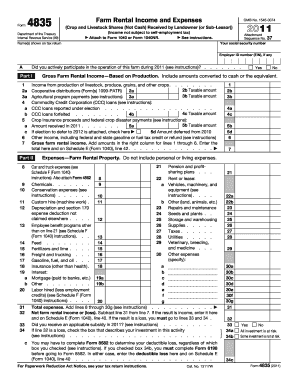
Articipate in the operation of this farm during 2011 (see instructions)? . Part I 1 2a 3a 4 a b 5 a c 6 7 Chemicals . . . . . . . Conservation expenses (see instructions) . . . . . . 11 12 Custom hire (machine work) . Depreciation and section 179 expense deduction not claimed elsewhere . . . . 13 Employee benefit programs other than on line 21 (see Schedule F (Form 1040) instructions). . . Feed . . . . . . . . Fertilizers and lime . . . . Freight and trucking . . . Gasoline, fuel, and oil.

How it works
  • Open form

    Open form follow the instructions

  • Easily sign form

    Easily sign the form with your finger

  • Share form

    Send filled & signed form or save

How to fill out the IRS 4835 online

Filling out Form 4835 is an essential task for landowners who need to report farm rental income from crops or livestock. This guide provides a clear, step-by-step approach to completing the form online, ensuring that users can navigate through the necessary fields with confidence.

Follow the steps to successfully complete Form 4835 online.

  1. Click ‘Get Form’ button to obtain the form and open it in the editor.
  2. Begin with Line A, where you will indicate if you actively participated in the operation of the farm during the specified year. Select 'Yes' or 'No'.
  3. In Part I, report your gross farm rental income based on production. Start with Line 1 for income from livestock, produce, and grains.
  4. Continue to Lines 2a and 2b for cooperative distributions. Enter your total distributions on 2a and the taxable amount on 2b.
  5. Proceed to Lines 3a and 3b to record any agricultural program payments received, following the same structure as previous lines.
  6. Fill out Lines 4a through 4c for Commodity Credit Corporation loans, specifically reporting forfeited loans as instructed.
  7. On Lines 5a through 5d, input crop insurance proceeds and federal crop disaster payments according to the guidelines provided.
  8. Line 6 is for other income not shown in previous lines. Make sure to reference the supplemental instructions if needed.
  9. Moving to Part II, start recording your expenses. Line 8 captures expenses for chemicals and conservation, so make sure to detail your spending accurately.
  10. Continue to Lines 9 through 30g, documenting all relevant expenses, ensuring you follow the structure indicated in the form.
  11. Upon completion, calculate your total expenses on Line 31, and also determine your net farm rental income or loss on Line 32.
  12. If applicable, check for any subsidies received on Line 33 and complete any necessary follow-up forms as indicated.
  13. Finally, save your changes, download the completed form, print it, or share it as required.

Complete your IRS 4835 form online today for accurate and efficient reporting.

Get form

Experience a faster way to fill out and sign forms on the web. Access the most extensive library of templates available.

Related content

About Form 4835, Farm Rental Income and Expenses

File this form to report farm rental income based on crops or livestock produced by the...

Learn more
Who Files a Schedule F?

Crop share landlords who do not materially participate in the farming activity report...

Learn more
2017 Publication 505

Mar 1, 2017 — Form 4835, Farm Rental Income and Ex- penses, line 7. Your share of the...

Learn more
Questions & Answers

Get answers to your most pressing questions about US Legal Forms API.

Contact support

What qualifies as a farm for IRS?

The IRS defines a farm as a place where agricultural products are produced for sale or personal use. This includes various types of operations, such as livestock, dairy, and crop production. Understanding this definition can help you determine your eligibility to file Form 4835 for reporting purposes.

As a farm owner, you can write off various expenses, including equipment costs, seed purchases, and maintenance expenses. Form 4835 helps you track and report these deductions properly. Ensure you maintain detailed records and consider using platforms like US Legal Forms to support your tax preparation.

Yes, you can deduct certain farm expenses even if you have not generated income. However, these deductions must be related to your farming activities. Form 4835 allows you to report these expenses in a straightforward manner to the IRS, ensuring you comply with regulations even in a loss year.

Choosing between Schedule F and Form 4835 depends on how you engage with your farm. If you actively run the farming operation, you would typically use Schedule F. However, if you simply rent out the land without farming, then Form 4835 is the appropriate choice to detail your income and expenses.

To report farm rental income, you will use IRS Form 4835 if you are not actively engaged in farming. Include all income received from renting your farmland, along with any associated expenses. Using US Legal Forms can help you find the right templates and ensure your filing meets IRS standards.

IRS Form 4835 is filed by individuals who receive rent from farms they do not actively operate. This includes landowners who rent their farmland to others for agricultural production. It's a straightforward form that allows you to report income and expenses when you are not the one actively farming.

You do not need a specific number of acres to claim farm income on taxes. Instead, the IRS focuses on your activities and the income generated. If your farming activities generate profit, you can utilize IRS Form 4835 to report your earnings and expenses effectively.

To file taxes on farm expenses, you need to gather all relevant financial records, including receipts and invoices. Use IRS Form 4835 if you are renting out your farm, as it helps report your expenses alongside your rental income. Consider using US Legal Forms to simplify the process, ensuring you complete your forms accurately.

Farmland rental income is generally taxed as ordinary income, similar to other forms of rental income. When you report this income using IRS Form 4835, you can also deduct eligible expenses related to the rental. This deduction can lower your overall tax liability, making it crucial to report both accurately.

In TurboTax, you should report your rental income on Schedule E if you are renting properties where you actively manage. However, if you are conducting a business through rental activities and materially participate, then Schedule C may be more appropriate. Using IRS Form 4835 allows you to ensure proper reporting of rental income from farmland.

Get This Form Now!

Use professional pre-built templates to fill in and sign documents online faster. Get access to thousands of forms.

If you believe that this page should be taken down, please follow our DMCA take down process here.

IRS 4835 Form

This form is available in several versions. Select the version you need from the drop-down list below.

Get IRS 4835