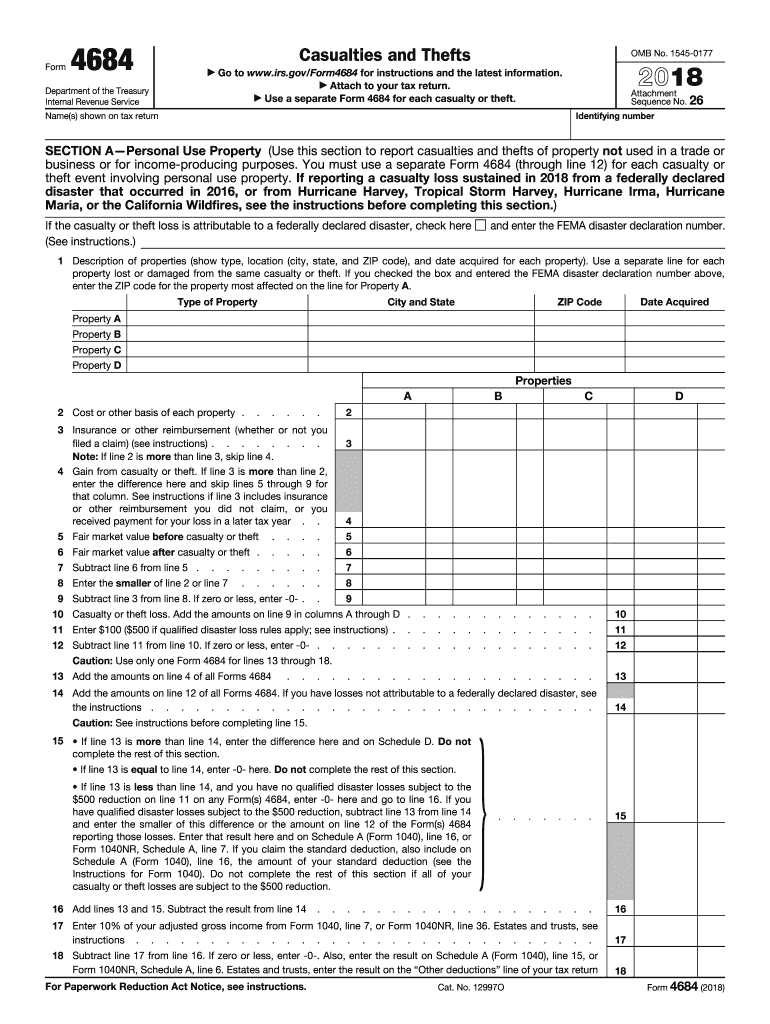
To your tax return. Use a separate Form 4684 for each casualty or theft. Attachment Sequence No. 26 Identifying number Name(s) shown on tax return SECTION A Personal Use Property (Use this section to report casualties and thefts of property not used in a trade or business or for income-producing purposes. You must use a separate Form 4684 (through line 12) for each casualty or theft event involving personal use property. If reporting a casualty loss sustained in 2018 from a federally d.
Loading

Open form follow the instructions

Easily sign the form with your finger

Send filled & signed form or save
How to fill out the IRS 4684 online
The IRS Form 4684 is used to report casualties and thefts. This guide will provide detailed instructions on how to fill out this form online, ensuring that you accurately report your losses.
Follow the steps to complete your IRS 4684 form accurately.
- Click ‘Get Form’ button to obtain the form and open it in the editor.
- Provide your identifying number and the name(s) shown on your tax return in the designated sections.
- In Section A, specify details about the personal use property affected by casualties or thefts, including type, location, date acquired, and the ZIP code of the most affected property.
- Enter the cost or other basis for each property in the corresponding fields. Complete this for Property A through Property D.
- Indicate any insurance or other reimbursements you received for the reported losses.
- Calculate your casualty or theft loss by entering the fair market values before and after the event. Follow the instructions provided for proper calculations.
- Complete Section B if applicable, detailing business and income-producing property losses. Repeat the data entry process for each casualty or theft event.
- In Section C, fill out the required fields concerning theft losses from Ponzi-type investment schemes, if this applies to your situation.
- If you are claiming a federally declared disaster loss, complete Section D with the necessary details regarding the disaster.
- Review all entries for accuracy and completeness. Once confirmed, save changes, download, print, or share the form as needed.
Complete your IRS Form 4684 online today to ensure your casualty and theft losses are accurately reported.
Experience a faster way to fill out and sign forms on the web. Access the most extensive library of templates available.
Related content
SECTION A—Personal Use Property (Use this section to report casualties and thefts of...
Caution: Use only one Form 4684 for lines 13 through 18. 13. Add the amounts on line 12 of...
You must use a separate Form 4684 (through line 12) for each casualty or theft event...
Get answers to your most pressing questions about US Legal Forms API.
How do I add depreciation to TurboTax?
To add depreciation to TurboTax, go to the 'Business Assets' section. Enter the details of your assets, and TurboTax will guide you through calculating your depreciation expense. In context with IRS 4684, it's crucial to ensure that these calculations are accurate to maximize your deductions.
How long does it take for the IRS to investigate identity theft?
The time for the IRS to investigate identity theft can vary widely, averaging several months. Once you report the issue and submit proper documentation, the IRS will start their inquiry. During this process, understanding how IRS 4684 might relate to your tax situation can give you clarity and help manage any related losses.
How to add self-employed health insurance deduction in TurboTax?
To add your self-employed health insurance deduction in TurboTax, first navigate to the 'Deductions & Credits' section. Look for 'Self-Employed Health Insurance Deduction' and input your insurance premiums. This can help lower your taxable income, complementing the calculations you make on IRS 4684.
Do I need to file form 4684?
You need to file form 4684 if you have suffered a casualty or theft loss that you plan to deduct. The form allows you to itemize these losses on your tax return. Always review your situation carefully or consult a tax professional to determine if filing IRS 4684 is necessary for your circumstances.
How to get 147C letter from IRS online?
To get a 147C letter from the IRS online, you must log into the IRS website and use their online services to request a transcript. This letter can confirm your tax information, including any loss reported on IRS 4684. If you prefer, you can also call the IRS directly to request this document.
How to add form 4684 TurboTax?
To add form 4684 in TurboTax, go to the 'Deductions & Credits' section of your tax return. Look for the option related to 'Casualty and Theft Losses' and select it. This section guides you through the process of entering your data for IRS 4684 to ensure proper reporting of any deduction.
How to claim hurricane damage on taxes?
To claim hurricane damage on your taxes, you need to fill out IRS 4684, which allows you to report property losses from disasters. Gather all relevant documentation, including photographs and repair estimates. Once you have this information, complete the form accurately and attach it to your tax return to maximize your deductible losses.
How to enter form 4684 in TurboTax?
To enter form 4684 in TurboTax, start by opening your tax return. Navigate to the section on income, and look for the option to add or edit forms. You can then enter the required details for IRS 4684, ensuring you accurately report any gains or losses related to casualty and theft.
How to report hurricane damage on tax return?
To report hurricane damage on your tax return, use IRS Form 4684 for casualty losses. This form will help you quantify the damage and determine what you can deduct. Be sure to maintain documentation of the damage, as well as any insurance reimbursements received. By properly completing this form, you can navigate the complexities of tax deductions related to hurricane losses effectively.
How to fill out a form 4684?
Filling out IRS Form 4684 requires specific details about your theft loss. Start with identifying the type of loss and providing the date of the theft. Then, calculate the amount you can deduct based on the fair market value before and after the theft event. If you find the process challenging, consider using the uslegalforms platform for guidance and templates that streamline the process.
Use professional pre-built templates to fill in and sign documents online faster. Get access to thousands of forms.
If you believe that this page should be taken down, please follow our DMCA take down process here.
This form is available in several versions. Select the version you need from the drop-down list below.