Nt of the Treasury - Internal Revenue Service Instructions for Employee You have received this form because your employer (or transfer agent) transferred your employer s stock to you pursuant to your exercise of an incentive stock option (ISO). You must recognize (report) gain or loss on your tax return for the year in which you sell or otherwise dispose of the stock. Keep this form and use it to figure the gain or loss. For more information, see Pub. 525, Taxable and Nontaxable Income. When.
Loading

Open form follow the instructions

Easily sign the form with your finger

Send filled & signed form or save
How to fill out the IRS 3921 online
Filling out the IRS Form 3921 online can be straightforward if you follow the correct steps. This guide will provide you with clear instructions to help you navigate each section of the form and ensure accurate completion.
Follow the steps to fill out the IRS 3921 online.
- Click the ‘Get Form’ button to access the form and open it in your preferred digital editor.
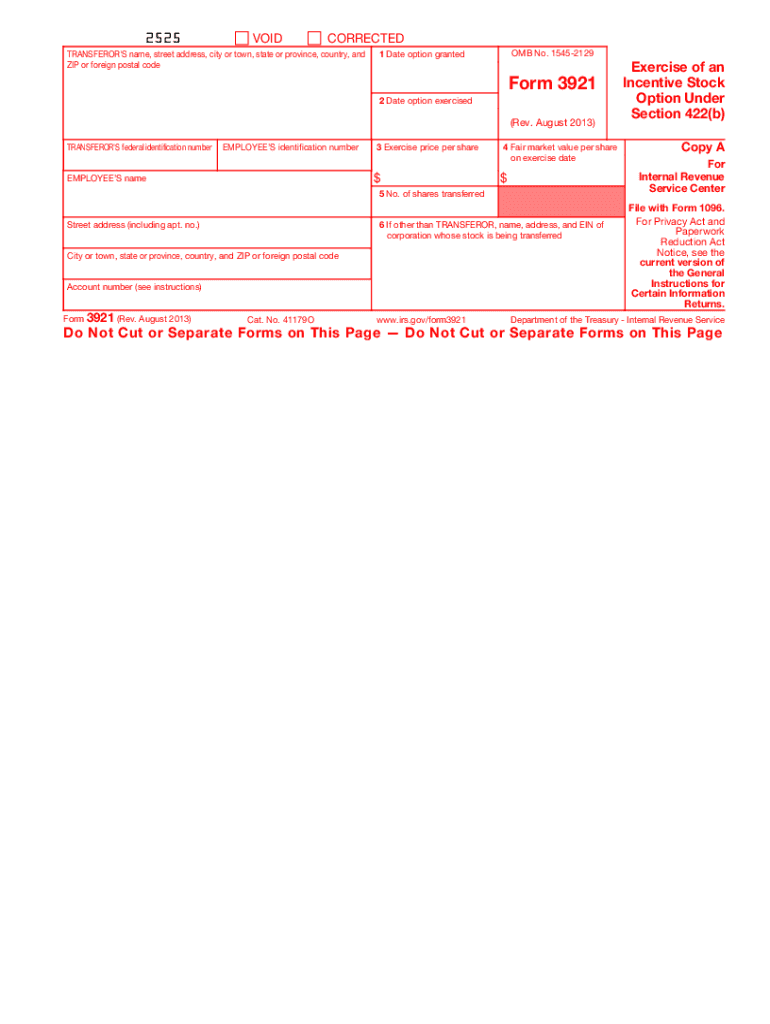
- Begin by entering the transferor's name, street address, city or town, state or province, country, and ZIP or foreign postal code in the designated fields.
- Input the transferor's federal identification number directly into the corresponding box.
- Enter the employee’s identification number accurately in the next field.
- Fill in the date the option was granted in Box 1.
- Provide the date the option was exercised in Box 2.
- Input the exercise price per share in Box 3.
- In Box 4, enter the fair market value per share on the exercise date.
- Indicate the number of shares transferred in Box 5.
- If applicable, fill in the name, address, and EIN of the corporation whose stock is being transferred in Box 6.
- Review all entries for accuracy and completeness before submitting.
- Once all changes are saved, you may download, print, or share the completed form.
Start filling out your IRS 3921 online today for a smoother tax experience.
Experience a faster way to fill out and sign forms on the web. Access the most extensive library of templates available.
Related content
Jun 6, 2025 — Corporations file this form for each transfer of stock to any person...
Jun 6, 2025 — Eligible educational institutions file Form 1098-T for each student they...
May 2, 2017 — You must notify employees who have no income tax withheld that they may be...
Get answers to your most pressing questions about US Legal Forms API.
How to report 3921 on tax return?
To report IRS 3921 on your tax return, include the details from the form in the appropriate sections of your return. It's crucial to enter the correct amounts for income and any capital gains or losses associated with the exercise of the options. For assistance, consider using US Legal Forms to help organize your paperwork effectively.
Who issues form 3921?
The employer issues IRS 3921 after an employee exercises their incentive stock options. This form contains important information that helps employees report their stock option activities accurately on their tax returns. Thus, keeping communication open with your employer is vital.
Who generates form 3922?
Form 3922 is generated by the employer for employees who have exercised non-qualified options. This form is similar to IRS 3921 but pertains to different types of stock options. It is essential that you receive the correct form from your employer for proper tax reporting.
Does Carta prepare 3921?
Yes, Carta is equipped to prepare IRS 3921 forms for your company. They streamline the process, ensuring that all necessary details are accurate and submitted on time. Utilizing Carta can help mitigate the complexities associated with managing stock options.
Who prepares form 3921?
Typically, the employer is responsible for preparing IRS 3921. This means that your company should provide you with this form after you exercise your stock options. Ensuring you receive this form in a timely manner is essential for accurate tax reporting.
Do employees need to file form 3921?
Yes, employees must file IRS 3921 if they exercised incentive stock options. The form provides crucial information regarding the transactions related to these options. Filing it helps ensure that you accurately report your income, which is essential for tax purposes.
What is the penalty for not filing 3921?
If you fail to file form 3921 when required, you may face significant penalties from the IRS. The penalty can vary depending on the duration of the delay but may amount to hundreds of dollars per form. Additionally, not filing can lead to issues during your tax return processing and potential audits. Using a service like uslegalforms can help you avoid these pitfalls by ensuring timely and accurate filing of IRS 3921.
What does an employee do with form 3921?
As an employee, you will receive form 3921 from your employer if you exercised incentive stock options. It's important to keep this form for your records, as it contains essential information needed for your tax reporting. You will use the details from the IRS 3921 when preparing your tax return to accurately report income and any capital gains. Staying organized with this documentation ensures you meet your tax obligations seamlessly.
How do I report incentive stock options on my taxes?
To report incentive stock options on your taxes, you generally need to use form 3921 if you exercised the options. The income from the exercise may also need to be reported on your income tax return. If you later sell the stock, you will report that sale on Schedule D and could be subject to capital gains tax. Tracking these details correctly will help you manage your tax responsibilities efficiently.
When to file form 3921?
You should file form 3921 by January 31 if your company granted you incentive stock options that were exercised in the previous year. Filing this form on time is crucial to adhere to IRS regulations regarding stock options. Late filing can result in penalties, so it is wise to stay organized and keep track of your stock option transactions. Using platforms like uslegalforms can simplify the filing process for you.
Use professional pre-built templates to fill in and sign documents online faster. Get access to thousands of forms.
If you believe that this page should be taken down, please follow our DMCA take down process here.
This form is available in several versions. Select the version you need from the drop-down list below.