Loading
Form preview
  • US Legal Forms
  • Form Library
  • Tax Forms
  • Executive Department Treasury IRS Forms
  • Irs 3903 2016

Get Irs 3903 2016

E closely related both in time and place to the start of work at your new job location. For more details, see Pub. 521. Members of the Armed Forces may not have to meet the distance and time tests. See Members of the Armed Forces later in the instructions. TIP Distance Test Your new principal workplace must be at least 50 miles farther from your old home than your old workplace was. For example, if your old workplace was 3 miles from your old home, your new workplace must be at least 53 miles.

This website is not affiliated with IRS

How it works

  1. Open form

    Open form follow the instructions

  2. Easily sign form

    Easily sign the form with your finger

  3. Share form

    Send filled & signed form or save

How to fill out the IRS 3903 online

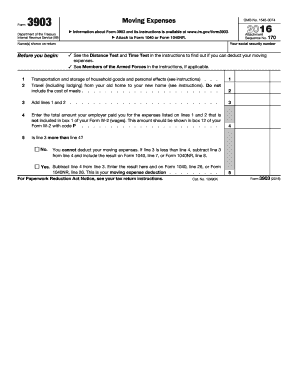
The IRS 3903 form is essential for individuals seeking to deduct moving expenses related to starting a new job. This guide provides a clear, step-by-step approach to filling out the form online, ensuring that users understand each section and field without difficulty.

Follow the steps to complete the IRS 3903 form effectively.

  1. Click 'Get Form' button to access the form and open it for editing.
  2. Enter your social security number and the name(s) shown on your return at the top of the form. This section is crucial for identification purposes.
  3. In section one, input the total expenses related to the transportation and storage of your household goods and personal effects. Be sure to review the related instructions for any necessary details.
  4. In section two, report the travel expenses from your old home to your new home. Include the costs related to transportation and lodging, but do not include meal expenses.
  5. Add the totals from lines one and two and enter the sum in section three. This total will establish the basis for your moving expense deduction.
  6. Reflect on section four to enter the total amount your employer reimbursed you for your moving expenses. Be sure this amount aligns with your Form W-2 to avoid discrepancies.
  7. Evaluate if the amount on line three exceeds the amount on line four. If yes, proceed to calculate your deduction by subtracting the lesser from the greater and note the result. If no, you cannot deduct your moving expenses.
  8. Conclude by saving your changes. You may also choose to download, print, or share the completed form as needed.

Complete your IRS 3903 form online today for a streamlined filing experience.

Get form

Experience a faster way to fill out and sign forms on the web. Access the most extensive library of templates available.

Related content

About Form 3903, Moving Expenses
Jan 28, 2025 — Use Form 3903 to figure your moving expense deduction for a move related...
Learn more
IRS Form 3903 - University of Colorado
Form 3903 summarizes the total cost for transportation, storage and lodging minus the...
Learn more
2017 Publication 521
Jan 3, 2018 — Form 3903, Moving Expenses, is used to claim the mov- ing expense...
Learn more

Related links form

NC PD 107 1995 Commercial Vehicle/Equipment Lease Agreement Community Service Letter of Verification Form English Translation of Birth Certificate

Questions & Answers

Get answers to your most pressing questions about US Legal Forms API.

Contact support

You will enter moving expenses on IRS Form 3903, which you can find on the IRS website or through various tax software platforms. Ensure that your expenses are clearly documented and eligible under IRS 3903. After completing the form, incorporate it into your overall tax filing to benefit from your deduction.

To report moving expenses, you should fill out IRS Form 3903, detailing all allowable expenses incurred during your move. Include the necessary information about the new job location and how your move meets the eligibility criteria. By following this process, you can ensure that your moving costs are properly accounted for on your tax return.

To deduct moving expenses, you first need to determine if your move qualifies under IRS 3903 requirements. Eligible moves typically require a change in job location or new job opportunities. You can then use Form 3903 to report these expenses on your tax return, allowing you to reduce your taxable income by the qualifying expenses.

To record moving expenses effectively, you should gather all relevant receipts and documentation related to your move. Look for expenses that qualify under IRS 3903 guidelines, which may include costs for packing, transportation, and storage. Keep a detailed record of these expenses to ensure accurate reporting when filing your taxes.

In accounting, a moving expense refers to costs associated with transferring a business or individual from one location to another. This includes not just physical relocation costs but also administrative expenses related to the move. Accurate accounting for these expenses, especially with IRS 3903, is important for both tax reporting and financial transparency. Using services from uslegalforms can assist you in keeping a reliable record of these expenditures.

IRS 3903 is a tax form used to report moving expenses. This form allows individuals to deduct certain relocation costs incurred due to a job change or transfer. Understanding how to correctly fill out IRS 3903 can significantly impact your tax return, potentially leading to substantial savings. You can streamline your filing process with resources available from uslegalforms, ensuring you take advantage of all deductions.

To categorize moving expenses, you should break them down into necessary categories such as transportation, lodging, and storage fees. This organization will make it easier to prepare your taxes, particularly when using IRS 3903 to report eligible costs. Proper categorization ensures that you can maximize any potential deductions. Consider using uslegalforms to find resources that clarify which expenses qualify for reporting.

A moving budget is a detailed plan that outlines the expected costs associated with moving. It typically includes expenses like hiring movers, packing supplies, and travel costs. By creating a moving budget, individuals can better manage their finances during the relocation process. Utilizing the IRS 3903 can also help track eligible moving expenses for potential tax deductions.

Relocation expenses refer to the costs incurred when an employee moves to a new location for work. This includes expenses such as transportation, temporary housing, and the costs associated with moving personal belongings. Understanding these expenses is crucial for tax purposes, especially when filing with the IRS 3903 form. You may find that reporting these costs accurately can lead to significant tax benefits.

Moving expenses are reported directly on your tax return using IRS Form 3903. This form allows you to list your qualifying moving expenses and calculate the deductible amount. Ensure you attach the form to your overall tax return, whether you file electronically or via mail. This structured reporting helps you maximize your deductions.

Get This Form Now!

Use professional pre-built templates to fill in and sign documents online faster. Get access to thousands of forms.
If you believe that this page should be taken down, please follow our DMCA take down processhere.

Industry-leading security and compliance

US Legal Forms protects your data by complying with industry-specific security standards.
  • In businnes since 1997
    25+ years providing professional legal documents.
  • Accredited business
    Guarantees that a business meets BBB accreditation standards in the US and Canada.
  • Secured by Braintree
    Validated Level 1 PCI DSS compliant payment gateway that accepts most major credit and debit card brands from across the globe.
Get IRS 3903
  • Adoption
  • Bankruptcy
  • Contractors
  • Divorce
  • Home Sales
  • Employment
  • Identity Theft
  • Incorporation
  • Landlord Tenant
  • Living Trust
  • Name Change
  • Personal Planning
  • Small Business
  • Wills & Estates
  • Packages A-Z
  • Affidavits
  • Bankruptcy
  • Bill of Sale
  • Corporate - LLC
  • Divorce
  • Employment
  • Identity Theft
  • Internet Technology
  • Landlord Tenant
  • Living Wills
  • Name Change
  • Power of Attorney
  • Real Estate
  • Small Estates
  • Wills
  • All Forms
  • Forms A-Z
  • Form Library
  • Legal Hub
  • About Us
  • Help Portal
  • Legal Resources
  • Blog
  • Affiliates
  • Contact Us
  • Delete My Account
  • Site Map
  • Industries
  • Forms in Spanish
  • Localized Forms
  • State-specific Forms
  • Forms Kit
  • Real Estate Handbook
  • All Guides
  • Notarize
  • Incorporation services
  • For Consumers
  • For Small Business
  • For Attorneys
  • USLegal
  • FormsPass
  • pdfFiller
  • signNow
  • altaFlow
  • DocHub
  • Instapage
Form Packages
  • Adoption
  • Bankruptcy
  • Contractors
  • Divorce
  • Home Sales
  • Employment
  • Identity Theft
  • Incorporation
  • Landlord Tenant
  • Living Trust
  • Name Change
  • Personal Planning
  • Small Business
  • Wills & Estates
  • Packages A-Z
Form Categories
  • Affidavits
  • Bankruptcy
  • Bill of Sale
  • Corporate - LLC
  • Divorce
  • Employment
  • Identity Theft
  • Internet Technology
  • Landlord Tenant
  • Living Wills
  • Name Change
  • Power of Attorney
  • Real Estate
  • Small Estates
  • Wills
  • All Forms
  • Forms A-Z
  • Form Library
Customer Service
  • Legal Hub
  • About Us
  • Help Portal
  • Legal Resources
  • Blog
  • Affiliates
  • Contact Us
  • Delete My Account
  • Site Map
  • Industries
  • Forms in Spanish
  • Localized Forms
  • State-specific Forms
  • Forms Kit
Legal Guides
  • Real Estate Handbook
  • All Guides
Prepared for you
  • Notarize
  • Incorporation services
Our Customers
  • For Consumers
  • For Small Business
  • For Attorneys
Our Sites
  • USLegal
  • FormsPass
  • pdfFiller
  • signNow
  • altaFlow
  • DocHub
  • Instapage
Social Media
Call us now toll free:
+1 833 426 79 33
As seen in:
© Copyright 1999-2026 airSlate Legal Forms, Inc. 3720 Flowood Dr, Flowood, Mississippi 39232
  • Your Privacy Choices
  • Terms of Service
  • Privacy Notice
  • Content Takedown Policy
  • Bug Bounty Program
IRS 3903
This form is available in several versions.
Select the version you need from the drop-down list below.
2024 IRS 3903
Select form
  • 2024 IRS 3903
  • 2022 IRS 3903
  • 2021 IRS 3903
  • 2020 IRS 3903
  • 2019 IRS 3903
  • 2018 IRS 3903
  • 2017 IRS 3903
  • 2016 IRS 3903
  • 2015 IRS 3903
  • 2013 IRS 3903
  • 2001 IRS 3903
  • 1997 IRS 3903
Select form