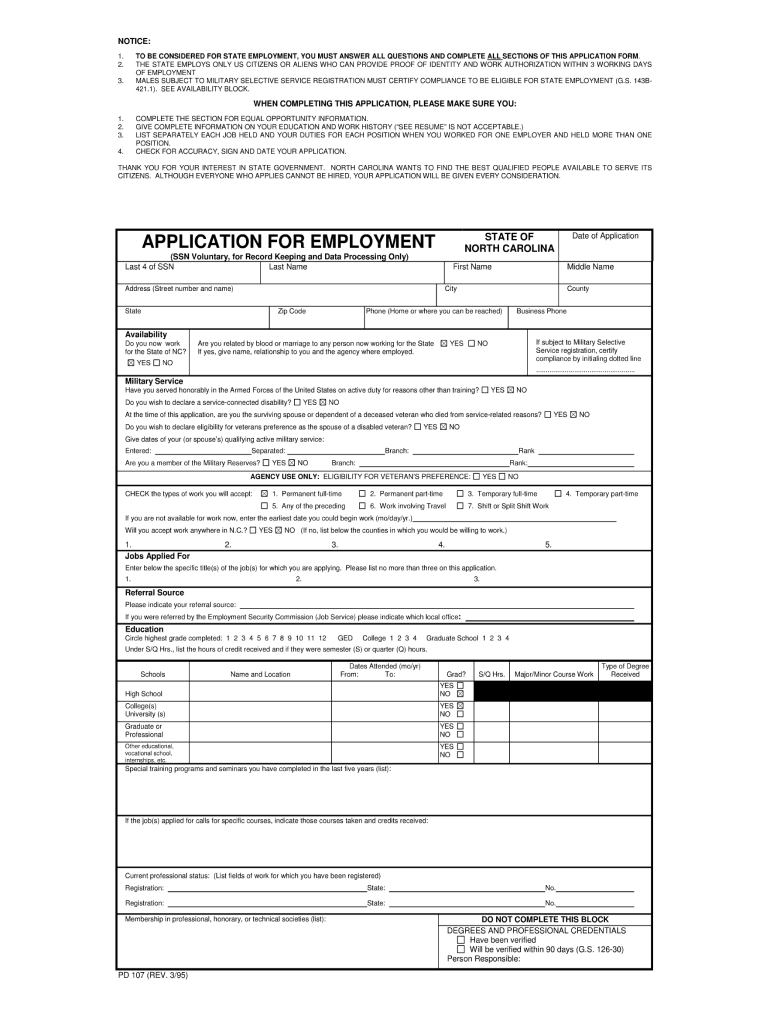
NOTICE: 1. 2. 3. TO BE CONSIDERED FOR STATE EMPLOYMENT, YOU MUST ANSWER ALL QUESTIONS AND COMPLETE ALL SECTIONS OF THIS APPLICATION FORM. THE STATE EMPLOYS ONLY US CITIZENS OR ALIENS WHO CAN PROVIDE.
Loading

Open form follow the instructions

Easily sign the form with your finger

Send filled & signed form or save
How to fill out the NC PD 107 online
Filling out the NC PD 107 form online can streamline the process and ensure accuracy. This guide will provide you with step-by-step instructions to help you complete the form effectively.
Follow the steps to fill out the NC PD 107 online.
- Click ‘Get Form’ button to obtain the form and open it in the editor.
- Begin by entering your personal information in the designated fields. This typically includes your name, address, and contact information. Ensure all details are accurate and up to date.
- Next, proceed to section two where you will provide relevant details pertaining to the purpose of the form. Be specific and concise, as this information is critical to the processing of your request.
- In section three, review any options presented. You may need to select certain preferences or affirmative options depending on your circumstances.
- Check the accuracy of all entered information by reviewing each section carefully. It is essential to correct any mistakes before finalizing the document.
- Once you have completed and reviewed the form, you can save your changes. Look for options to download, print, or share the completed NC PD 107 form to finalize your submission.
Start filling out your NC PD 107 form online today for a seamless experience.
Experience a faster way to fill out and sign forms on the web. Access the most extensive library of templates available.
Related content
NC State Government Paper Application for Employment (PD-107). Documents. PD107-2023.pdf...
May 21, 2021 — Please mail applications to the attention of Michelle Shackelford at...
... NC. NC. VSS. VDD. A. B. VSS. VSSQ. DQ0. DM. VSSQ. VDDQ. B. C. VDDQ. DQ2. DQS. DQ1...
Get answers to your most pressing questions about US Legal Forms API.
Who is covered by the NC State Human Resources Act?
The NC State Human Resources Act provides protections for various categories of state employees, specifically those involved in human resources operations. This act covers employees in state agencies under the NC PD 107 framework, ensuring compliance with employment laws. Knowing your coverage can help you understand your rights regarding workplace issues.
How many vacation days do NC state employees get?
North Carolina state employees typically receive a set number of vacation days, which increases based on years of service. Generally, state employees earn vacation time that accrues annually. Understanding how vacation benefits work under NC PD 107 can help you plan your time off and ensure you utilize your earned benefits.
What is the minimum PD limit in NC?
The minimum PD limit in North Carolina refers to the minimum performance and disciplinary standards that state employees must meet to maintain their positions. Under NC PD 107, these standards are designed to promote accountability and ensure that all state employees perform at an acceptable level. Familiarizing yourself with these limits can help you strive for career excellence.
Who is subject to the North Carolina State Personnel Act?
The North Carolina State Personnel Act applies to most state employees across various agencies, ensuring fair treatment in employment matters. However, this act does not cover specific groups, such as members of boards, commissions, or independent agencies. Understanding your status under NC PD 107 will help you navigate your rights and obligations effectively.
Who is considered a state employee in NC?
In North Carolina, a state employee is defined as an individual who works for a state agency, including full-time and part-time positions. These employees serve in various roles across state government departments. It's essential to understand your status, as it affects your benefits and protections under the NC PD 107 regulations.
How do you fill out a title certification?
Filling out a title certification involves providing essential information about the vehicle's title status and ownership. You will need to complete specific sections, detailing any liens or claims against the title. To ensure you meet all requirements, refer to the NC PD 107 guidelines or consider using tools from uslegalforms for assistance.
How to fill out an NC title application?
To fill out an NC title application, start by downloading the NC PD 107 form from a trusted source. Carefully enter the required vehicle details, owner information, and any other pertinent details. Using a service like uslegalforms can simplify this process, ensuring accuracy and adherence to state regulations.
Does an NC title application need to be notarized?
Yes, in some cases, the NC title application may need notarization, especially if there are multiple owners or if it's a transfer of ownership. This step adds an extra layer of security, confirming that all parties have agreed to the transaction. Always check the current requirements on the NC PD 107 form to ensure compliance.
How to apply to NC state?
To apply to NC state, begin by visiting the official state website. You will find detailed instructions on the application process and necessary forms, including the NC PD 107. Completing these steps accurately will ensure your application is reviewed promptly.
Are teachers state employees in NC?
Yes, teachers in North Carolina are considered state employees and are governed by the State Personnel Act. This classification ensures that teachers have access to state employee benefits and protections. By understanding the implications of NC PD 107, educators can better navigate their rights and responsibilities within the state's educational system.
Use professional pre-built templates to fill in and sign documents online faster. Get access to thousands of forms.
If you believe that this page should be taken down, please follow our DMCA take down process here.
This form is available in several versions. Select the version you need from the drop-down list below.