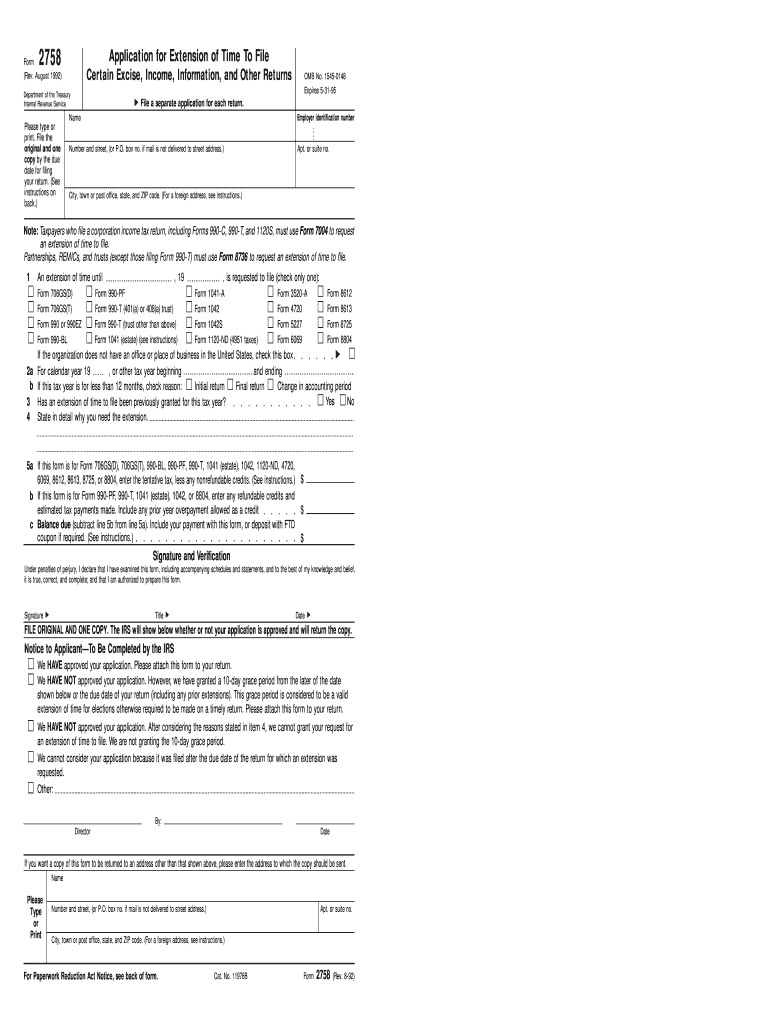
O. box no. if mail is not delivered to street address.) Apt. or suite no. City, town or post office, state, and ZIP code. (For a foreign address, see instructions.) Note: Taxpayers who file a corporation income tax return, including Forms 990-C, 990-T, and 1120S, must use Form 7004 to request an extension of time to file. Partnerships, REMICs, and trusts (except those filing For m 990-T) must use Form 8736 to request an extension of time to file. 1 , 19 An extension of time until Form 706G.
Loading

Open form follow the instructions

Easily sign the form with your finger

Send filled & signed form or save
How to fill out the IRS 2758 online
Filling out the IRS Form 2758 is essential for those seeking an extension of time to file specific tax returns. This guide will provide clear, step-by-step instructions to help users navigate the process with confidence.
Follow the steps to successfully complete the IRS Form 2758 online.
- Use the ‘Get Form’ button to access the IRS Form 2758 and open it for editing.
- Begin by entering your name and employer identification number in the appropriate fields.
- Fill in your address, including the number, street, apartment or suite number (if applicable), city, state, and ZIP code.
- Indicate the tax year for which you are requesting an extension. Provide accurate start and end dates if it is not a calendar year.
- Specify the tax form for which you are requesting an extension by checking the corresponding box under Line 1.
- Detail your reasons for needing the extension in Line 4, ensuring to provide ample explanation.
- If applicable, fill in the tentative tax amounts, nonrefundable credits, and the balance due as indicated in Lines 5a, 5b, and 5c.
- Complete the signature and verification section, ensuring the signatory is authorized.
- Review the completed form for accuracy, then save your changes, and you can download, print, or share the form as needed.
Start your online process to fill out the IRS Form 2758 today.
Experience a faster way to fill out and sign forms on the web. Access the most extensive library of templates available.
Related content
Cited by 4 — Note: An extension of time granted by filing Form 2758 will apply only to...
If you need more time to file Form 1042, you may submit Form 2758,. Application for...
We realized strong growth in our Life Storage Solutions division. with management fee...
Get answers to your most pressing questions about US Legal Forms API.
How can I get in touch with a live person at the IRS?
To reach a live person at the IRS, you can call their customer service number and follow the prompts to speak with a representative. Be prepared for possible wait times, especially during peak seasons. If you need immediate assistance regarding IRS 2758 inquiries, consider utilizing the USLegalForms platform, which offers resources and guidance for various tax-related issues.
Why did the IRS deposit $2800 in my account?
An IRS deposit of $2800 may indicate that you've qualified for a credit or refund related to your recent tax filings, possibly under the IRS 2758 criteria. Reviewing your tax records will help clarify the source of the deposit and ensure that all information is accurate. If you have concerns about the deposit, it's advisable to contact the IRS or a qualified tax advisor.
What are good reasons to request an abatement of IRS penalties?
Requesting an abatement of IRS penalties can be justified by reasons such as reasonable cause, first-time penalty abatement, or reliance on professional tax advice. Such situations often align with the guidelines established in the IRS 2758 rulings. If you believe you have a valid reason, consider using resources like USLegalForms to assist with your application for abatement.
What is the IRS form 8995 used for?
IRS Form 8995 is used to calculate the Qualified Business Income Deduction for individuals and entities. If you're self-employed or a small business owner, understanding this form can help you take full advantage of the benefits associated with the IRS 2758 tax credit. Make sure to fill it out correctly to maximize your potential tax savings.
Why did I get $2800 from the IRS today?
Receiving $2800 from the IRS could be due to a tax refund or a stimulus payment related to the IRS 2758 provisions. It's essential to check your tax filings to understand your eligibility for such payments. If you're unsure, you can visit the IRS website or contact a tax expert for clear guidance on your specific case.
What is the $2800 tax credit?
The $2800 tax credit is a financial benefit provided by the IRS, allowing eligible taxpayers to reduce their tax liability. This credit is often associated with various tax relief initiatives, including those related to the IRS 2758 guidelines. If you think you qualify, it's wise to consult with a tax professional for precise information tailored to your situation.
Why did I get $1400 from the IRS today?
Receiving $1,400 from the IRS could be related to a number of factors, such as a refund from overpaid taxes or the Economic Impact Payment. It’s essential to review your recent tax filings to understand the source of this payment. Exploring IRS 2758 can help you retrieve detailed information regarding your tax status and any refunds owed.
Who qualifies for the IRS fresh start program?
The IRS Fresh Start Program is designed for individuals and small businesses struggling with tax debt. Eligible participants usually include those who owe $50,000 or less and meet certain income requirements. By understanding the IRS 2758, you can better navigate the Fresh Start Program, taking advantage of its benefits.
What is the IRS form 8995 for?
IRS form 8995 is primarily used to calculate the Qualified Business Income (QBI) deduction. This deduction can significantly reduce your taxable income, allowing eligible taxpayers to keep more of their earnings. Properly utilizing IRS 2758 can guide you in harnessing all available deductions, maximizing your tax savings.
Who must file the IRS form 8995?
IRS Form 8995 must be filed by eligible taxpayers claiming the Qualified Business Income deduction. This form helps determine the amount you can deduct, making it essential for those with qualifying business income. To navigate this process efficiently, consult IRS 2758 for comprehensive guidance.
Use professional pre-built templates to fill in and sign documents online faster. Get access to thousands of forms.
If you believe that this page should be taken down, please follow our DMCA take down process here.
This form is available in several versions. Select the version you need from the drop-down list below.