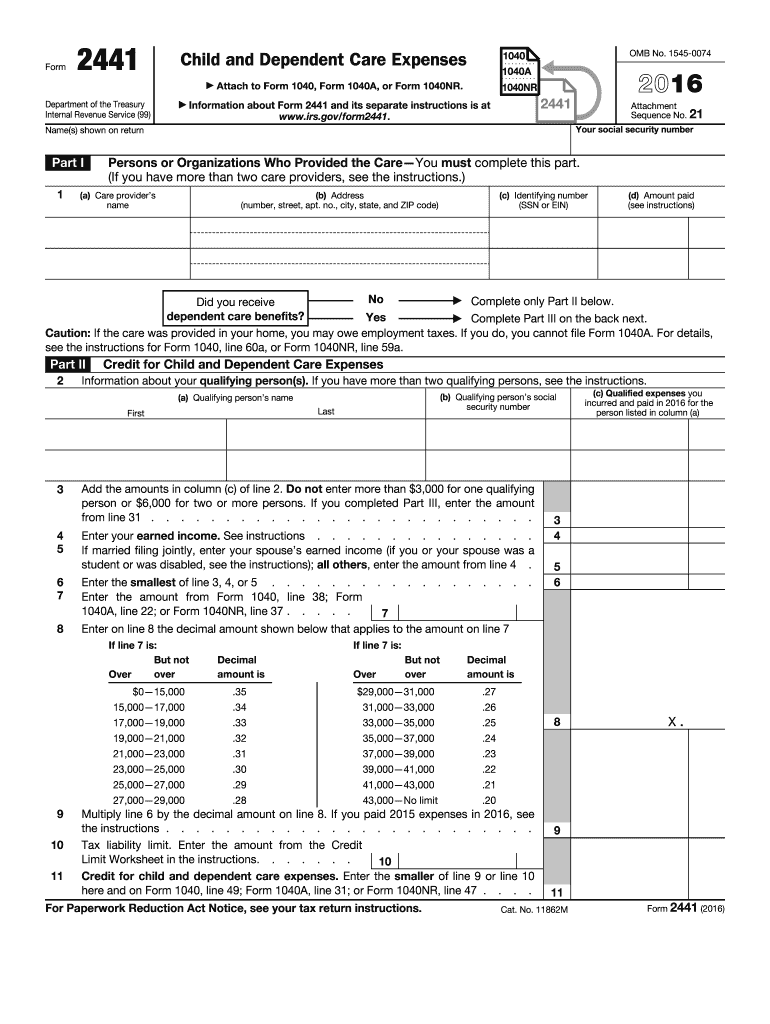
1040, line 49; Form 1040A, line 31; or Form 1040NR, line 47 . . . . For Paperwork Reduction Act Notice, see your tax return instructions. X. 9 11 Cat. No. 11862M Form 2441 (2016) Page 2 Form 2441 (2016) Part III Dependent Care Benefits 12 Enter the total amount of dependent care benefits you received in 2016. Amounts you received as an employee should be shown in box 10 of your Form(s) W-2. Do not include amounts reported as wages in box 1 of Form(s) W-2. If you were self-employed or.
Loading

Open form follow the instructions

Easily sign the form with your finger

Send filled & signed form or save
How to fill out the IRS 2441 online
Filling out the IRS 2441 form online can be straightforward with the right guidance. This form is used to claim the child and dependent care expenses credit, helping users receive potential tax benefits for eligible childcare expenses.
Follow the steps to complete the form accurately.
- Click ‘Get Form’ button to obtain the form and open it for completion.
- In Part I, enter the names and addresses of the care providers. Include their identifying numbers and the amounts paid to them for care services.
- Proceed to Part II, where you will provide information about your qualifying persons. Enter their names and Social Security numbers.
- Calculate the total qualifying expenses from Part II. Remember, the total cannot exceed $3,000 for one qualifying person or $6,000 for two or more.
- Enter your earned income on the indicated line. If you are married and filing jointly, include your spouse’s earned income, taking into consideration any special circumstances like disability or student status.
- Follow the instructions to determine any applicable limits on your claimed credit based on your income.
- Complete Part III if you received dependent care benefits. Report the total amount of benefits received and include any amounts carried over from previous years.
- Once all necessary information has been entered, save your changes, and choose whether to download, print, or share the form.
Complete your IRS 2441 form online today to ensure you receive the benefits you're eligible for.
Experience a faster way to fill out and sign forms on the web. Access the most extensive library of templates available.
Related content
Dec 4, 2024 — If you paid someone to care for your child or other qualifying person so...
2022 · Cited by 1 — You must include on line 2 of Form. 2441, Child and Dependent Care...
3. Add the amounts in column (c) of line 2. Don't enter more than $3,000 for one...
Get answers to your most pressing questions about US Legal Forms API.
What proof do you need for a child care tax credit?
To claim the child care tax credit, you typically need proof of your eligible childcare expenses. This proof may include receipts, invoices, or a statement from the care provider including their tax identification number. IRS 2441 requires you to document these expenses correctly to ensure eligibility for the credit. Utilizing platforms like US Legal Forms can assist you in organizing your records effectively to support your claim.
How do I claim my dependent care tax credit?
To claim your dependent care tax credit, begin by gathering all necessary documentation for your eligible care expenses. Next, complete IRS 2441 as part of your tax return, ensuring you include all qualifying costs and the appropriate information about your dependents. Remember, accurate reporting will enable you to capture the full amount you deserve. For further support, check out US Legal Forms to access a range of resources designed to help you with tax forms and filings.
Why is TurboTax making me fill out form 2441?
TurboTax prompts you to fill out form 2441 because it is essential for claiming the child and dependent care credit correctly. This form provides the IRS with detailed insights into your care expenses and the dependents in your care, which is critical for accurate tax reporting. By completing IRS 2441, you can ensure you receive the credit due to you, maximizing your tax refund. If you need assistance, consider using the robust features of US Legal Forms to simplify the process.
Why am I only getting $1200 for dependent care credit?
Receiving only $1200 for your dependent care credit may be due to the limitations set by IRS 2441. The amount you qualify for can depend on your income, the number of qualifying individuals, and the total care expenses incurred. If your income is higher, it could reduce the maximum credit available to you. Make sure to review any changes in your circumstances and the specific calculations reflected in your filing.
What disqualifies the taxpayer from claiming the child and dependent care credit?
Several factors may disqualify you from claiming the child and dependent care credit, often referenced in IRS 2441. For example, if your care provider is a relative, or if your dependents do not meet the age or residency requirements, you may not be eligible. Additionally, if your income exceeds certain limits, this could further affect your eligibility. Reviewing the IRS 2441 instructions closely will provide you with a clearer understanding.
Who claims dependent care credit?
The dependent care credit is typically claimed by the taxpayer who incurred the child care expenses necessary for working or studying. In most cases, this means the custodial parent or guardian fills out the IRS 2441 to claim the credit. Ensure you understand who holds the primary responsibility for claiming this benefit to maximize your tax advantages.
How to calculate line 10 on form 2441?
To calculate line 10 on form 2441, you'll need to total your qualifying child and dependent care expenses, then apply the applicable percentage based on your adjusted gross income. This process can streamline your credit calculation. If you're uncertain about the exact calculations, consider leveraging resources like uslegalforms, which can guide you through the process.
Who needs to fill out form 2441?
Taxpayers who incurred expenses for child and dependent care in order to work, or who maintain full-time student status, need to complete the IRS 2441 form. This form applies to anyone seeking to gain credits for care provided to children or dependents under the age of 13. Make sure you understand your eligibility to benefit from this tax relief tool.
What is line 10 on my tax return?
Line 10 on your tax return typically refers to the total amount of your Child and Dependent Care Credit. This line summarizes the calculation from the IRS 2441 and directly impacts your overall tax liability. Make sure to review this line carefully, as it reflects your filing accuracy.
What is the correct amount of their Child and Dependent Care Credit?
The correct amount of the Child and Dependent Care Credit depends on your expenses, income, and the number of dependents you are claiming. You can claim up to 35% of your qualifying expenses, with a maximum of $3,000 for one child or $6,000 for two or more children. To determine your accurate credit, fill out the IRS 2441 to ensure all eligible expenses are captured.
Use professional pre-built templates to fill in and sign documents online faster. Get access to thousands of forms.
If you believe that this page should be taken down, please follow our DMCA take down process here.
This form is available in several versions. Select the version you need from the drop-down list below.