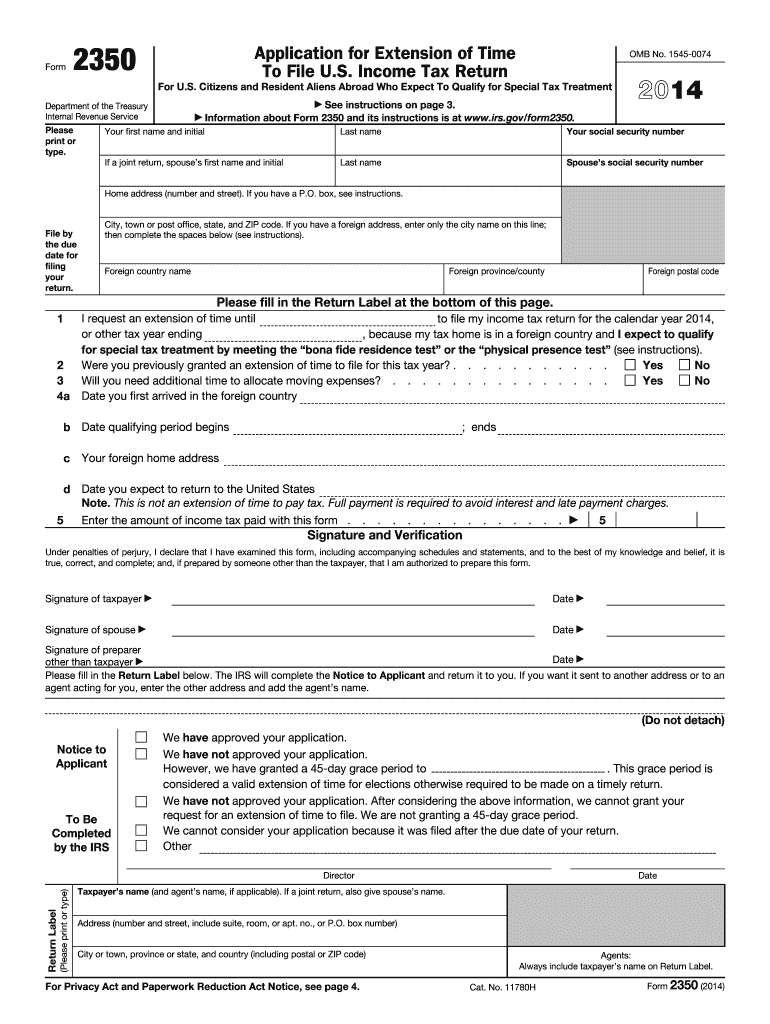
Ime to file. We are not granting a 45-day grace period. We cannot consider your application because it was filed after the due date of your return. Other (Please print or type) Return Label Director Date Taxpayer s name (and agent s name, if applicable). If a joint return, also give spouse s name. Address (number and street, include suite, room, or apt. no., or P.O. box number) City or town, province or state, and country (including postal or ZIP code) For Privacy Act and Paperwork R.
Loading

Open form follow the instructions

Easily sign the form with your finger

Send filled & signed form or save
How to fill out the IRS 2350 online
Filling out the IRS Form 2350 can seem daunting, especially for those not well- in tax terminology. This guide will provide clear, step-by-step instructions for completing the form online, ensuring that you can effectively request an extension to file your U.S. income tax return.
Follow the steps to successfully fill out the IRS 2350 online.
- Press the ‘Get Form’ button to obtain the form, which will open it in your online editor.
- Enter your first name, initial, last name, and social security number in the appropriate fields. If you are filing jointly, also include your spouse’s first name, initial, last name, and social security number.
- Provide your home address, including the number and street. If applicable, specify your P.O. box and ensure to fill out the city, state, and ZIP code. For a foreign address, only the city name is needed initially, followed by the complete foreign country name, province/county, and postal code.
- Indicate the date until which you are requesting an extension for filing your income tax return. Include any details on the tax year end date if it differs from the default date.
- Respond to the questions regarding previous extensions and the need for additional time to allocate moving expenses by selecting 'Yes' or 'No.'
- Fill in the date you first arrived in the foreign country, and specify the qualifying period's start and end dates.
- Input your current foreign home address and the expected date of your return to the United States, leaving the latter blank if uncertain.
- Enter the amount of income tax paid along with this form if applicable, and remember to check the certification box before signing.
- Sign and date the form. If applicable, have your spouse also sign. If someone else prepares the form, ensure they sign in the designated area.
- Finally, you can save the changes made to the form, download it for your records, print a hard copy, or share the completed form as necessary.
Start filling out your IRS 2350 form online today to ensure timely submission and avoid penalties.
Experience a faster way to fill out and sign forms on the web. Access the most extensive library of templates available.
Related content
Jan 21, 2025 — US citizens and resident aliens abroad file this form 2350 to ask for an...
Use Form 2350 to ask for an extension to file your tax return if you need the time to meet...
Use Form 2350 to ask for an extension of time to file your tax return only if you expect...
Get answers to your most pressing questions about US Legal Forms API.
What is the IRS form 2350 for?
IRS form 2350 is used to request an extension to file your tax return if you are a U.S. citizen or resident alien living abroad and need extra time. This form allows you to ensure compliance and avoid penalties. It is a vital tool for anyone navigating the complexities of filing taxes from an international location.
What is IRS CP523?
IRS CP523 is a notice issued when the IRS places your account in default due to unpaid trust fund taxes. This notice serves as a warning that the IRS may seize assets if payment is not made promptly. Using the IRS 2350 form can help you better manage your tax obligations and avoid further complications.
What is the IRS trust fund penalty?
The IRS trust fund penalty applies to business owners who fail to remit trust fund taxes. This penalty can amount to 100% of the unpaid balance and is imposed on responsible parties, such as business owners or executives. The IRS 2350 form can guide you through resolving these penalties and understanding your options.
What is the difference between Form 4868 and Form 2350?
Form 4868 is an application for an automatic extension of time to file your federal income tax return, while Form 2350 is specifically for requesting an extension to file U.S. income taxes for citizens living abroad. The IRS 2350 form is particularly beneficial for those who need additional time due to specific circumstances related to international residency. Understanding which form to use can ease your tax process.
What is the IRS extension form for married couples?
Married couples typically use IRS form 4868 to request a filing extension. This form allows both spouses to extend their tax filing deadline even if only one spouse is requesting an extension. If you face specific situations while living abroad, you may then consider the IRS 2350 for further flexibility.
How do I file an extension for an estate tax return?
Filing an extension for an estate tax return involves submitting IRS form 4768. When you need more time due to complexities in the estate, you should file this form to gain a six-month extension. It’s advisable to ensure timely filing using IRS 2350 if any residents abroad impact your ability to meet the deadline.
Does the IRS provide proof of an extension?
Yes, the IRS offers proof of an extension when you file the relevant form, including the IRS 2350. After processing, taxpayers receive confirmation that their extension request has been accepted. Keeping this proof is essential, as it serves as evidence that you requested additional time to file.
What is the IRS form 2350?
The IRS form 2350 is an Extension to File U.S. Income Tax Return for U.S. Citizens and Resident Aliens Living Abroad. This form allows eligible taxpayers to request an extension beyond the regular filing deadline when they need additional time to meet their tax obligations. Utilizing IRS 2350 is important for avoiding late penalties.
How to fill out a withholding exemption form?
To fill out a withholding exemption form, start by gathering the necessary personal information, including your Social Security number and filing status. Next, accurately complete the form, ensuring you check the appropriate boxes regarding exemptions. Once done, submit the withholding exemption form to your employer for processing.
What is the difference between form 4868 and 2350?
The IRS 2350 and form 4868 serve different purposes when requesting an extension for tax filing. Form 4868 grants a general extension for individual tax returns, while IRS 2350 specifically aids U.S. citizens and residents who need more time to file due to living abroad. Understanding these differences can help you choose the right form for your tax situation.
Use professional pre-built templates to fill in and sign documents online faster. Get access to thousands of forms.
If you believe that this page should be taken down, please follow our DMCA take down process here.
This form is available in several versions. Select the version you need from the drop-down list below.