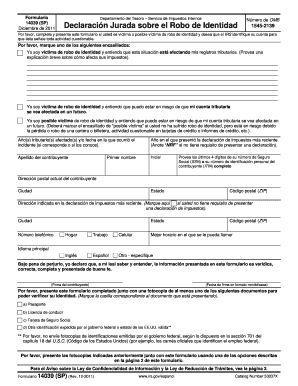
Y presente este formulario si usted es v ctima o posible v ctima de robo de identidad y desea que el IRS identifique su cuenta para que sta se ale toda actividad cuestionable. Por favor, marque uno de los siguientes encasillados: Yo soy v ctima de robo de identidad y entiendo que esta situaci n est afectando mis registros tributarios. (Provea una explicaci n breve sobre c mo afecta sus impuestos). Yo soy v ctima de robo de identidad y entiendo que puedo estar en riesgo de que mi c.
Open form follow the instructions
Easily sign the form with your finger
Send filled & signed form or save
How to fill out the IRS 14039 (SP) online
The IRS 14039 (SP) is a sworn statement for individuals who have been victims or potential victims of identity theft. This guide provides clear and actionable steps on how to complete the form online, ensuring that your submission is accurate and efficient.
Follow the steps to fill out the IRS 14039 (SP) online effectively.
- To initiate the process, click the ‘Get Form’ button to access the IRS 14039 (SP) form and open it in your preferred editing tool.
- Begin by indicating your status regarding identity theft. You must select one of the options provided, indicating if you are a victim or a possible victim of identity theft, and briefly explain how it affects your tax records.
- Next, identify the tax year(s) affected by the incident or the date when the incident occurred, if known.
- Provide information regarding your most recent tax return filing year. If you do not have a filing requirement, enter 'NRF'.
- Fill in your last name, middle initial, and first name as they appear on your tax documents.
- Enter the last four digits of your Social Security Number (SSN) or your complete Individual Taxpayer Identification Number (ITIN).
- List your current mailing address, including city, state, and ZIP code.
- If applicable, state the address shown on your most recent tax return. Check the box if you do not have a filing requirement.
- Provide your phone numbers, including home, work, and mobile, as well as your preferred language (English or Spanish) and your main language used.
- Indicate the best times for the IRS to contact you.
- Under penalty of perjury, sign and date the form in the specified format (mm/dd/yyyy) to certify that the information provided is accurate and complete.
- Attach a photocopy of at least one identification document (passport, driver’s license, Social Security card, or another valid government-issued ID) to verify your identity.
- Submit the filled-out form along with the copies of the identification using one of the specified methods such as mail or fax.
Complete your IRS 14039 (SP) form online today to protect your identity!
Experience a faster way to fill out and sign forms on the web. Access the most extensive library of templates available.
Related content
This affidavit is for victims of identity theft. To avoid delays do not use this form if...
Oct 22, 2019 — Callon Petroleum is an independent oil and natural gas company focused on...
Get answers to your most pressing questions about US Legal Forms API.
How long does it take the IRS to fix identity theft?
Fixing identity theft cases can take the IRS several months, often averaging 6 months to resolve fully. The duration largely depends on the specifics of your situation and the volume of similar cases being handled. Staying patient and keeping the lines of communication open with the IRS will help ease the process.
What happens when you file 14039?
When you file form 14039 (SP), the IRS starts an investigation into your identity theft claim. They will review your documentation and may contact you for more information. Understanding this process can help you navigate the aftermath of identity theft more effectively.
How do I get through to the taxpayer protection hotline?
To reach the taxpayer protection hotline, call the number listed on the IRS website. Be prepared to provide your personal information, including your Social Security number and details related to your IRS 14039 (SP) case. Staying organized will help facilitate a smoother communication process.
How long does it take the IRS to process form 14039?
Processing time for the IRS 14039 (SP) form generally takes about 4 to 6 weeks. This timeline can shift, depending on the IRS's caseload and the complexity of your claim. You can use the IRS's online tools to check status updates for your submission.
Can IRS form 14039 be filed electronically?
No, IRS form 14039 (SP) must be filed via mail and cannot be submitted electronically. This requirement helps the IRS manage identity theft cases carefully. For the best results, please ensure you follow all instructions closely when filing.
Can form 14039 be electronically signed?
Currently, form 14039 (SP) cannot be electronically signed and must be printed for submission. Although this may seem inconvenient, it is vital for the integrity of the identity theft protection process. Ensure all sections are completed accurately before mailing to the IRS.
How do I submit form 14039 to the IRS?
To submit form 14039 (SP) to the IRS, you need to print the completed form and mail it to the appropriate address designated on the form. Make sure to provide any additional documentation required to support your claim of identity theft. Following all submission guidelines ensures your form is filed correctly.
What IRS forms can be signed electronically?
There are several IRS forms that can be signed electronically, including many related to identity theft, like the IRS 14039 (SP). Utilizing electronic signatures expedites your submission process and provides a convenient option. Always check for updates on which forms are currently eligible for electronic signatures.
How long does it take the IRS to process forms?
The IRS processing time for forms generally varies, but it usually takes about 6 to 8 weeks. Factors affecting this timeframe include your type of submission and the IRS's current volume. To ensure timely processing of your IRS 14039 (SP) form, submit it correctly and on time.
Can e-file authorization forms be signed electronically?
file authorization forms can often be signed electronically, streamlining your tax process. This feature allows taxpayers to complete the necessary paperwork without needing to print and mail documents. Using the electronic option saves time when working with forms like the IRS 14039 (SP).
Use professional pre-built templates to fill in and sign documents online faster. Get access to thousands of forms.
If you believe that this page should be taken down, please follow our DMCA take down process here.
This form is available in several versions. Select the version you need from the drop-down list below.