Loading
Get Irs 13973 2016-2026
This website is not affiliated with IRS
How it works
-

Open form follow the instructions
-

Easily sign the form with your finger
-

Send filled & signed form or save
How to fill out the IRS 13973 online
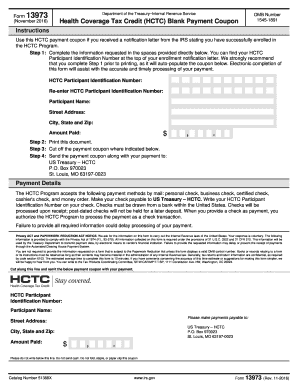
The IRS 13973 form, known as the Health Coverage Tax Credit (HCTC) Blank Payment Coupon, is essential for individuals enrolled in the HCTC Program to make their payments. This guide will walk you through each section of the form to ensure accurate and timely submission.
Follow the steps to complete your IRS 13973 form online efficiently.
- Click ‘Get Form’ button to obtain the form and open it in your chosen editing tool.
- Begin by filling in the 'HCTC Participant Identification Number' as found on your enrollment notification letter. Re-enter this number in the designated field to ensure accuracy.
- Input your full name as the participant in the appropriate space provided.
- Fill in your street address, making sure it is complete and accurate.
- Enter your city, state, and zip code in the respective fields to ensure proper identification.
- Specify the total amount you are paying by entering it in the designated payment area.
- Once all fields are completed, review your entries for accuracy before proceeding.
- Print the completed document to generate a hard copy of your payment coupon.
- Carefully cut off the payment coupon where indicated on the form.
- Mail the payment coupon along with your payment to the specified address: US Treasury – HCTC, P.O. Box 970023, St. Louis, MO 63197-0023.
Complete your IRS 13973 form online today to ensure prompt payment processing.
To qualify for an IRS stimulus check, your income must fall within the specified limits set by the IRS. Review the guidelines outlined in IRS 13973 for clarity on income thresholds and other eligibility requirements. If you meet the criteria, ensure you file your tax return timely. This will enable you to receive your payment efficiently.