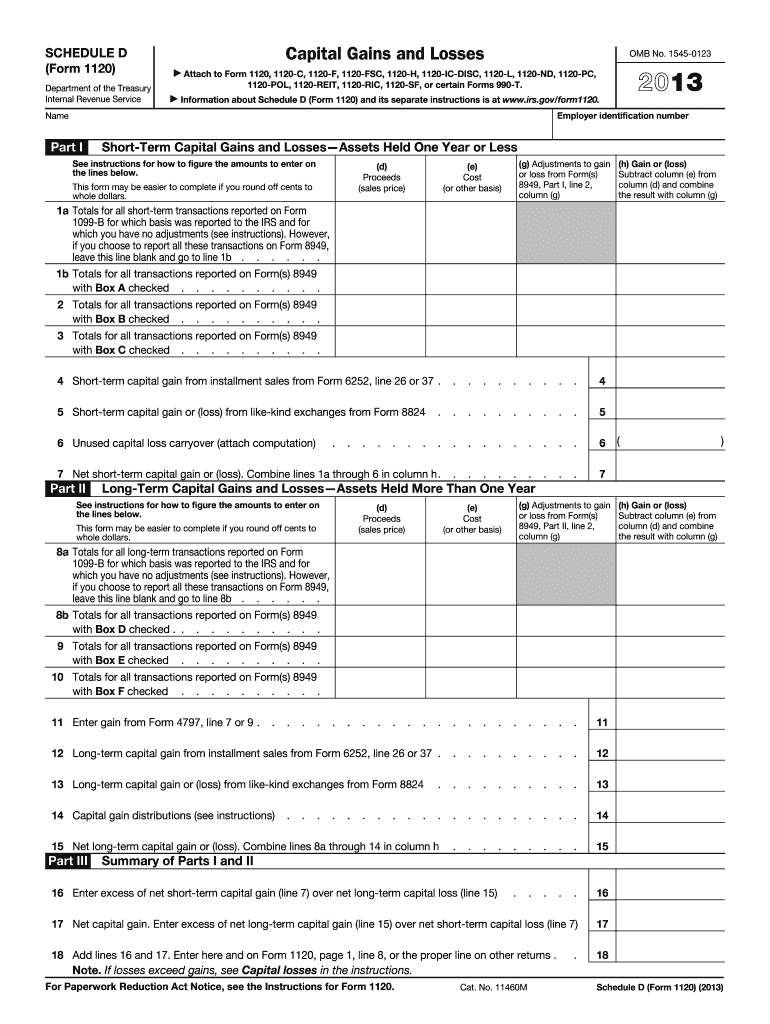
C, 1120-F, 1120-FSC, 1120-H, 1120-IC-DISC, 1120-L, 1120-ND, 1120-PC, 1120-POL, 1120-REIT, 1120-RIC, 1120-SF, or certain Forms 990-T. Information about Schedule D (Form 1120) and its separate instructions is at www.irs.gov/form1120. Employer identification number Name Part I Short-Term Capital Gains and Losses Assets Held One Year or Less See instructions for how to figure the amounts to enter on the lines below. (d) Proceeds (sales price) This form may be easier to complete if you.
Loading

Open form follow the instructions

Easily sign the form with your finger

Send filled & signed form or save
How to fill out the IRS 1120 - Schedule D online
This guide provides detailed instructions on how to effectively fill out the IRS 1120 - Schedule D online. Following these steps will help ensure accurate reporting of capital gains and losses for your business.
Follow the steps to successfully complete your IRS 1120 - Schedule D.
- Click ‘Get Form’ button to obtain the form and open it in the editor.
- Enter your employer identification number (EIN) and your business name at the top of the form.
- In line 1a, report totals for short-term transactions for which basis was reported to the IRS. If reporting via Form 8949 instead, leave this line blank and move to line 1b.
- Once all short-term transactions are completed, calculate your net short-term capital gain or loss by combining lines 1a through 6 in column (h). Record the total in line 7.
- Next, shift to Part II for long-term capital gains and losses, following a similar structure to Part I. Fill in the details for proceeds, costs, and adjustments in respective columns and determine gain or loss in column (h).
- Complete lines 8a through 15, reporting totals for long-term transactions and calculating your net long-term capital gain or loss.
- Lastly, add lines 16 and 17 and enter the final figure on Form 1120, page 1, line 8, or the appropriate line on other returns.
Complete your documents online today to ensure accurate and timely filing.
Experience a faster way to fill out and sign forms on the web. Access the most extensive library of templates available.
Related content
See instructions for how to figure the amounts to enter on the lines below. This form may...
Schedule D should be used by a taxpayer who files either Forms 1120, 1120-A...
Jan 31, 2012 — However, you may want to complete certain Form 1120 schedules, such as...
Get answers to your most pressing questions about US Legal Forms API.
How do I enter Schedule D Turbo Tax?
To enter the IRS 1120 - Schedule D in TurboTax, navigate to the section for investment income and proceed to input your capital gains and losses. The software will guide you through entering the necessary information from your investment records. Utilizing TurboTax streamlines the process and helps ensure that your Schedule D is completed accurately.
What is the Schedule D used for?
The IRS 1120 - Schedule D is used to report capital gains and losses from the sale of assets. This form aids corporations in accurately documenting their profit or loss from these transactions during the tax year. Properly filling out Schedule D is crucial for compliance and can help you determine your tax obligations.
What is the $3000 capital loss rule?
The $3000 capital loss rule allows you to deduct capital losses against ordinary income, with a limit of $3000 per year. If your losses exceed this amount, you can carry the excess forward to future tax years. This rule, associated with the IRS 1120 - Schedule D, can significantly lower your tax liability.
What sales are reported on Schedule D?
Sales reported on the IRS 1120 - Schedule D typically include the sale of stocks, bonds, and real estate. Any capital asset that you've sold during the tax year must be included. Reporting these sales accurately helps you reflect your true profit or loss on your corporate tax return.
What is the difference between Schedule D and form 8949?
The IRS 1120 - Schedule D summarizes capital gains and losses, but Form 8949 provides detailed information about each individual sale of capital assets. You typically report your sales on Form 8949 first, and then transfer the totals to Schedule D. Both forms are important for an accurate tax return, ensuring you comply with IRS requirements.
What is the difference between Schedule D and 4797?
While both forms deal with the sale of assets, the IRS 1120 - Schedule D focuses on capital gains and losses, whereas Form 4797 deals specifically with the sale of business property. Essentially, Schedule D is for individual capital assets, while Form 4797 addresses property used in a trade or business. Determining which form to use depends on the nature of the asset you are reporting.
What is a Schedule D on 1120?
The IRS 1120 - Schedule D is a form used by corporations to report capital gains and losses. This schedule details the sale of capital assets, such as stocks and real estate. Using Schedule D helps ensure that you accurately report your gains and losses to the IRS. It's an essential part of completing your corporate tax return.
Do I have to file a Schedule D if I sold my house?
If you sold your house, you may not need to file IRS 1120 - Schedule D unless you had a gain that exceeded the exclusion limits. Generally, if you profit from the sale and it doesn't qualify as a primary residence, you’ll need to report it. Consulting relevant tax forms and possibly a tax expert can clarify your specific filing requirements.
Who sends Schedule D?
Typically, the corporation completing the IRS 1120 - Schedule D submits this form along with its tax return. If you're using a tax professional, they will handle the filing process for you. It's crucial that Schedule D is submitted on time to avoid penalties.
Who completes Schedule E?
Schedule E is completed by individuals and entities that report supplemental income or loss. This includes income from rental properties or partnerships. Although Schedule E may not generally relate to the IRS 1120 - Schedule D directly, it’s important for those who have rental activities alongside capital gains reporting.
Use professional pre-built templates to fill in and sign documents online faster. Get access to thousands of forms.
If you believe that this page should be taken down, please follow our DMCA take down process here.
This form is available in several versions. Select the version you need from the drop-down list below.