Loading
Form preview
  • US Legal Forms
  • Other Templates
  • Tax Forms
  • Executive Department Treasury IRS Forms
  • Irs 1099-oid 2013

Get Irs 1099-oid 2013

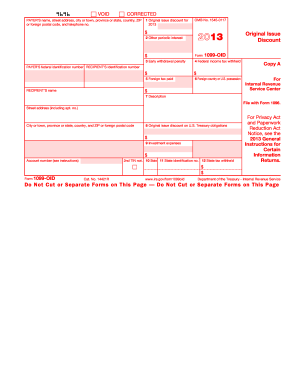
Y 4 Federal income tax withheld $ $ 5 Foreign tax paid 6 Foreign country or U.S. possession Copy B PAYER S federal identification number RECIPIENT S identification number For Recipient $ RECIPIENT S name 7 Description Street address (including apt. no.) City or town, province or state, country, and ZIP or foreign postal code Account number (see instructions) This is important tax information and is being furnished to the Internal Revenue Service. If you are required to file a.

This website is not affiliated with IRS

How it works

  1. Open form

    Open form follow the instructions

  2. Easily sign form

    Easily sign the form with your finger

  3. Share form

    Send filled & signed form or save

How to fill out the IRS 1099-OID online

The IRS 1099-OID form, or Original Issue Discount form, is essential for reporting amounts of original issue discount that are taxable as interest. This guide will provide clear, step-by-step instructions on how to complete this form online, ensuring a smooth filing process.

Follow the steps to fill out the IRS 1099-OID online.

  1. Use the ‘Get Form’ button to acquire the IRS 1099-OID form and open it in your online interface.
  2. Begin filling in the 'Payer’s name, street address, city or town, province or state, country, ZIP or foreign postal code, and telephone number' fields at the top of the form.
  3. Enter the 'Payer’s federal identification number' and the 'Recipient’s identification number' in the appropriate fields.
  4. For Box 1, fill in the amount for 'Original issue discount for 2013'. This amount represents the financial instrument's original issue discount that needs to be reported.
  5. In Box 2, report any 'Other periodic interest' earned on the obligation for that year, which is separate from the original issue discount.
  6. If applicable, fill in Box 3 with any 'Early withdrawal penalty' incurred if the obligation was cashed out early.
  7. Report 'Federal income tax withheld' amounts in Box 4. This is reported in case backup withholding was applied.
  8. If any 'Foreign tax paid' amounts are applicable, enter this in Box 5, along with the corresponding country or U.S. possession in Box 6.
  9. Provide a description or CUSIP number for the obligation in Box 7, helping identify the financial instrument.
  10. If there is 'Original issue discount on U.S. Treasury obligations', fill in the appropriate amount in Box 8/9 as needed.
  11. Once all fields are completed, you can save your changes, download the finalized form, print a copy for your records, or share it as required.

Complete your IRS 1099-OID online today to ensure accurate reporting of your original issue discounts.

Get form

Experience a faster way to fill out and sign forms on the web. Access the most extensive library of templates available.

Related content

About Form 1099-OID, Original Issue Discount
Jun 6, 2025 — Information about Form 1099-OID, including recent updates, related forms...
Learn more
FORM 1099 OID (1977)
Record owner's Identifying number. 1 Total original issue discount 2 Ratable monthly...
Learn more
Parents' Election To Report Child's Interest and...
This type of interest should be shown in box 9 of Form 1099-INT. See Form 6251...
Learn more

Related links form

IRS Publication 974 2017 IRS Publication 974 2015 IRS Publication 974 2015 IRS RP 99-38

Questions & Answers

Get answers to your most pressing questions about US Legal Forms API.

Contact support

You typically report a 1099 on your tax return under the income section. Whether it is for interest income or other types of earnings, clarity is crucial. Platforms like US Legal Forms can assist in ensuring you accurately categorize your 1099 income, which is essential for a successful tax filing.

To report a 1099-OID on your tax return, include the amount listed on the form as income on the appropriate line in your tax return. This may typically fall under interest income. Keep this report straightforward, and utilizing tax software can streamline this entire reporting process.

In TurboTax, you can enter your 1099-OID by navigating to the 'Income' section. Locate the option that mentions 'Other income' or 'Interest income', and follow the prompts. Ensure you accurately input your OID amount, as this is essential for maintaining compliance with IRS 1099-OID requirements.

To treat market discount on your tax return, you must first determine if the market discount exceeds a certain threshold. If it does, you will generally need to report it as income when you sell the bond. IRS regulations outline specific steps, and using a reliable tax preparation platform, like US Legal Forms, can help simplify this process.

Yes, you can file your Form 1099-OID online, making it a convenient option for many taxpayers. Several e-filing platforms offer the ability to submit this form electronically. Look for services compliant with IRS regulations, as this ensures your filing is accurate and secure.

To report an original issue discount (OID), you will need to gather the details from your Form 1099-OID. This form lists the OID amount you need to include in your income. Make sure to enter this amount on your tax return, as it is considered taxable income under the IRS 1099-OID guidelines.

OID gets reported on your IRS 1099-OID form, which is essential for tax reporting. This form details the amount of original issue discount that you must include as income. Be sure to keep this information for your tax filings, as it plays a crucial part in your overall tax return.

To receive an IRS 1099-OID, you typically need to hold financial instruments that yield original issue discount. Your lender or financial institution should issue this form if applicable. If you don’t receive it, you can contact them directly for clarification.

You can find your IRS 1099-OID form in your financial statements or tax documents provided by your bank or financial institution. Additionally, some institutions may offer electronic copies through their online platforms. If you don’t see it, reach out to your financial institution for assistance.

In TurboTax, you enter your IRS 1099-OID under the 'Other Income' section. Select 'Income' in the 'Federal' tab, and then click on 'Start' near the option for 1099 forms. This will guide you through the process of entering your 1099 details.

Get This Form Now!

Use professional pre-built templates to fill in and sign documents online faster. Get access to thousands of forms.
If you believe that this page should be taken down, please follow our DMCA take down processhere.
Get IRS 1099-OID
  • Adoption
  • Bankruptcy
  • Contractors
  • Divorce
  • Home Sales
  • Employment
  • Identity Theft
  • Incorporation
  • Landlord Tenant
  • Living Trust
  • Name Change
  • Personal Planning
  • Small Business
  • Wills & Estates
  • Packages A-Z
  • Affidavits
  • Bankruptcy
  • Bill of Sale
  • Corporate - LLC
  • Divorce
  • Employment
  • Identity Theft
  • Internet Technology
  • Landlord Tenant
  • Living Wills
  • Name Change
  • Power of Attorney
  • Real Estate
  • Small Estates
  • Wills
  • All Forms
  • Forms A-Z
  • Other Templates
  • Legal Hub
  • About Us
  • Help Portal
  • Legal Resources
  • Blog
  • Affiliates
  • Contact Us
  • Delete My Account
  • Site Map
  • Industries
  • Forms in Spanish
  • Localized Forms
  • State-specific Forms
  • Forms Kit
  • Real Estate Handbook
  • All Guides
  • Notarize
  • Incorporation services
  • For Consumers
  • For Small Business
  • For Attorneys
  • USLegal
  • FormsPass
  • pdfFiller
  • signNow
  • altaFlow
  • DocHub
  • Instapage
Form Packages
  • Adoption
  • Bankruptcy
  • Contractors
  • Divorce
  • Home Sales
  • Employment
  • Identity Theft
  • Incorporation
  • Landlord Tenant
  • Living Trust
  • Name Change
  • Personal Planning
  • Small Business
  • Wills & Estates
  • Packages A-Z
Form Categories
  • Affidavits
  • Bankruptcy
  • Bill of Sale
  • Corporate - LLC
  • Divorce
  • Employment
  • Identity Theft
  • Internet Technology
  • Landlord Tenant
  • Living Wills
  • Name Change
  • Power of Attorney
  • Real Estate
  • Small Estates
  • Wills
  • All Forms
  • Forms A-Z
  • Other Templates
Customer Service
  • Legal Hub
  • About Us
  • Help Portal
  • Legal Resources
  • Blog
  • Affiliates
  • Contact Us
  • Delete My Account
  • Site Map
  • Industries
  • Forms in Spanish
  • Localized Forms
  • State-specific Forms
  • Forms Kit
Legal Guides
  • Real Estate Handbook
  • All Guides
Prepared for you
  • Notarize
  • Incorporation services
Our Customers
  • For Consumers
  • For Small Business
  • For Attorneys
Our Sites
  • USLegal
  • FormsPass
  • pdfFiller
  • signNow
  • altaFlow
  • DocHub
  • Instapage
Social Media
Call us now toll free:
+1 833 426 79 33
As seen in:
© Copyright 1999-2026 airSlate Legal Forms, Inc. 17 Station Street, Ste. 203, Brookline, MA 02445
  • Your Privacy Choices
  • Terms of Service
  • Privacy Notice
  • Content Takedown Policy
  • Bug Bounty Program
IRS 1099-OID
This form is available in several versions.
Select the version you need from the drop-down list below.
2019 IRS 1099-OID
Select form
  • 2019 IRS 1099-OID
  • 2018 IRS 1099-OID
  • 2017 IRS 1099-OID
  • 2016 IRS 1099-OID
  • 2015 IRS 1099-OID
  • 2014 IRS 1099-OID
  • 2013 IRS 1099-OID
  • 2012 IRS 1099-OID
  • 2011 IRS 1099-OID
  • 2010 IRS 1099-OID
Select form