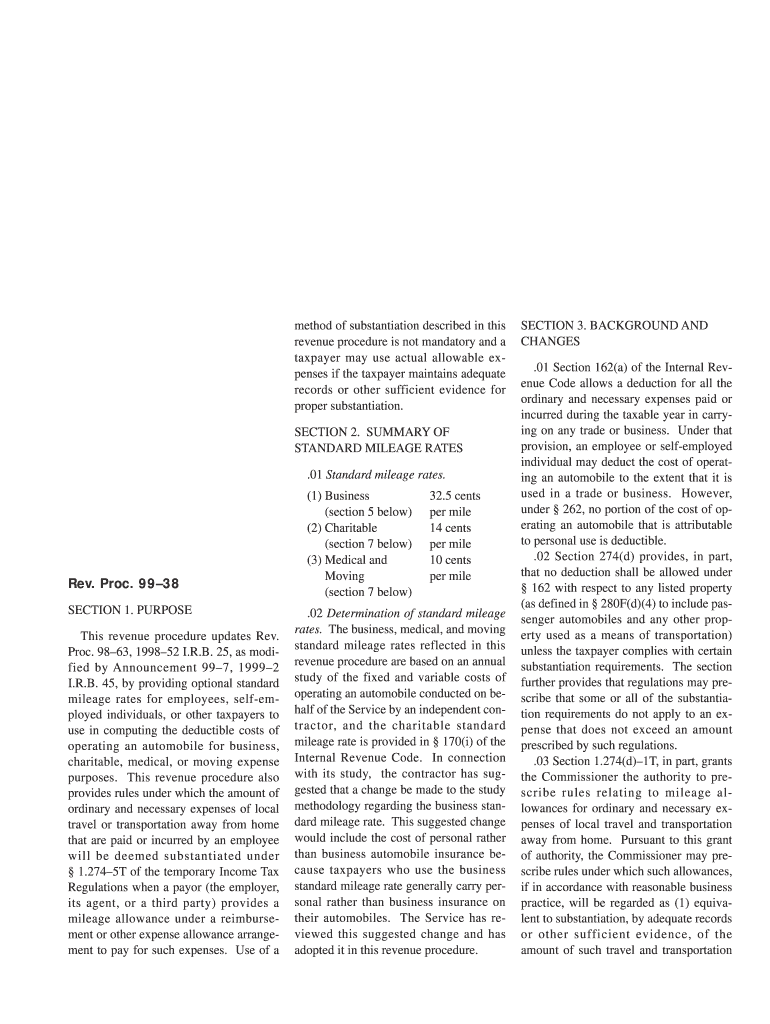
Ection, substantiation, and returning amounts in excess of expenses as specified in the regulations. Section 1.62 2T(e)(2) specifically provides that substantiation of certain business expenses in accordance with rules prescribed under the authority of 1.274(d) 1T will be treated as substantiation of the amount of such expenses for purposes of 1.62 2. Under 1.62 2(f)(2), the Commissioner may prescribe rules under which an arrangement providing mileage allowances will be treated.

Open form follow the instructions

Easily sign the form with your finger

Send filled & signed form or save
How to fill out the IRS RP 99-38 online
This guide provides step-by-step instructions for completing the IRS RP 99-38 form online, ensuring clarity for users with various levels of experience. Follow this guide to navigate through the form accurately and efficiently.
Follow the steps to complete the IRS RP 99-38 online.
- Click ‘Get Form’ button to obtain the form and open it in an editor.
- Review the purpose section of the form, which outlines the optional standard mileage rates that can be used for various purposes such as business, charitable, medical, or moving expenses.
- Fill in the required fields that specify the type of mileage rate applicable to your circumstances, ensuring you select the correct rate for business, charitable, medical, or moving use.
- Complete any additional fields that pertain to special circumstances or allowances, as outlined in the form's guidelines. This may include details about reimbursement arrangements.
- Double-check all entries for accuracy, ensuring that the mileage amounts and other calculations align with the latest IRS guidelines.
- Save your changes, then download a copy of the completed form for your records. You may print it or share it electronically as needed.
Complete your IRS RP 99-38 form online today to ensure compliance and maximize your potential deductions.
Experience a faster way to fill out and sign forms on the web. Access the most extensive library of templates available.
Related content
26 CFR 601.105: Examination of returns and claims for refund, credit, or abatement;...
by JE Merrill · 1950 · Cited by 49 — SAO/NASA ADS Astronomy Abstract Service...
Get answers to your most pressing questions about US Legal Forms API.
What is a good percentage to withhold for taxes?
A good percentage to withhold for taxes varies based on your income and tax situation. However, as a general rule, reviewing IRS RP 99-38 can provide guidance on setting your withholding rates appropriately. Most taxpayers find it beneficial to withhold enough to avoid penalties, typically aiming for around 10-15% of their taxable income. Using tax planning tools can help ensure you meet requirements while avoiding too much withheld.
What does rev proc mean?
Rev proc is short for revenue procedure, a type of IRS guideline that provides clarity on specific tax issues. For instance, IRS RP 99-38 is a revenue procedure that provides instructions related to tax withholding. Staying updated with these revenue procedures helps you understand tax administration better. Platforms like US Legal Forms can aid in summarizing these details for your reference.
What is the IRS revenue rule?
The IRS revenue rule refers to guidelines established by the IRS to clarify specific tax laws and procedures. IRS RP 99-38 is an example of such a revenue rule that helps taxpayers navigate their withholding obligations. Understanding these rules is essential for compliance and effective tax planning. For more in-depth insights, consider exploring resources provided by US Legal Forms.
How do I fill out an IRS withholding form?
Filling out an IRS withholding form requires essential information like your name, address, Social Security number, and filing status. Additionally, IRS RP 99-38 outlines instructions that may assist you in accurately reporting your allowances and other relevant details. Take time to read all instructions carefully, ensuring your form is complete. Leveraging tools from US Legal Forms can also guide you through the process.
Do I claim 0 or 1 on my W4?
Deciding between claiming 0 or 1 on your W-4 depends on your tax situation. Claiming 0 will typically withhold more taxes, which may be beneficial if you have other income sources. On the other hand, claiming 1 can result in a smaller withholding. IRS RP 99-38 provides insights on how to determine the best option tailored to your needs.
How should I fill out my tax withholding form?
To fill out your tax withholding form effectively, start by gathering your financial documents and details about your allowances. Reference IRS RP 99-38 for specific recommendations on completing the form accurately. Ensure that you answer all questions truthfully and provide your income information clearly. This will help ensure your withholding aligns with your tax obligations.
How to find IRS revenue procedure?
You can find IRS revenue procedures, including IRS RP 99-38, on the official IRS website. Simply search for the specific revenue procedure number or browse their archives for comprehensive tax guidance. Understanding these procedures can enhance your tax planning strategies. Utilizing resources like US Legal Forms can simplify your search and offer additional support.
What number should I put for withholding allowances?
When determining withholding allowances, refer to the guidelines provided in IRS RP 99-38. This revenue procedure helps you calculate the correct number based on your personal tax situation. Generally, one allowance reduces your withholding amount, while additional allowances may lower it further. Consider your financial situation carefully to make the best choice.
What is the IRS revenue procedure 89-52?
IRS revenue procedure 89-52 deals with the tax implications for certain transfers between retirement plans. This procedure provides clarity on how such transfers should be treated under the tax code. Understanding IRS revenue procedure 89-52 is beneficial, especially for individuals managing multiple retirement accounts. Having this knowledge, alongside IRS RP 99-38, equips you to manage your retirement savings effectively.
Do I need date of death valuation for IRA?
Yes, obtaining a date of death valuation for an IRA is often crucial for tax reporting and compliance purposes. This valuation is important for determining the fair market value of the account at that specific time. When managing inherited IRAs, understanding these requirements set forth in IRS RP 99-38 can help ensure you handle the account correctly. Consulting resources or services like USLegalForms can streamline this process and keep you informed.
Use professional pre-built templates to fill in and sign documents online faster. Get access to thousands of forms.
If you believe that this page should be taken down, please follow our DMCA take down process here.