Life insurance company or viatical settlement provider may pay accelerated death benefits if the insured has been certified by either a physician as terminally ill or by a licensed health care practitioner as chronically ill. Long-term care insurance contract. Generally, amounts received under a qualified long-term care insurance contract are excluded from your income. However, if payments are made on a per diem basis, the amount you may exclude is limited. The per diem exclusion limit must be.

Open form follow the instructions

Easily sign the form with your finger

Send filled & signed form or save
How to fill out the IRS 1099-LTC online
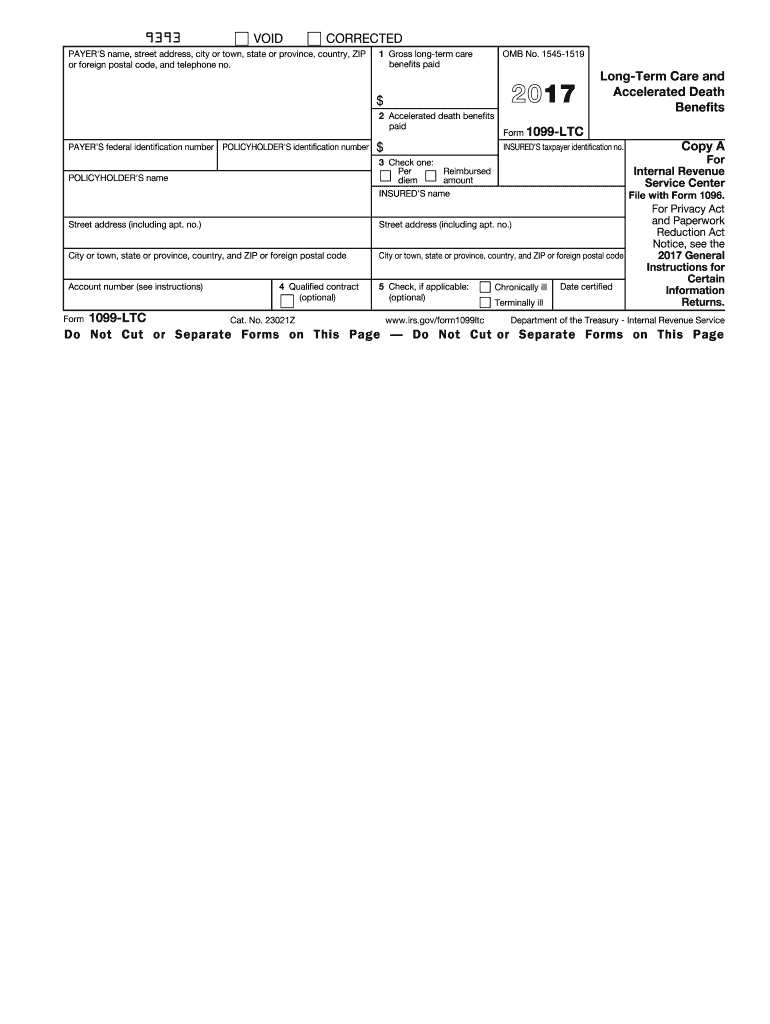
The IRS 1099-LTC form is essential for reporting long-term care benefits and accelerated death benefits. This guide provides clear and supportive instructions to help users complete this form accurately online.
Follow the steps to complete the IRS 1099-LTC online.
- Click ‘Get Form’ button to obtain the form and open it in the editor.
- Fill in the payer's name, address, and telephone number in the appropriate fields. This information identifies the entity that issued the benefits.
- Enter the gross long-term care benefits paid in Box 1. This amount reflects the total benefits paid to the insured during the tax year.
- Record the accelerated death benefits paid in Box 2. This is the amount disbursed as accelerated death benefits within the same timeframe.
- Complete the payer’s and policyholder's identification numbers. This includes any applicable identification numbers to ensure proper reporting.
- In Box 3, indicate whether the amounts reported in Box 1 or 2 were paid on a per diem basis or as reimbursement for actual long-term care expenses.
- If relevant, use Box 4 to check if the benefits were from a qualified long-term care insurance contract.
- For Box 5, indicate if the insured was chronically ill or terminally ill, and provide the date certified.
- After completing all sections, review the information for accuracy. Make any necessary corrections.
- Once confirmed, save the changes, download, print, or share the completed form as needed.
Complete your IRS 1099-LTC form online to ensure accurate tax reporting.
Experience a faster way to fill out and sign forms on the web. Access the most extensive library of templates available.
Related content
Jun 5, 2025 — File this form if you pay any long-term care benefits, including...
Oct 13, 2011 — Reimbursed basis means payments made for. 1099-LTC. actual expenses...
Jun 14, 2019 — We have audited the accompanying statements of net assets available for...
Get answers to your most pressing questions about US Legal Forms API.
Where do I put 1099-LTC on Turbo Tax?
In TurboTax, you will find a section to report IRS 1099-LTC once you begin the tax filing process. Navigate to 'Income', then look for 'Other Income' or similar options that allow you to add health insurance payments. Input the information accurately to ensure that your tax return reflects the correct details from your 1099-LTC form. Bettering your tax filing experience, TurboTax offers easy navigation to input these details.
How do I report a 1099-LTC on my tax return?
To report a 1099-LTC on your tax return, start by gathering your IRS 1099-LTC form and reviewing its contents. You typically include it on your Form 1040, distinguishing between taxable and nontaxable portions. It's essential to maintain clear records of what you received and consult a tax expert if needed. Efficient software like US Legal Forms can provide guidance through this process.
Where do I enter 1099-LTC in Drake software?
To enter IRS 1099-LTC in Drake software, navigate to the income section of the program. There, you will find options to input long-term care benefits received. Input the amounts exactly as shown on your 1099-LTC form, as this affects your overall tax calculation. If you have any questions during the process, Drake's support resources are quite helpful.
Do you report 1099-LTC on tax return TurboTax?
Yes, you do report IRS 1099-LTC on your tax return using TurboTax. As you go through the software, you will find specific sections designed for entering health-related benefits. When entering your 1099-LTC, follow the prompts to ensure you capture any exclusions that might apply. This ensures your tax return remains accurate and compliant.
Where to enter long-term care insurance on tax return?
To enter long-term care insurance on your tax return, you will refer to the IRS 1099-LTC. If you receive benefits from a policy, include them in the income section of your tax forms. Depending on your situation, some portions of these benefits may not be taxable. Utilizing intuitive tax software like US Legal Forms can simplify this process and ensure you maximize any allowable deductions.
How do I enter 1099-K in TurboTax?
Entering your IRS 1099-K in TurboTax is a straightforward process. Begin by opening your TurboTax account, and navigate to the section for income. Follow prompts to add other income, where you can find an option to report 1099-K information. Ensuring accurate entry helps in reducing the chances of mistakes or audits in your tax return.
Where do I report 1099-LTC on my tax return?
To report IRS 1099-LTC on your tax return, start by locating the specific amounts on the form. Typically, you'll include this information on Form 1040, specifically on Schedule A if you are itemizing deductions. Make sure to check if your 1099-LTC qualifies for exclusions, as some benefits may not be taxable. It's beneficial to consult with a tax professional or use reliable software for accurate filing.
Where do I put 1099-LTC on my tax return?
This matter is straightforward when dealing with IRS 1099-LTC. You place the income reported on the form in the relevant sections on Form 1040. Make sure to fill out Schedule 1 accurately, as this will reflect the income associated with your long-term care benefits on your tax return.
Where do I enter 1099-K in ProSeries?
To enter IRS 1099-K in ProSeries, proceed to the 'Income' section. Look for the area focused on reporting payment card and third-party network transactions. This will allow you to input the necessary details related to your 1099-K accurately.
Where to enter 1099-LTC in ProSeries?
In ProSeries, you can enter IRS 1099-LTC details in the income section dedicated to long-term care benefits. Make sure to check the relevant fields that correspond to the information provided on your form. Accurate data entry helps maintain compliance with tax regulations.
Use professional pre-built templates to fill in and sign documents online faster. Get access to thousands of forms.
If you believe that this page should be taken down, please follow our DMCA take down process here.
This form is available in several versions. Select the version you need from the drop-down list below.