We use cookies to improve security, personalize the user experience, enhance our marketing activities (including cooperating with our marketing partners) and for other business use.
Click "here" to read our Cookie Policy. By clicking "Accept" you agree to the use of cookies. Read less
Read more
Accept
Loading
Form preview
  • US Legal Forms
  • Form Library
  • Tax Forms
  • Executive Department Treasury IRS Forms
  • Irs 1099-k 2012

Get Irs 1099-k 2012

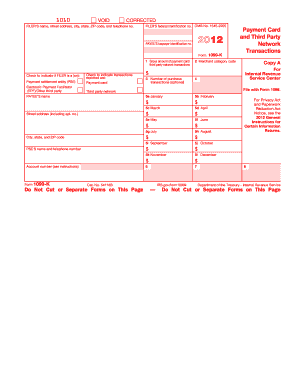
Payee Third party network Check to indicate if FILER is a (an): Payment Card and Third Party Network Transactions 7 IRS.gov/form1099k 8 Department of the Treasury - Internal Revenue Service Instructions for Payee You have received this form because you have either: (a) accepted payment cards for payments, or (b) received payments through a third party network that exceeded $20,000 in gross total reportable transactions and the aggregate number of those transactions exceeded 200 for the.

How it works

  1. Open form

    Open form follow the instructions

  2. Easily sign form

    Easily sign the form with your finger

  3. Share form

    Send filled & signed form or save

How to fill out the IRS 1099-K online

Filling out the IRS 1099-K form online can be a straightforward process when you understand each section of the form. This guide aims to provide a clear and detailed walkthrough of the key components, ensuring that users can complete their form accurately.

Follow the steps to fill out the IRS 1099-K online effectively.

  1. Click ‘Get Form’ button to obtain the IRS 1099-K form and open it in your designated editor.
  2. Begin by entering the filer’s information, including name, street address, city, state, ZIP code, and telephone number in the designated fields.
  3. Next, provide the filer’s federal identification number (EIN) in the corresponding box, which is crucial for tax identification purposes.
  4. Fill in the payee’s taxpayer identification number (TIN), which may be your Social Security number or Employer Identification Number.
  5. In box 1, report the gross amount of payment card or third-party network transactions that occurred during the calendar year.
  6. Enter the merchant category code in box 2. This code identifies the type of services or goods provided.
  7. If applicable, indicate the number of purchase transactions in box 3. Note this step is optional.
  8. Complete boxes 5a through 5l by entering the gross transaction amounts for each month from January to December.
  9. Include the name and telephone number of the payment settlement entity (PSE) in the provided fields.
  10. If relevant, fill in the account number assigned by the PSE to distinguish your payments.
  11. Review all entries for accuracy. Once confirmed, save your changes, and select the option to download, print, or share the completed form.

Start filling out your IRS 1099-K online today to ensure timely and accurate reporting.

Get form

Experience a faster way to fill out and sign forms on the web. Access the most extensive library of templates available.

Related content

Understanding your Form 1099-K
Mar 6, 2025 — Form 1099-K reports payments from payment apps or online marketplaces and...
Learn more
A Student's (and Others') Guide to Understanding...
Mar 26, 2025 — A Form 1099-K is basically the IRS's way of tracking money that flows...
Learn more
2011 - Instructions for Form 1120S
Jan 31, 2012 — 1099-K represent gross payments company, on line 16a of Schedule K...
Learn more

Related links form

IRS Instructions 1099-CAP 2010 IRS Instructions 1099-K 2018 IRS Instructions 1099-K 2017 IRS Instructions 1099-K 2016

Questions & Answers

Get answers to your most pressing questions about US Legal Forms API.

Contact support

No, you should not ignore an IRS 1099-K if you receive one. It's a legal document indicating income that the IRS expects you to report. Ignoring it can lead to tax issues, so always include it in your tax filings.

You can enter your IRS 1099-K in TurboTax under the 'Income' section. Look for the category that pertains to 'Business Income' or 'Other Income.' TurboTax will guide you through the process, ensuring you capture all necessary details.

Yes, a 1099-K must be reported on your tax return. The IRS uses this form to track income that businesses and individuals earn from third-party networks. To avoid any penalties, ensure you accurately report this income on your tax documents.

To report IRS 1099-K income, start by entering it on Schedule C for self-employed individuals. Those without a business can include it in Schedule 1 of Form 1040. Make sure to report the total amount accurately to reflect your earnings. If you need support, consider using platforms like uslegalforms for guidance on tax matters.

Yes, the IRS 1099-K is indeed considered earned income. It reflects earnings from various sources, including online platforms and freelance work. Reporting this income is necessary for accurate tax filing. Ensuring that all earned income is documented helps you remain compliant with IRS rules.

You can place the IRS 1099-K income on Schedule C if you are self-employed. For those without a business, report it on Schedule 1 of Form 1040. Properly categorizing this income aids the IRS in verifying your earnings correctly. Using the right forms makes your tax return clearer and more accurate.

Regardless of your situation, if you received an IRS 1099-K, you must report that income. This requirement applies whether you run a business or not. Omitting this income can lead to tax issues down the line. Always prioritize transparent reporting to stay compliant with tax laws.

Yes, reporting the IRS 1099-K on your taxes is mandatory. Any income, even from side gigs or casual sales, must be reported to avoid complications. Use the information from your 1099-K to accurately fill out your tax return. This step helps you comply with IRS requirements and avoid potential issues.

Yes, a 1099, including the IRS 1099-K, is considered earned income. This type of income is often received for services rendered or products sold. Reporting this income accurately on your tax return is essential to ensure you meet your tax obligations. Understand that all earned income contributes to your overall financial picture.

Even if you do not have a business, you still need to report income from your IRS 1099-K. This income can come from gig work, side jobs, or online sales. Any income you receive should be included on your tax return to remain within IRS regulations. Reporting this income is crucial for accurate tax filings.

Get This Form Now!

Use professional pre-built templates to fill in and sign documents online faster. Get access to thousands of forms.
If you believe that this page should be taken down, please follow our DMCA take down processhere.

Industry-leading security and compliance

US Legal Forms protects your data by complying with industry-specific security standards.
  • In businnes since 1997
    25+ years providing professional legal documents.
  • Accredited business
    Guarantees that a business meets BBB accreditation standards in the US and Canada.
  • Secured by Braintree
    Validated Level 1 PCI DSS compliant payment gateway that accepts most major credit and debit card brands from across the globe.
Get IRS 1099-K
Form Packages
Adoption
Bankruptcy
Contractors
Divorce
Home Sales
Employment
Identity Theft
Incorporation
Landlord Tenant
Living Trust
Name Change
Personal Planning
Small Business
Wills & Estates
Packages A-Z
Form Categories
Affidavits
Bankruptcy
Bill of Sale
Corporate - LLC
Divorce
Employment
Identity Theft
Internet Technology
Landlord Tenant
Living Wills
Name Change
Power of Attorney
Real Estate
Small Estates
Wills
All Forms
Forms A-Z
Form Library
Customer Service
Terms of Service
Privacy Notice
Legal Hub
Content Takedown Policy
Bug Bounty Program
About Us
Blog
Affiliates
Contact Us
Delete My Account
Site Map
Industries
Forms in Spanish
Localized Forms
State-specific Forms
Forms Kit
Legal Guides
Real Estate Handbook
All Guides
Prepared for You
Notarize
Incorporation services
Our Customers
For Consumers
For Small Business
For Attorneys
Our Sites
US Legal Forms
USLegal
FormsPass
pdfFiller
signNow
airSlate WorkFlow
DocHub
Instapage
Social Media
Call us now toll free:
+1 833 426 79 33
As seen in:
  • USA Today logo picture
  • CBC News logo picture
  • LA Times logo picture
  • The Washington Post logo picture
  • AP logo picture
  • Forbes logo picture
© Copyright 1997-2025
airSlate Legal Forms, Inc.
3720 Flowood Dr, Flowood, Mississippi 39232
Form Packages
Adoption
Bankruptcy
Contractors
Divorce
Home Sales
Employment
Identity Theft
Incorporation
Landlord Tenant
Living Trust
Name Change
Personal Planning
Small Business
Wills & Estates
Packages A-Z
Form Categories
Affidavits
Bankruptcy
Bill of Sale
Corporate - LLC
Divorce
Employment
Identity Theft
Internet Technology
Landlord Tenant
Living Wills
Name Change
Power of Attorney
Real Estate
Small Estates
Wills
All Forms
Forms A-Z
Form Library
Customer Service
Terms of Service
Privacy Notice
Legal Hub
Content Takedown Policy
Bug Bounty Program
About Us
Blog
Affiliates
Contact Us
Delete My Account
Site Map
Industries
Forms in Spanish
Localized Forms
State-specific Forms
Forms Kit
Legal Guides
Real Estate Handbook
All Guides
Prepared for You
Notarize
Incorporation services
Our Customers
For Consumers
For Small Business
For Attorneys
Our Sites
US Legal Forms
USLegal
FormsPass
pdfFiller
signNow
airSlate WorkFlow
DocHub
Instapage
Social Media
Call us now toll free:
+1 833 426 79 33
As seen in:
  • USA Today logo picture
  • CBC News logo picture
  • LA Times logo picture
  • The Washington Post logo picture
  • AP logo picture
  • Forbes logo picture
© Copyright 1997-2025
airSlate Legal Forms, Inc.
3720 Flowood Dr, Flowood, Mississippi 39232
IRS 1099-K
This form is available in several versions.
Select the version you need from the drop-down list below.
2024 IRS 1099-K
Select form
  • 2024 IRS 1099-K
  • 2021 IRS 1099-K
  • 2020 IRS 1099-K
  • 2019 IRS 1099-K
  • 2018 IRS 1099-K
  • 2017 IRS 1099-K
  • 2016 IRS 1099-K
  • 2015 IRS 1099-K
  • 2014 IRS 1099-K
  • 2013 IRS 1099-K
  • 2012 IRS 1099-K
  • 2011 IRS 1099-K
Select form