Loading
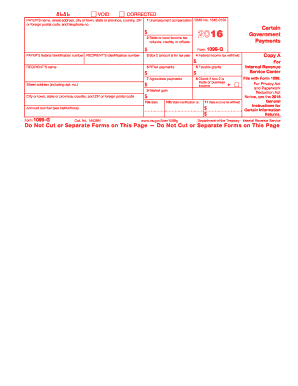
Get Irs 1099-g 2016
This website is not affiliated with IRS
How it works
-

Open form follow the instructions
-

Easily sign the form with your finger
-

Send filled & signed form or save
How to fill out the IRS 1099-G online
The IRS 1099-G form is used to report certain government payments, including unemployment compensation and state tax refunds. This guide will provide clear and detailed instructions for filling out the form online, ensuring you complete it accurately.
Follow the steps to complete the IRS 1099-G online
- Click ‘Get Form’ button to obtain the form and open it in the editor.
- Begin filling out the form by entering the payer’s name, address, city or town, state, ZIP code, and telephone number in the designated fields. This information identifies the source of the payments.
- Enter the payer’s federal identification number and the recipient’s identification number, which may include the recipient’s social security number (SSN) or employer identification number (EIN).
- In Box 1, input the total amount of unemployment compensation received during the tax year.
- In Box 2, report any state or local income tax refunds, credits, or offsets that were received.
- For Box 3, specify the tax year related to the amount reported in Box 2.
- If applicable, show any federal income tax withheld in Box 4.
- Document any reemployment trade adjustment assistance (RTAA) payments in Box 5, if received.
- Record any taxable grants in Box 6.
- Input any agriculture payments in Box 7.
- If Box 2 reflects trade or business income, check the corresponding box 8.
- Note any market gain in Box 9, related to Commodity Credit Corporation loans.
- Fill out the state information in Boxes 10a and 10b, including state income tax withheld in Box 11.
- Once all relevant fields are completed, review your entries for accuracy before saving your changes.
- Finally, download, print, or share the completed form as needed. Ensure to retain a copy for your records.
Complete your IRS 1099-G form online today to stay compliant with federal reporting requirements.
Get form
Experience a faster way to fill out and sign forms on the web. Access the most extensive library of templates available.
Filling out a 1099-G form on TurboTax involves selecting the right category under 'Income.' Enter the information required, including the amounts from your IRS 1099-G. You can find guidance throughout the process, making it easier to ensure that all fields are correctly populated to avoid any mistakes.
Get This Form Now!
Use professional pre-built templates to fill in and sign documents online faster. Get access to thousands of forms.