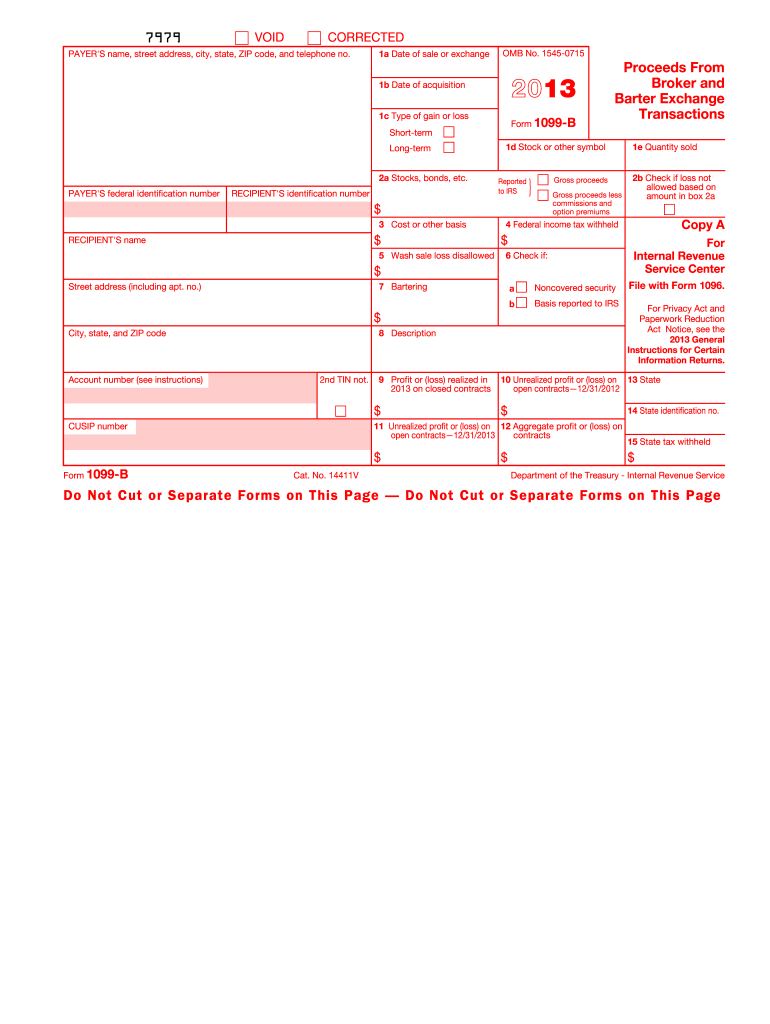
(loss) realized in 2013 on closed contracts $ CUSIP number (keep for your records) This is important tax information and is being furnished to the Internal Revenue Service. If you are required to file a return, a negligence penalty or other sanction may be imposed on you if this income is taxable and the IRS determines that it has not been reported. 10 Unrealized profit or (loss) on 13 State open contracts 12/31/2012 $ 14 State identification no. 11 Unrealized profit or (loss) on 12 Ag.
Loading

Open form follow the instructions

Easily sign the form with your finger

Send filled & signed form or save
How to fill out the IRS 1099-B online
Filling out the IRS 1099-B form online is essential for accurately reporting proceeds from broker and barter exchange transactions. This guide offers clear, step-by-step instructions to ensure you complete the form correctly.
Follow the steps to complete the IRS 1099-B online successfully.
- Click ‘Get Form’ button to obtain the form and open it in the digital editor.
- Enter the payer's name, street address, city, state, ZIP code, and telephone number in the designated area at the top of the form. This information identifies the entity reporting the proceeds.
- Fill in the payer's federal identification number, ensuring accuracy to avoid discrepancies during processing.
- Input the recipient's identification number, which can be the social security number, individual taxpayer identification number, or adoption taxpayer identification number.
- Complete section 1 by entering the date of sale or exchange in box 1a, the date of acquisition in box 1b, and select the type of gain or loss (short-term or long-term) in box 1c.
- Specify the gross proceeds from the transaction in box 2a. If applicable, check the corresponding boxes for whether the gross proceeds were reported to the IRS.
- Record the cost or other basis of the sold securities in box 3, which should reflect your investment in those securities.
- If applicable, check box 5 to indicate any wash sale loss disallowed for tax purposes, providing necessary details.
- Complete boxes 9 through 12 if applicable to report profit or loss realized on futures contracts and any unrealized profits or losses.
- Ensure all sections are completed accurately, then save your changes. Depending on your needs, you can download, print, or share the completed form.
Take the next step and complete your IRS 1099-B form online to ensure compliance and accurate reporting.
Experience a faster way to fill out and sign forms on the web. Access the most extensive library of templates available.
Related content
May 13, 2025 — A broker or barter exchange must file this form for each person: For...
Most 1099 forms a farm business will file should be sent to the recipient by January 31...
This is important tax information and is being furnished to the IRS. If you are required...
Get answers to your most pressing questions about US Legal Forms API.
How do I report a 1099-B on my tax return?
To report IRS 1099-B on your tax return, gather all your 1099-B forms and record the information, including gross sale proceeds. Enter this data in the appropriate sections of your tax preparation software or paper forms. Ensuring these details are accurate will help you file correctly and avoid potential audits or penalties.
Where is 1099-B income reported on 1040?
Income from IRS 1099-B is reported on Line 1a of your Form 1040, specifically under 'Ordinary Dividends' and 'Total Income.' When filing your taxes, this ensures the income from your investments is appropriately reflected in your total earnings. It is essential to include this information to avoid issues with the IRS.
Where do I enter 1099-B in the TaxAct?
To enter your IRS 1099-B in TaxAct, go to the 'Federal' tab and select 'Income.' Look for the section titled 'Investment Income,' where you can input the details from your 1099-B form. Following these steps allows you to accurately report your investment income and ensures your tax return is complete.
Do I have to file a 1099-B if under $600?
Yes, you must file an IRS 1099-B regardless of the amount if you conducted taxable transactions. The $600 threshold typically applies to reporting payments made to independent contractors, but not for 1099-B. It’s crucial to report all relevant transactions to ensure compliance with tax laws. Be diligent in your reporting for accurate tax filings.
How do I report a 1099-B on my tax return TurboTax?
To report IRS 1099-B on your tax return using TurboTax, begin by selecting 'Investment Income' under the 'Wages & Income' section. Follow the prompts to input details from your 1099-B form, such as the date and sale amount. TurboTax will guide you through the necessary steps to ensure you report this information accurately.
Where do I enter my 1099-B in TurboTax?
In TurboTax, you can enter your IRS 1099-B information by navigating to the 'Federal' section. Look for the 'Wages & Income' tab, and find 'Investment Income.' Select 'Stocks, Cryptocurrency, Mutual Funds, Etc.' to input your 1099-B data. This process ensures your tax return reflects accurate income from your investments.
Do I have to report 1099-B on my tax return?
Yes, you need to report IRS 1099-B on your tax return if you received one. This form details the proceeds from broker and barter exchange transactions. Not reporting the information may lead to discrepancies in your tax filings and potential penalties. Always ensure the figures from your 1099-B match your records.
What is a supplemental 1099-B?
A supplemental 1099-B is an additional form that provides extra details regarding capital gains or losses on transactions not covered in the primary IRS 1099-B. This form provides necessary clarification for complex transactions, ensuring taxpayers have all the information needed for accurate tax reporting. Utilize resources like uslegalforms to access or submit your supplemental 1099-B easily.
What information is required on a 1099-B?
Your IRS 1099-B must include the payer's information, recipient's details, and specifics of the transactions, such as sale dates and amounts. Additionally, the form requires details about whether the transaction was reported to the IRS. Accurate and comprehensive details are crucial to fulfill tax obligations correctly.
What is the supplemental tax reporting statement?
The supplemental tax reporting statement provides additional information that may not be fully reflected on your IRS 1099-B. This statement may include details about your taxable transactions, adjustments, or any losses applicable. It is essential for ensuring all aspects of your financial activities are accurately reported to the IRS.
Use professional pre-built templates to fill in and sign documents online faster. Get access to thousands of forms.
If you believe that this page should be taken down, please follow our DMCA take down process here.
This form is available in several versions. Select the version you need from the drop-down list below.