Get Irs 1099-b 2017
How it works
-

Open form follow the instructions
-

Easily sign the form with your finger
-

Send filled & signed form or save
How to fill out the IRS 1099-B online
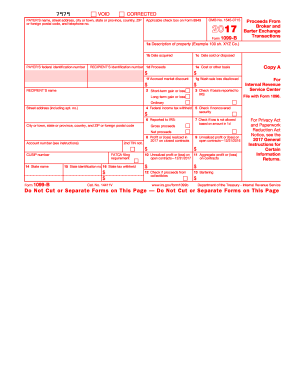
Filling out the IRS 1099-B form online can seem daunting, but with clear guidance, the process can be manageable. This guide will provide you with step-by-step instructions for accurately completing the form and ensuring compliance with IRS requirements.
Follow the steps to fill out the form correctly.
- Click ‘Get Form’ button to access the form and initialize it in your online workspace.
- Enter the payer's name, address, and telephone number accurately in the designated fields. This information identifies who is reporting the transactions.
- Input the payer's federal identification number. Make sure to double-check for accuracy to avoid processing issues.
- Fill in the recipient's name and address in the corresponding fields, ensuring that the details match their identification documentation.
- Provide the recipient's identification number. For individuals, this can be a social security number or individual taxpayer identification number.
- Complete the sections detailing the transaction specifics: description of property, date acquired, date sold, proceeds, cost or other basis, and any applicable adjustments such as accrued market discount or wash sale loss disallowed.
- Indicate if there was federal income tax withheld and whether the basis was reported to the IRS by checking the appropriate boxes.
- For transactions involving contracts, enter the necessary profit or loss realization details, including unrealized profits or losses for open contracts as of the specified dates.
- Carefully review each entry for accuracy and completeness. Any mistakes could lead to complications in processing the form.
- Once completed, you can save your changes, download the document, print it, or share it for further review.
Start compiling your IRS 1099-B and complete your documentation accurately online to ensure compliance.
Get form
You can typically find your IRS 1099-B form on your broker's website, where they provide secure access to your account details. Log into your account and navigate to the tax documents section to locate your 1099-form. If you encounter any difficulties, don't hesitate to contact their support for help. Additionally, USLegalForms offers resources to assist you in navigating tax documents effectively.