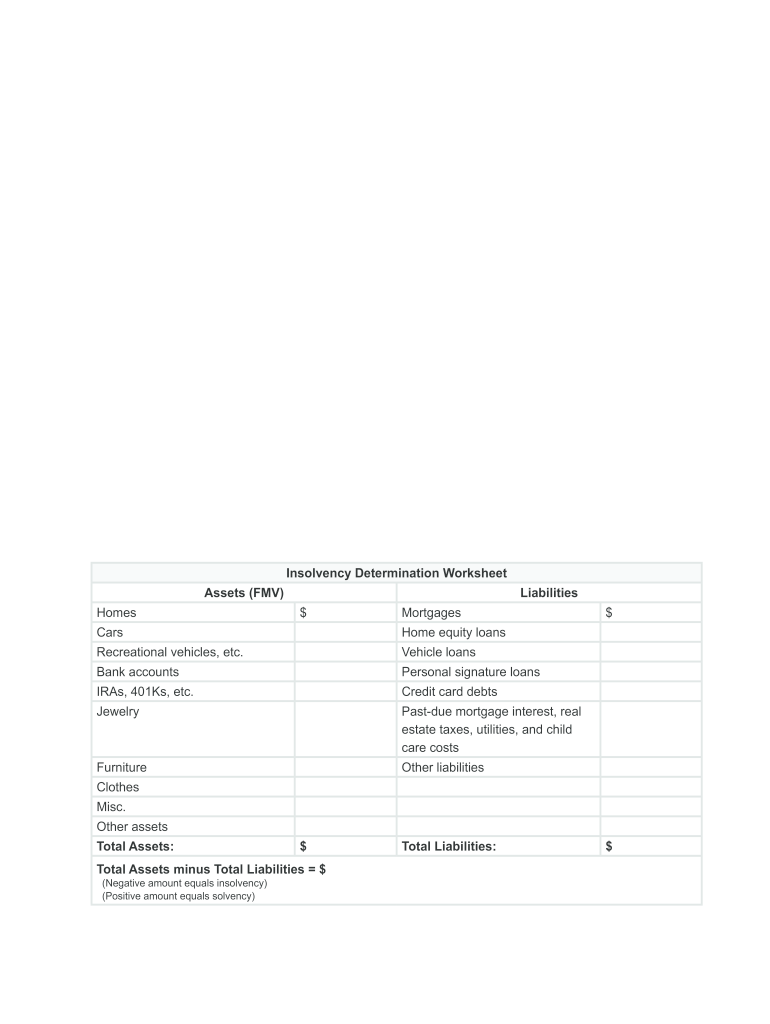
All the canceled debt will be included on Form 1040, line 21, Other Income. No additional supporting forms or schedules are needed to report canceled credit card debt. example John made a deal with his credit card company to pay $2,000 on his $7,000 balance, and the company agreed to take it as payment in full. In January 2013, John received a Form 1099-C from his credit card company reporting $5,000 in box 2 (the amount of debt canceled). John was solvent (assets greater than liabilities) imme.
Loading

Open form follow the instructions

Easily sign the form with your finger

Send filled & signed form or save
How to fill out the IRS Insolvency Determination Worksheet online
This guide provides clear instructions on how to accurately complete the IRS Insolvency Determination Worksheet online. Understanding your financial standing is essential, especially when dealing with canceled debts, and this worksheet will help determine your solvency status effectively.
Follow the steps to successfully complete the IRS Insolvency Determination Worksheet online.
- Press the ‘Get Form’ button to obtain the IRS Insolvency Determination Worksheet and open it in your document editor.
- Begin by entering the fair market value (FMV) of your assets in the designated sections, including homes, vehicles, and bank accounts.
- Next, list your total liabilities, such as mortgages, loans, and credit card debts, in the corresponding fields.
- Once you have completed both sections, calculate the total assets and total liabilities by summing the values you have entered.
- Subtract the total liabilities from the total assets; if the result is a negative number, it indicates insolvency.
- Review all the information for accuracy and ensure that all fields are filled out completely.
- Save the completed form, and if necessary, download, print, or share it as needed.
Complete your IRS Insolvency Determination Worksheet online today to understand your financial situation better.
Experience a faster way to fill out and sign forms on the web. Access the most extensive library of templates available.
Related content
A negative result from total assets minus total liabilities indicates insolvency, while a...
Form 982 Insolvency Worksheet is a critical tool in understanding and managing insolvency...
Jan 30, 2018 — This section contains step-by-step instructions for figuring out how much...
Get answers to your most pressing questions about US Legal Forms API.
How do I prove insolvency on a 1099c?
To establish insolvency on a 1099-C, you must show that your total liabilities exceeded your total assets on the date of cancellation. This can be detailed on the IRS Insolvency Determination Worksheet, which serves as proof of your financial situation. Be sure to maintain documentation that supports your calculation to avoid any discrepancies.
How to fill out insolvency worksheet pdf?
Filling out the IRS Insolvency Determination Worksheet PDF involves gathering your financial information first. List all your assets and liabilities clearly, following the worksheet instructions. If you find it challenging, platforms like uslegalforms provide detailed guidance to help navigate these forms confidently.
How do you calculate insolvency?
You can calculate insolvency by assessing your total assets and subtracting your total liabilities. If the result is negative, you are insolvable. Utilizing the IRS Insolvency Determination Worksheet can streamline this calculation, ensuring that you capture all necessary figures accurately and completely.
Which spouse's assets and liabilities are included on the insolvency worksheet?
Typically, both spouses’ assets and liabilities are included on the IRS Insolvency Determination Worksheet if the debt was shared. If only one spouse is responsible for the debt, you may only include that spouse’s financials. Always refer back to your specific situation and the IRS guidelines when filling out the worksheet.
What is the insolvency of a cancelled debt?
The insolvency related to a cancelled debt refers to the financial state where a taxpayer’s liabilities are greater than their assets at the time the debt is cancelled. This situation can significantly impact how the cancelled debt is reported to the IRS. Understanding this is vital; using the IRS Insolvency Determination Worksheet simplifies the assessment.
How is insolvency calculated for cancellation of debt?
When it comes to cancellation of debt, insolvency is calculated by comparing your total assets against your total liabilities. If your liabilities surpass your assets at the time of the cancellation, you qualify as insolvent. Use the IRS Insolvency Determination Worksheet to aid in this process and ensure accurate calculations.
How to calculate insolvency for IRS?
To calculate insolvency for the IRS, begin by determining your total assets and total liabilities. Subtract your total liabilities from your total assets to find your net worth. If your total liabilities exceed your total assets, you are considered insolvent according to the IRS Insolvency Determination Worksheet.
How do I prove insolvency to the IRS?
To prove insolvency to the IRS, you will need to provide the completed IRS Insolvency Determination Worksheet along with supporting documentation of your debts and assets. Be thorough in your calculations, as they will support your claim. Having a clear, well-documented presentation can help you effectively communicate your financial situation to the IRS.
What is the IRS rule for insolvency?
The IRS states that a taxpayer is insolvent when their total liabilities exceed their total assets. This rule plays a critical role when dealing with canceled debts, as demonstrated in the IRS Insolvency Determination Worksheet. Understanding this distinction can help you manage your financial situation effectively.
How to prove insolvency for 1099-C?
To prove insolvency for a 1099-C, you need to detail your liabilities and assets as outlined in the IRS Insolvency Determination Worksheet. Start by listing your total debts, and then sum your assets to see if your liabilities exceed that amount. When documenting, ensure that you keep records of all assets and debts, as the IRS may request this information during audits.
Use professional pre-built templates to fill in and sign documents online faster. Get access to thousands of forms.
If you believe that this page should be taken down, please follow our DMCA take down process here.