Loading
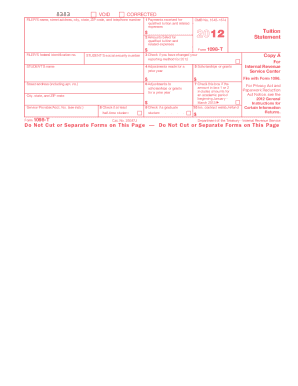
Get Irs 1098-t 2012
This website is not affiliated with IRS
How it works
-

Open form follow the instructions
-

Easily sign the form with your finger
-

Send filled & signed form or save
How to fill out the IRS 1098-T online
The IRS 1098-T form is crucial for students seeking to claim education credits for qualified tuition and related expenses. This guide provides a comprehensive overview of how to fill out the form online, ensuring accuracy and compliance with IRS regulations.
Follow the steps to complete the IRS 1098-T online
- Click ‘Get Form’ button to obtain the form and open it in the editor.
- Enter the filer's information, including name, address, and federal identification number. This information is typically provided by the educational institution.
- Input the student’s details, such as their name, social security number, and address. Make sure this information matches what is on file with the institution.
- In Box 1, enter the total payments received during the year for qualified tuition and related expenses, minus any refunds made.
- Check Box 3 if your educational institution has changed its reporting method for the year.
- Record any adjustments for a prior year in Box 4, if applicable.
- Enter the total amount of scholarships or grants received in Box 5.
- Check Box 7 if the amount in Box 1 or 2 includes amounts for an academic period starting in January through March of the following year.
- Indicate in Box 8 if the student is enrolled at least half-time.
- In Box 10, enter any insurance contract refunds related to qualified tuition and expenses.
- Review all entered information for accuracy and completeness before proceeding.
- Once all fields are correctly filled out, save changes, download, print, or share the completed form as needed.
Complete your IRS 1098-T online today to ensure accurate filing and maximize potential education credits.
Get form
Experience a faster way to fill out and sign forms on the web. Access the most extensive library of templates available.
Entering the IRS 1098-T on your tax return involves documenting the tuition and related expenses on the appropriate forms, such as Form 8863 for education credits. Ensure you reference the amounts from the 1098-T correctly to claim your eligible credits. If you're new to this process, using platforms like US Legal Forms can make filling out your tax forms easier and more accurate.
Get This Form Now!
Use professional pre-built templates to fill in and sign documents online faster. Get access to thousands of forms.