Student 5 Scholarships or grants $ STUDENT'S name Tuition Statement 9 Checked if a graduate student . . . This is important tax information and is being furnished to the Internal Revenue Service. 10 Ins. contract reimb./refund . www.irs.gov/form1098t $ Department of the Treasury - Internal Revenue Service Instructions for Student An eligible educational institution, such as a college or university in which you are enrolled, and an insurer who makes reimbursements or refunds of qua.
Loading

Open form follow the instructions

Easily sign the form with your finger

Send filled & signed form or save
How to fill out the IRS 1098-T online
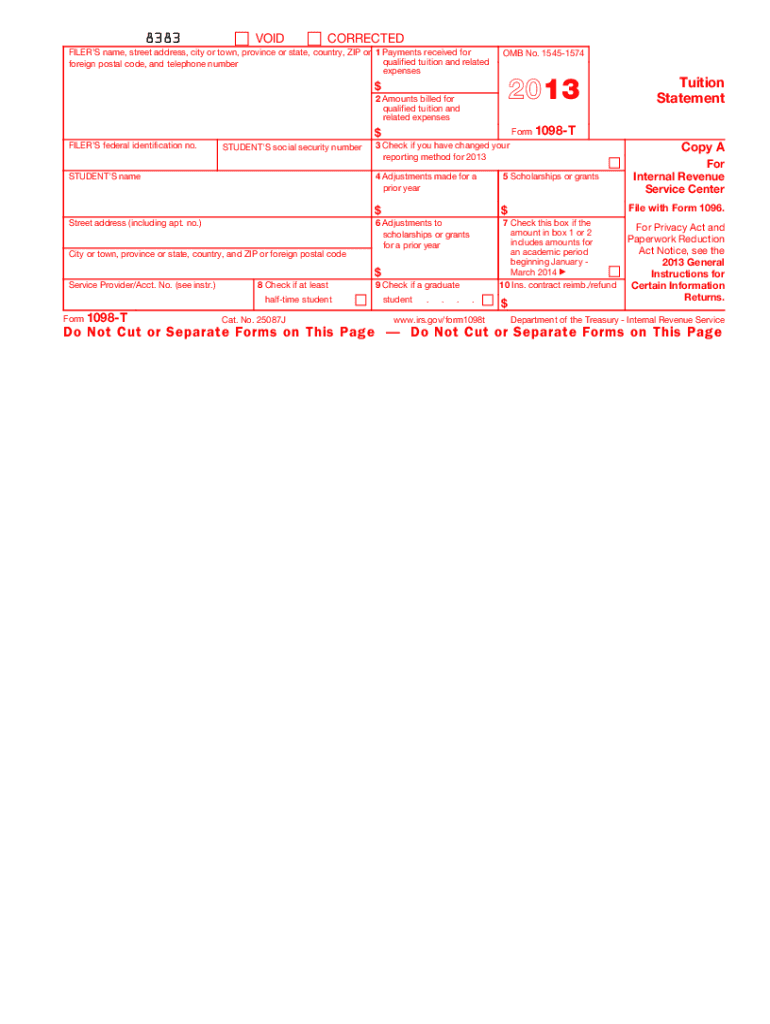
The IRS 1098-T form is an essential document for students that reports qualified tuition and related expenses paid during the tax year. This guide provides step-by-step instructions on how to fill out the form accurately and efficiently online.
Follow the steps to complete the IRS 1098-T form online.
- Click ‘Get Form’ button to obtain the form and open it in the editor.
- Enter the filer's information, including the name, address, and telephone number. Make sure this information is accurate as it is crucial for identification.
- Input the student's Social Security number in the designated field. This information is necessary for the IRS to associate the form with the correct individual.
- Fill in the payments received for qualified tuition and related expenses in Box 1. This amount must include all payments received during the year minus any reimbursements.
- Complete Box 2 with the amounts billed for tuition and related expenses if applicable. If this method is used, ensure it reflects the amounts billed and not necessarily what was paid.
- Check Box 3 if the educational institution has changed its reporting method for the year. This indicates whether they switched from reporting payments received to amounts billed.
- Record any adjustments for a prior year in Box 4 if applicable. This allows for proper reporting of changes that might affect prior-year claims.
- Report total scholarships or grants received in Box 5. This amount can impact the education credit eligibility.
- Enter any adjustments to scholarships or grants for a prior year in Box 6, which may affect previously claimed credits.
- Check Box 7 if amounts in Boxes 1 or 2 include amounts for an academic period beginning in January or March of the following year.
- Indicate in Box 8 if the student is enrolled as at least a half-time student, which can affect credit eligibility.
- Check Box 9 if the student is a graduate student. This status may also influence education-related credit claims.
- Complete Box 10 to show any insurance-related reimbursements or refunds. This can also affect the education credit amount.
- After filling in all necessary fields, save your changes. You have options to download, print, or share the completed form.
Complete your IRS 1098-T form online today and ensure accurate reporting for your education-related expenses.
Experience a faster way to fill out and sign forms on the web. Access the most extensive library of templates available.
Related content
Jun 6, 2025 — Eligible educational institutions file Form 1098-T for each student they...
Jun 6, 2025 — Eligible educational institutions file Form 1098-T for each student they...
• Copies of Form 1098-T, Tuition Statement, from each institution the student attended...
Get answers to your most pressing questions about US Legal Forms API.
Does 1098 help tax refund?
Yes, the IRS 1098-T can help increase your tax refund by making you eligible for education-related deductions and credits. By utilizing the information reported on the form, you can effectively reduce your taxable income or claim valuable credits. This process can lead to significant savings, making your education more affordable.
How do I file a 1098-T on my taxes?
To file the IRS 1098-T on your taxes, include the information on your federal tax return and complete the necessary forms for claiming educational tax credits. Ensure that you collect all the required supporting documents, so you have accurate records to back up your claims. If you're unsure, platforms like uslegalforms can simplify this process.
Who claims 1098-T, parent or student?
Typically, the parent who claims the student as a dependent is eligible to claim the IRS 1098-T for corresponding tax benefits. However, if the student is independent and filing their own taxes, they can claim the 1098-T. Coordinating with the family is crucial to avoid conflicting claims.
Where do I enter form 1098 on my tax return TurboTax?
In TurboTax, you should navigate to the education section where you can enter the information from your IRS 1098-T. Follow the on-screen prompts to input the details regarding tuition, fees, and scholarships. This straightforward process helps ensure you claim available tax credits effectively.
Where does 1098-T show up on a tax return?
The information from the IRS 1098-T typically shows up on Form 8863, which is used to claim education credits. You'll need to enter the amounts for qualified tuition and related expenses as indicated on your 1098-T. Properly reporting this information can significantly influence your refund.
Do I have to add my 1098 on my taxes?
You do not have to add the IRS 1098-T itself to your taxes, but it's essential to use the information from the form to claim any eligible education tax credits. This documentation helps the IRS verify the expenses you report. If you miss including this information, it could impact your potential refund.
How do I enter a 1098 on my tax return?
To enter the IRS 1098-T on your tax return, you'll need to include the information provided on the form in the appropriate sections. For most tax software, there will be a dedicated section for education credits where you can input the details. Ensure that you have all relevant information, such as qualified expenses and any scholarships or grants received.
Does a 1098-T increase the refund?
The IRS 1098-T can potentially increase your tax refund by allowing you to claim education-related tax credits. These credits can offset the costs of higher education and reduce your overall tax liability. You should evaluate your eligibility for tax credits like the American Opportunity Credit or Lifetime Learning Credit to see how the 1098-T benefits you.
Can both parents and students claim 1098-T?
Yes, both parents and students can claim the IRS 1098-T, but only one can claim the educational tax benefits related to the same expenses. If both parents and students qualify for the same deductions, they need to coordinate to avoid double claiming. Typically, the parent who claims the student as a dependent is eligible.
Where does my 1098-T come from?
Your IRS 1098-T form comes from your educational institution, which is required by the IRS to report tuition payments and related financial aid. Typically, you will receive it directly via mail or through your school's online portal. If you do not see your IRS 1098-T, you should reach out to your institution’s financial or registrar's office for help. US Legal Forms can also assist you in understanding how to properly utilize this form for your tax filings.
Use professional pre-built templates to fill in and sign documents online faster. Get access to thousands of forms.
If you believe that this page should be taken down, please follow our DMCA take down process here.
This form is available in several versions. Select the version you need from the drop-down list below.