Loading
Form preview
  • US Legal Forms
  • Other Templates
  • Tax Forms
  • Executive Department Treasury IRS Forms
  • Irs 1098-t 2015

Get Irs 1098-t 2015

Your records) 9 Checked if a graduate student . . . Tuition Statement . www.irs.gov/form1098t 10 Ins. contract reimb./refund $ Copy B For Student This is important tax information and is being furnished to the Internal Revenue Service. This form may be used to complete Form 8863 to claim education credits. Give it to the tax preparer or use it to prepare the tax return. Department of the Treasury - Internal Revenue Service Instructions for Student You, or the person who can claim yo.

This website is not affiliated with IRS

How it works

  1. Open form

    Open form follow the instructions

  2. Easily sign form

    Easily sign the form with your finger

  3. Share form

    Send filled & signed form or save

How to fill out the IRS 1098-T online

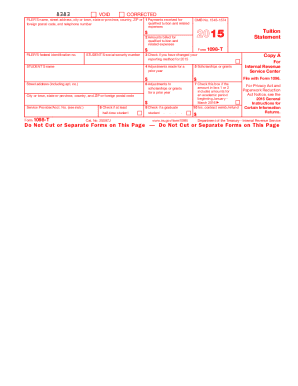
The IRS 1098-T form, also known as the Tuition Statement, is essential for students who wish to claim education credits. This guide provides a clear, step-by-step approach to filling out the form correctly online.

Follow the steps to fill out the IRS 1098-T successfully.

  1. Click ‘Get Form’ button to obtain the form and open it in the editor.
  2. Enter the filer's name and address information in the appropriate fields at the top of the form. This information represents the educational institution that provided the tuition statement.
  3. Provide the filer's federal identification number, which is crucial for IRS tracking purposes.
  4. Input the student's social security number and full name in the respective fields. Ensure this information is accurate to avoid issues with tax reporting.
  5. Fill in the student's address details, including the street address, city or town, state, and ZIP code.
  6. In box 1, report the total payments received for qualified tuition and related expenses, subtracting any reimbursements made in the year.
  7. In box 2, document the total amounts billed for qualified tuition and related expenses, excluding any reductions made during the year.
  8. Check box 3 if the educational institution has changed its reporting method for the year—this can affect the handling of educational credits.
  9. In box 4, report any adjustments made for prior year tuition that may change previous claims on tax credits.
  10. Enter totals for scholarships or grants received in box 5. This amount typically reduces the education credit claimable.
  11. In box 6, record any adjustments to prior year scholarships or grants which may affect previously reported tax credits.
  12. Check box 7 if the amounts in box 1 or 2 relate to an academic period beginning in January to March of the current year.
  13. Fill in the details for box 8, indicating whether the student is considered at least a half-time student based on their enrollment.
  14. For box 9, check if the student is enrolled in a graduate-level program. This impacts eligibility for specific education credits.
  15. In box 10, provide any refunds or reimbursements received by the student from insurance coverage related to qualified tuition.
  16. Once all sections are completed, review the information for accuracy before proceeding to save changes, download, print, or share the completed form.

Complete your IRS 1098-T online today to ensure accurate filing and maximize your education credits.

Get form

Experience a faster way to fill out and sign forms on the web. Access the most extensive library of templates available.

Related content

About Form 1098-T, Tuition Statement
Jun 6, 2025 — Eligible educational institutions file Form 1098-T for each student they...
Learn more
About Form 1098-T, Tuition Statement
Jun 6, 2025 — Eligible educational institutions file Form 1098-T for each student they...
Learn more
Form 886-H-AOC (Rev. 5-2017)
• Copies of Form 1098-T, Tuition Statement, from each institution the student attended...
Learn more

Related links form

IRS 990 - Schedule O 2014 IRS 990 - Schedule O 2013 IRS 990 - Schedule O 2012 IRS 990 - Schedule O 2011

Questions & Answers

Get answers to your most pressing questions about US Legal Forms API.

Contact support

To claim your IRS 1098-T, you will use the information on the form to complete Form 8863, which is for education credits. Make sure to fill out each section accurately, as this will determine your eligibility for various credits. If you need help during this process, platforms like US Legal Forms can guide you through the necessary steps.

When filing taxes, you won’t actually file the IRS 1098-T itself but will use the information from it to fill out relevant forms. The most common forms related to the 1098-T are Form 8863 for education credits and Form 1040. Ensure you report the amounts accurately to optimize your tax benefits.

The IRS 1098-T form can be claimed by either the student or the parent, depending on who pays for the educational expenses. If the parent claims the student as a dependent, then the parent should use the 1098-T. It's important to communicate with your family to determine the best approach for your tax situation.

To enter your IRS 1098-T on your tax return, you typically report the information on Form 8863 if you're claiming education credits. Use the amounts from your 1098-T to determine your eligible educational expenses. Ensure you carefully follow the IRS guidelines to maximize your benefits.

You do not need to attach your IRS 1098-T form to your tax return when you file. However, it’s crucial to keep it with your tax records in case of an audit. This form helps you claim education tax credits, but the IRS does not require it to be submitted.

The IRS 1098-T can substantially help with taxes by putting you in a position to claim valuable education-related credits. Depending on your situation, these credits can provide hundreds to thousands of dollars in financial relief. It simplifies the process of documenting your education expenses, enhancing your tax situation. To navigate this effectively, uslegalforms offers tools and templates to assist you in accurately reporting these credits.

Filing the IRS 1098-T may increase your tax refund by allowing you to claim education credits like the American Opportunity Credit or Lifetime Learning Credit. These credits can significantly boost your refund amount or reduce the taxes owed. Understanding how to leverage the 1098-T effectively can result in financial benefits. You can find resources on uslegalforms to optimize your filing process.

Typically, the student claims the IRS 1098-T if they are filing a tax return and meet the requirements. However, parents can claim it if they are supporting the student and claim them as a dependent on their tax return. It is essential to know who will benefit most from the educational tax benefits related to the 1098-T. When unsure, uslegalforms can help clarify these claims.

Filing the IRS 1098-T can be beneficial for many taxpayers as it may lead to education-related tax credits. These credits can help reduce your tax bill significantly and even increase your refund. If you are eligible, the potential tax savings often outweigh the hassle of filing. Using uslegalforms can help you easily determine your eligibility and understand the benefits.

To enter your IRS 1098-T on your tax return, first locate the information on the form. You need to report tuition payments, grants, and scholarships listed on the form on IRS Form 8863, which is for education credits. Ensure you fill in the amounts correctly to claim the available tax benefits. If you have any doubts, consider using uslegalforms to access guides that simplify this process.

Get This Form Now!

Use professional pre-built templates to fill in and sign documents online faster. Get access to thousands of forms.
If you believe that this page should be taken down, please follow our DMCA take down processhere.
Get IRS 1098-T
  • Adoption
  • Bankruptcy
  • Contractors
  • Divorce
  • Home Sales
  • Employment
  • Identity Theft
  • Incorporation
  • Landlord Tenant
  • Living Trust
  • Name Change
  • Personal Planning
  • Small Business
  • Wills & Estates
  • Packages A-Z
  • Affidavits
  • Bankruptcy
  • Bill of Sale
  • Corporate - LLC
  • Divorce
  • Employment
  • Identity Theft
  • Internet Technology
  • Landlord Tenant
  • Living Wills
  • Name Change
  • Power of Attorney
  • Real Estate
  • Small Estates
  • Wills
  • All Forms
  • Forms A-Z
  • Other Templates
  • Legal Hub
  • About Us
  • Help Portal
  • Legal Resources
  • Blog
  • Affiliates
  • Contact Us
  • Delete My Account
  • Site Map
  • Industries
  • Forms in Spanish
  • Localized Forms
  • State-specific Forms
  • Forms Kit
  • Real Estate Handbook
  • All Guides
  • Notarize
  • Incorporation services
  • For Consumers
  • For Small Business
  • For Attorneys
  • USLegal
  • FormsPass
  • pdfFiller
  • signNow
  • altaFlow
  • DocHub
  • Instapage
Form Packages
  • Adoption
  • Bankruptcy
  • Contractors
  • Divorce
  • Home Sales
  • Employment
  • Identity Theft
  • Incorporation
  • Landlord Tenant
  • Living Trust
  • Name Change
  • Personal Planning
  • Small Business
  • Wills & Estates
  • Packages A-Z
Form Categories
  • Affidavits
  • Bankruptcy
  • Bill of Sale
  • Corporate - LLC
  • Divorce
  • Employment
  • Identity Theft
  • Internet Technology
  • Landlord Tenant
  • Living Wills
  • Name Change
  • Power of Attorney
  • Real Estate
  • Small Estates
  • Wills
  • All Forms
  • Forms A-Z
  • Other Templates
Customer Service
  • Legal Hub
  • About Us
  • Help Portal
  • Legal Resources
  • Blog
  • Affiliates
  • Contact Us
  • Delete My Account
  • Site Map
  • Industries
  • Forms in Spanish
  • Localized Forms
  • State-specific Forms
  • Forms Kit
Legal Guides
  • Real Estate Handbook
  • All Guides
Prepared for you
  • Notarize
  • Incorporation services
Our Customers
  • For Consumers
  • For Small Business
  • For Attorneys
Our Sites
  • USLegal
  • FormsPass
  • pdfFiller
  • signNow
  • altaFlow
  • DocHub
  • Instapage
Social Media
Call us now toll free:
+1 833 426 79 33
As seen in:
© Copyright 1999-2026 airSlate Legal Forms, Inc. 17 Station Street, Suite 303, Brookline, MA 02445
  • Your Privacy Choices
  • Terms of Service
  • Privacy Notice
  • Content Takedown Policy
  • Bug Bounty Program
IRS 1098-T
This form is available in several versions.
Select the version you need from the drop-down list below.
2021 IRS 1098-T
Select form
  • 2021 IRS 1098-T
  • 2020 IRS 1098-T
  • 2018 IRS 1098-T
  • 2017 IRS 1098-T
  • 2016 IRS 1098-T
  • 2015 IRS 1098-T
  • 2014 IRS 1098-T
  • 2013 IRS 1098-T
  • 2012 IRS 1098-T
  • 2011 IRS 1098-T
  • 2010 IRS 1098-T
  • 2009 IRS 1098-T
  • 2008 IRS 1098-T
Select form