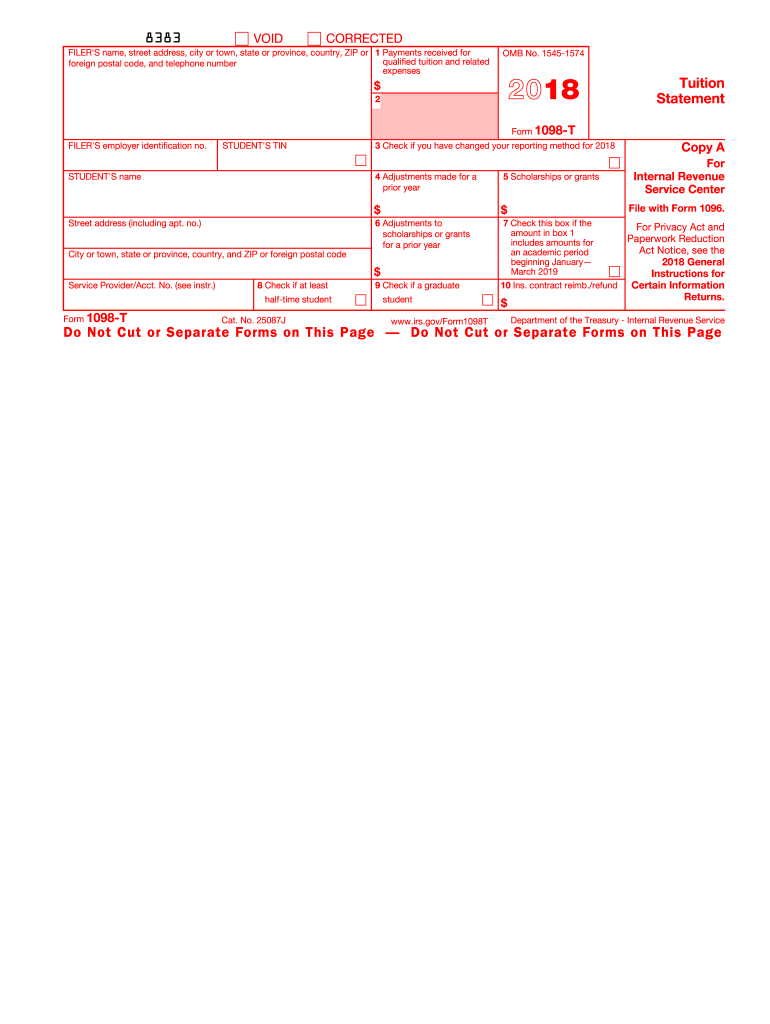
For a prior year 5 Scholarships or grants $ $ 6 Adjustments to scholarships or grants for a prior year 7 Checked if the amount in box 1 includes amounts for an academic period beginning January March 2019 $ Service Provider/Acct. No. (see instr.) 8 Check if at least half-time student Form 1098-T (keep for your records) 9 Checked if a graduate student www.irs.gov/Form1098T 10 Ins. contract reimb./refund Copy B For Student This is important tax information and is being furnished to.
Loading

Open form follow the instructions

Easily sign the form with your finger

Send filled & signed form or save
How to fill out the 1098 T online
This guide provides comprehensive, step-by-step instructions to help you fill out the 1098 T form online. Whether you are a student or a person who prepares tax documents for a student, understanding this form is crucial for claiming education credits.
Follow the steps to complete the 1098 T form successfully.
- Click 'Get Form' button to access the 1098 T form. This will allow you to open the form for editing online.
- Fill in the filer's name, street address, city or town, state or province, country, ZIP or foreign postal code, and telephone number in the appropriate fields.
- Enter the filer's employer identification number in the designated field.
- Complete the student's name and street address, including apartment number, city or town, state or province, country, and ZIP or foreign postal code.
- If applicable, check the box for changes in the reporting method for the year, located in Box 3.
- Report any adjustments made for a prior year in Box 4.
- Input the total amount of scholarships or grants in Box 5.
- Document any adjustments to scholarships or grants for a prior year in Box 6.
- Indicate if the amount reported in Box 1 includes amounts for an academic period starting between January and March of the following year in Box 7.
- Check the box if the student is considered to be at least half-time in Box 8.
- Check the box if the student is a graduate student in Box 9.
- Record any insurance contract reimbursements or refunds in Box 10.
- Once all fields are completed, save your changes. You may download, print, or share the form as needed.
Complete your 1098 T form online today to ensure you are prepared for claiming your education credits.
Experience a faster way to fill out and sign forms on the web. Access the most extensive library of templates available.
Related content
Jun 6, 2025 — Eligible educational institutions file Form 1098-T for each student they...
Jun 6, 2025 — Eligible educational institutions file Form 1098-T for each student they...
Oct 10, 2023 — 1098-E refers to the Student Loan Interest Statement. 1098-T pertains to...
Get answers to your most pressing questions about US Legal Forms API.
How do I get my 1098 mortgage form online?
To get your 1098 mortgage form online, you typically need to contact your mortgage lender or servicer. Many lenders provide an online portal where you can access your mortgage documents, including the 1098 form. If you are having trouble finding it, reaching out to customer service for guidance will likely provide the assistance you need.
Who gets issued a 1098-T?
T is issued to students who are enrolled at eligible educational institutions that receive federal funding. This includes students who have made tuition payments or have received scholarships or grants. It's important for students to understand how this form documents their educational expenses, as it can impact their tax filings.
Do I get a 1098-T if I get financial aid?
Receiving financial aid does not automatically disqualify you from getting a 1098-T. Typically, if you have incurred qualifying tuition and fees, you should still receive the form, even if financial aid covers your costs. The 1098-T will reflect any payments you made during the tax year, along with any scholarships or grants received.
Can I file my taxes without my 1098?
You can file your taxes without your 1098-T, but doing so may limit your ability to claim education-related tax benefits. The 1098-T provides crucial information regarding qualifying expenses and received financial aid. If you are missing your form, it is recommended to reconstruct your expenses and consult tax guidance to ensure accurate reporting.
Will I get a 1098-T if I get a Pell Grant?
Yes, you will typically receive a 1098-T if you receive a Pell Grant, provided you have qualifying tuition expenses. The 1098-T form includes information about grants, scholarships, and tuition payments, which can benefit your tax filing. Make sure to include all related financial aid on your tax return to accurately report your educational costs.
What happens if my school doesn't give me a 1098-T form?
If your school does not provide a 1098-T, it is essential to consult with them directly. Schools are required to issue this form to eligible students, so they should be able to explain why you did not receive it. In some cases, schools may provide alternative documentation that outlines your tuition payments.
How do I find my 1098-T online?
To find your 1098-T online, visit your school's official website and log into your student account. From there, navigate to the financial documents section, where you should see the 1098-T form available for download. If you still have issues, contacting your school's registrar or financial aid office can be beneficial.
Can I look up my 1098 online?
You can look up your 1098-T online, depending on your institution's policies. Most schools provide an online platform where students can access their financial documents, including the 1098-T. If you cannot find yours, consider reaching out to your school's support team for help.
Can I get a copy of my 1098 online?
Yes, many educational institutions allow you to access your 1098-T online through their student portals. You can log into your student account and navigate to the financial section to download your 1098-T. If you encounter difficulties, your school's financial office can assist you in obtaining your form.
What makes you eligible for a 1098-T?
To be eligible for a 1098-T, you must be enrolled in an eligible educational institution that participates in the federal student aid program. This includes colleges, universities, and certain vocational schools. The 1098-T form reports tuition payments and related expenses, which may help you qualify for educational tax credits.
Use professional pre-built templates to fill in and sign documents online faster. Get access to thousands of forms.
If you believe that this page should be taken down, please follow our DMCA take down process here.