Loading
Form preview
  • US Legal Forms
  • Form Library
  • Tax Forms
  • Executive Department Treasury IRS Forms
  • Irs 1098-e 2013

Get Irs 1098-e 2013

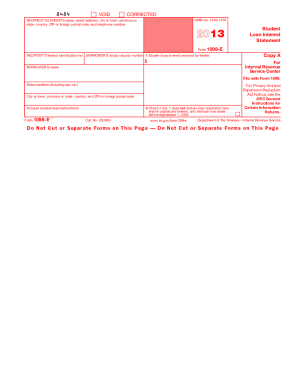
) that receives interest payments of $600 or more during the year on one or more qualified student loans must furnish this statement to you. You may be able to deduct student loan interest that you actually paid in 2013 on your income tax return. However, you may not be able to deduct the full amount of interest reported on this statement. Do not contact the recipient/ lender for explanations of the requirements for (and how to figure) any allowable deduction for the interest paid. Instead, for.

This website is not affiliated with IRS

How it works

  1. Open form

    Open form follow the instructions

  2. Easily sign form

    Easily sign the form with your finger

  3. Share form

    Send filled & signed form or save

How to fill out the IRS 1098-E online

Filling out the IRS 1098-E form online can be a straightforward process when you understand each section's requirements. This guide provides step-by-step instructions to help you effectively complete the form, ensuring accurate reporting of your student loan interest.

Follow the steps to complete the IRS 1098-E form online.

  1. Click ‘Get Form’ button to obtain the form and open it in the editor.
  2. Fill out the recipient's/lender's information, including their name, address, city or town, province or state, country, ZIP or foreign postal code, and telephone number.
  3. Enter the recipient's federal identification number. This is the number assigned to the lender or financial institution.
  4. Input the borrower's social security number, ensuring that it is accurate to avoid any filing issues.
  5. In box 1, report the total amount of student loan interest received by the lender during the year.
  6. If applicable, check the box in section 2 if the amount in box 1 does not include loan origination fees and/or capitalized interest for loans made before September 1, 2004.
  7. Provide the account number, which distinguishes your loan account as assigned by the lender.
  8. Review all the information entered to ensure its accuracy before submitting.
  9. Upon completion, save the changes. You can then download, print, or share the form as needed.

Start filling out your IRS 1098-E form online today to ensure a smooth filing process.

Get form

Experience a faster way to fill out and sign forms on the web. Access the most extensive library of templates available.

Related content

About Form 1098-E, Student Loan Interest Statement
Jun 6, 2025 — If you receive student loan interest of $600 or more from an individual...
Learn more
2024 Instructions for Forms 1098-E and 1098-T
File Form 1098-E, Student Loan Interest Statement, if you receive student loan interest of...
Learn more
2017 Publication 936
Jan 31, 2018 — If you receive a Form 1098 from the cooper- ative housing corporation...
Learn more

Related links form

IRS 990 - Schedule F 2013 IRS 990 - Schedule F 2012 IRS 990 - Schedule F 2011 IRS 990 - Schedule F 2010

Questions & Answers

Get answers to your most pressing questions about US Legal Forms API.

Contact support

While you technically can file your taxes without your IRS 1098-E, it's not advisable. Filing without this form could lead to incomplete information, resulting in inaccuracies or delayed refunds. It’s best to obtain the form to ensure your tax return is accurate. If you're searching for resources on tax forms, uslegalforms can provide you with essential tools.

Forgetting to add your IRS 1098-T can affect your tax return. You may need to file an amendment to include the information provided in this form. This is crucial to ensure you take advantage of any applicable education credits or deductions. Utilizing a service like uslegalforms can guide you through this process smoothly.

If you forgot to file your IRS 1098 mortgage interest statement, you should rectify it as soon as possible. You can typically amend your tax return to include this information, which may affect your tax outcome. Be cautious, as missing this form may result in a higher tax liability. Seeking assistance through platforms like uslegalforms can help navigate this situation effectively.

Failing to file the IRS 1098-E when required can lead to complications in your tax return. The IRS may contact you for clarification, which can delay your refund. It's essential to keep track of all tax forms you receive, including the 1098. If you need clarification on filing these forms, platforms like uslegalforms can offer valuable guidance.

Yes, you can usually look up your IRS 1098-T online via your educational institution’s website. Most institutions store these documents securely within their online portals for easy access. If you do not find it easily, don’t hesitate to reach out for assistance. Accessing this information online makes managing your taxes simpler.

Yes, in many cases, you can find your IRS 1098-T form online through your educational institution's student portal. Most schools provide access to tax forms, including the 1098-T, which reflects tuition payments and financial aid received. If you encounter issues, contact your school’s financial office for help. This can streamline your tax filing process.

Typically, you should expect to receive your IRS 1098-E by the end of January. Financial institutions are required to provide this form to you by this deadline. If you do not receive it by early February, don’t hesitate to reach out to the lender for assistance. Ensuring you have it on time helps you prepare your taxes effectively.

If you did not receive your IRS 1098-E, it is important to contact the institution that should have issued it. They may be able to provide you with a duplicate copy. Additionally, you can check if you have online access to your tax documents. Remember, having your IRS 1098-E is essential for accurate tax filing.

When dealing with IRS forms, the 1098-T is typically reported on Schedule 3 of your tax return. This form details tuition payments and can affect your eligibility for certain educational credits. Ensure you include it correctly to access these benefits.

Typically, you do not need to attach the IRS 1098-E to your tax return when filing electronically. However, it’s crucial to keep a copy for your records and provide accurate figures from the form. If you are filing a paper return, you may want to attach it to support your claims. Always prioritize accurate record-keeping to simplify the tax process.

Get This Form Now!

Use professional pre-built templates to fill in and sign documents online faster. Get access to thousands of forms.
If you believe that this page should be taken down, please follow our DMCA take down processhere.
Get IRS 1098-E
  • Adoption
  • Bankruptcy
  • Contractors
  • Divorce
  • Home Sales
  • Employment
  • Identity Theft
  • Incorporation
  • Landlord Tenant
  • Living Trust
  • Name Change
  • Personal Planning
  • Small Business
  • Wills & Estates
  • Packages A-Z
  • Affidavits
  • Bankruptcy
  • Bill of Sale
  • Corporate - LLC
  • Divorce
  • Employment
  • Identity Theft
  • Internet Technology
  • Landlord Tenant
  • Living Wills
  • Name Change
  • Power of Attorney
  • Real Estate
  • Small Estates
  • Wills
  • All Forms
  • Forms A-Z
  • Form Library
  • Legal Hub
  • About Us
  • Help Portal
  • Legal Resources
  • Blog
  • Affiliates
  • Contact Us
  • Delete My Account
  • Site Map
  • Industries
  • Forms in Spanish
  • Localized Forms
  • State-specific Forms
  • Forms Kit
  • Real Estate Handbook
  • All Guides
  • Notarize
  • Incorporation services
  • For Consumers
  • For Small Business
  • For Attorneys
  • USLegal
  • FormsPass
  • pdfFiller
  • signNow
  • altaFlow
  • DocHub
  • Instapage
Form Packages
  • Adoption
  • Bankruptcy
  • Contractors
  • Divorce
  • Home Sales
  • Employment
  • Identity Theft
  • Incorporation
  • Landlord Tenant
  • Living Trust
  • Name Change
  • Personal Planning
  • Small Business
  • Wills & Estates
  • Packages A-Z
Form Categories
  • Affidavits
  • Bankruptcy
  • Bill of Sale
  • Corporate - LLC
  • Divorce
  • Employment
  • Identity Theft
  • Internet Technology
  • Landlord Tenant
  • Living Wills
  • Name Change
  • Power of Attorney
  • Real Estate
  • Small Estates
  • Wills
  • All Forms
  • Forms A-Z
  • Form Library
Customer Service
  • Legal Hub
  • About Us
  • Help Portal
  • Legal Resources
  • Blog
  • Affiliates
  • Contact Us
  • Delete My Account
  • Site Map
  • Industries
  • Forms in Spanish
  • Localized Forms
  • State-specific Forms
  • Forms Kit
Legal Guides
  • Real Estate Handbook
  • All Guides
Prepared for you
  • Notarize
  • Incorporation services
Our Customers
  • For Consumers
  • For Small Business
  • For Attorneys
Our Sites
  • USLegal
  • FormsPass
  • pdfFiller
  • signNow
  • altaFlow
  • DocHub
  • Instapage
Social Media
Call us now toll free:
+1 833 426 79 33
As seen in:
© Copyright 1999-2026 airSlate Legal Forms, Inc. 3720 Flowood Dr, Flowood, Mississippi 39232
  • Your Privacy Choices
  • Terms of Service
  • Privacy Notice
  • Content Takedown Policy
  • Bug Bounty Program
IRS 1098-E
This form is available in several versions.
Select the version you need from the drop-down list below.
2022 IRS 1098-E
Select form
  • 2022 IRS 1098-E
  • 2020 IRS 1098-E
  • 2019 IRS 1098-E
  • 2018 IRS 1098-E
  • 2017 IRS 1098-E
  • 2016 IRS 1098-E
  • 2015 IRS 1098-E
  • 2014 IRS 1098-E
  • 2013 IRS 1098-E
  • 2012 IRS 1098-E
  • 2011 IRS 1098-E
  • 2010 IRS 1098-E
Select form