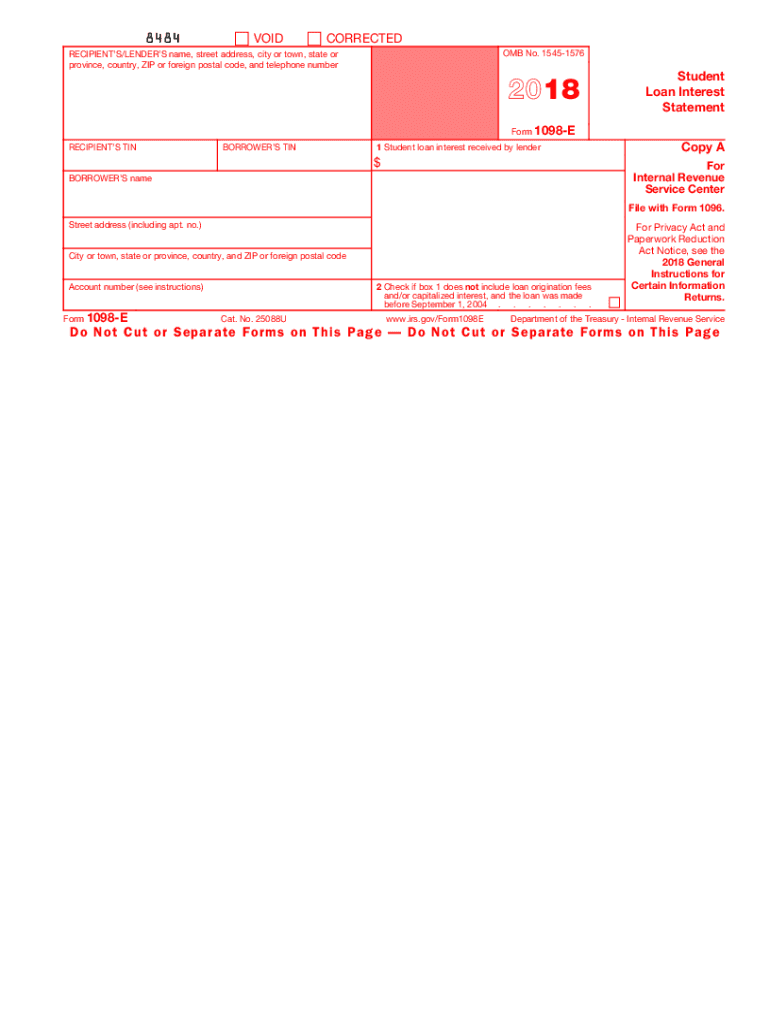
To the IRS. If you are required to file a return, a negligence penalty or other sanction may be imposed on you if the IRS determines that an underpayment of tax results because you overstated a deduction for student loan interest. Department of the Treasury - Internal Revenue Service Instructions for Borrower A person (including a financial institution, a governmental unit, and an educational institution) that receives interest payments of $600 or more during the year on one or more qualified.

Open form follow the instructions

Easily sign the form with your finger

Send filled & signed form or save
How to fill out the IRS 1098-E online
The IRS 1098-E form is designed for reporting student loan interest payments that borrowers have made during the tax year. This guide will provide you with a clear, step-by-step approach to effectively complete the form online, ensuring you have all necessary information at your fingertips.
Follow the steps to fill out the IRS 1098-E online.
- Click ‘Get Form’ button to obtain the form and open it in the editor.
- Locate the section for the recipient's/lender's details. Enter the name, street address, city or town, state or province, country, ZIP or foreign postal code, and telephone number of the lender.
- Input the recipient's taxpayer identification number (TIN) and the borrower's TIN. This is crucial as it links the form to the respective parties involved.
- In box 1, enter the total student loan interest received by the lender during the tax year. Ensure this amount accurately reflects all qualified interest paid.
- If applicable, check the box in step 2 to indicate that box 1 does not include loan origination fees and/or capitalized interest for loans made before September 1, 2004.
- Fill in the borrower's name and complete their street address, including any apartment number, city or town, state or province, country, and ZIP or foreign postal code.
- Complete the account number field if applicable. This number may help distinguish the borrower's account.
- Review all the entered information for accuracy. Mistakes may lead to complications or penalties.
- Once confirmed, you can save your changes, download, print, or share the completed form as needed.
Complete your IRS 1098-E form online to ensure you accurately report your student loan interest and stay compliant with tax regulations.
Experience a faster way to fill out and sign forms on the web. Access the most extensive library of templates available.
Related content
Jun 6, 2025 — If you receive student loan interest of $600 or more from an individual...
File Form 1098-E, Student Loan Interest Statement, if you receive student loan interest of...
Jan 31, 2018 — If you receive a Form 1098 from the cooper- ative housing corporation...
Get answers to your most pressing questions about US Legal Forms API.
When should I expect my 1098-E?
You can expect to receive your IRS 1098-E form within the first few weeks of January following the end of the tax year. Lenders are required to send these forms out by January 31. If it doesn't arrive, tools available on uslegalforms can help you check your status and ensure you have the necessary documents for your tax filing.
How long does it take to get 1098-T electronically?
Receiving your IRS 1098-T electronically usually takes a few days, depending on your school’s processing speed. Institutions often notify students via email when the form is available. If you haven't received yours in a timely manner, uslegalforms can guide you through the follow-up process with your school.
Can I look up my 1098 online?
Accessing your IRS 1098 form online is often possible, depending on how your lender or institution distributes them. Many offer online portals where you can view and download your forms. If you encounter difficulties, platforms like uslegalforms are available to assist you in locating your documents.
Can I look up my 1098-T online?
Yes, you can look up your IRS 1098-T online if your school offers electronic access. Most institutions have systems in place for students to retrieve these documents quickly. If you can't find yours, consider reaching out to your school's financial aid office or try using uslegalforms for assistance.
Can I file my taxes without my 1098-T form?
You can file your taxes without your IRS 1098-T form, but it may not be the best choice. This form contains essential information about tuition payments and scholarships. Missing it could lead to inaccuracies on your tax return. Using a service like uslegalforms can help you find what you need to ensure a complete filing.
Can I find my 1098-T form online?
Yes, you can find your 1098-T form online in many cases. Educational institutions typically provide access to these forms through their student portals. Just log in to your account with the school to check for your IRS 1098-E. If you're having trouble, tools like uslegalforms can help streamline your search.
Where do I put my 1098 on my tax return?
You report your 1098 on Schedule A if you are itemizing deductions, and you will need the information from your IRS 1098 form to do so. Make sure to accurately enter the figures as they appear on the 1098. If you are not itemizing, this information will not enter into your tax return.
How much does 1098-E affect a tax return?
The IRS 1098-E can significantly affect your tax return by allowing you to deduct mortgage interest, which may lower your taxable income. The amount you can deduct depends on your total mortgage interest payments, as indicated on your 1098-E. If you have large interest payments, the deduction can lead to substantial tax savings.
What happens if you forgot to add 1098-E to your tax return?
If you forget to include the IRS 1098-E on your tax return, you risk underreporting your deductions, which could lead to a higher tax bill. To correct this, you can file an amended return using Form 1040-X. It’s important to address this quickly to minimize any potential penalties or interest due.
Do I need to attach 1098 to tax return?
You do not need to attach the IRS 1098-E form itself to your tax return when you file electronically. However, you must keep it for your records. If you file a paper return, it is advisable to include a copy of the 1098-E. With uslegalforms, you can find convenient checklists and instructions on how to handle your documentation.
Use professional pre-built templates to fill in and sign documents online faster. Get access to thousands of forms.
If you believe that this page should be taken down, please follow our DMCA take down process here.
This form is available in several versions. Select the version you need from the drop-down list below.